162
4-5. Setup
1 Display the audio settings screen:
“MENU” button “Setup”
“Audio”
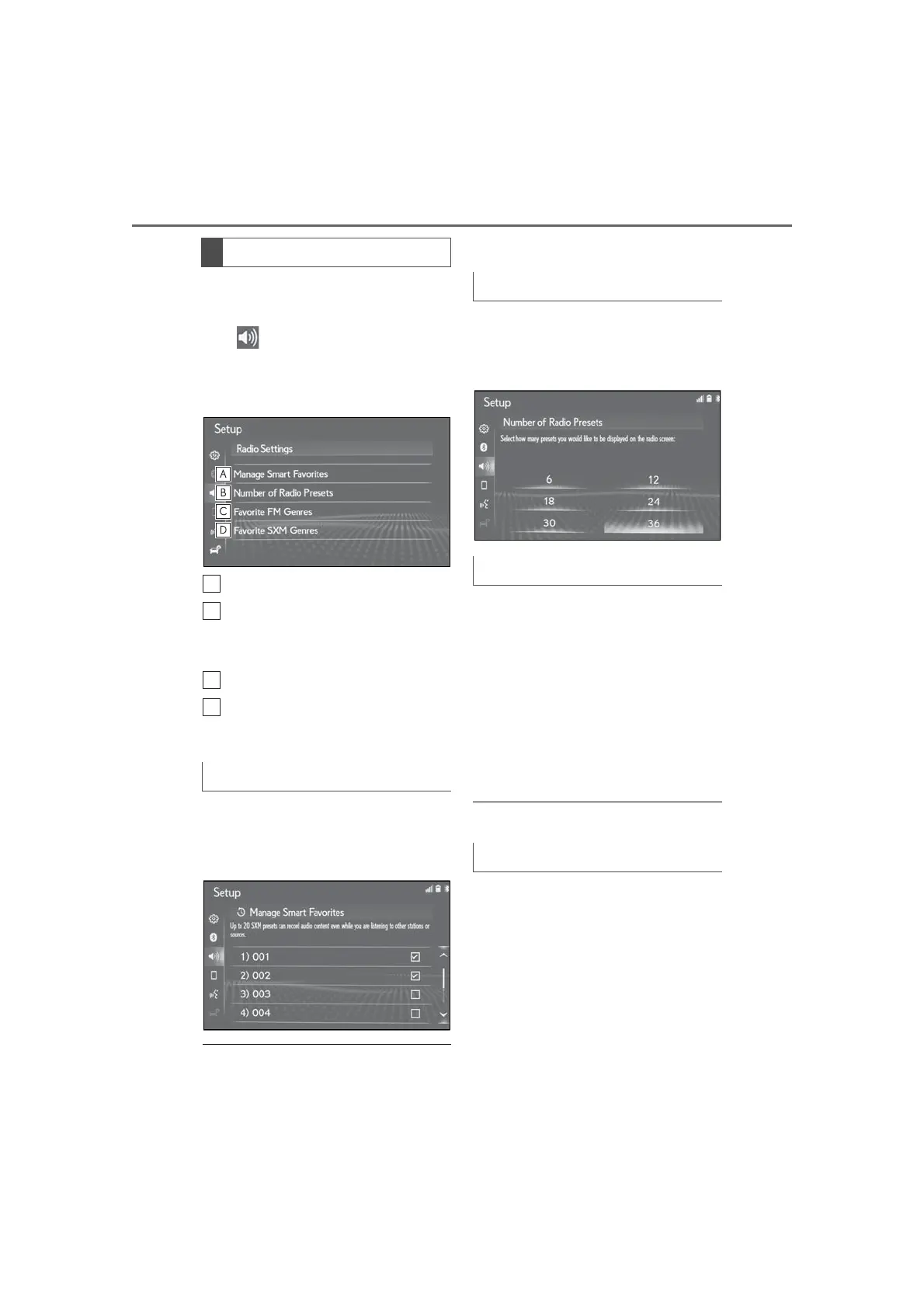
2 Select “Radio”.
3 Select the desired item to be set.
Edit smart favorites. (P.162)
Select to change the number of
preset radio stations displayed on
the screen. (P.162)
Edit favorite FM genres. (P.162)
Edit favorite SXM genres.
(P.162)
1 Select “Manage Smart Favorites”.
2 Select the desired channel to be
set.
● Displays the registered preset channels.
● Up to 20 channels can be registered.
1 Select “Number of Radio Presets”.
2 Select the button with the desired
number to be displayed.
1 Select “Favorite FM Genres”.
2 Select the genre you want to
change.
3 Select the genre you want to regis-
ter.
4 Select “OK”.
“Default”: Select to set the default
genres.
● Up to 6 genres can be registered.
1 Select “Favorite SXM Genres”.
2 Select the genre you want to
change.
3 Select the genre you want to regis-
ter.
4 Select “OK”.
“Default”: Select to set the default
genres.
Radio settings
Manage smart favorites
Setting the number of radio presets
Favorite FM Genres
Favorite SXM Genres



 To Next Page