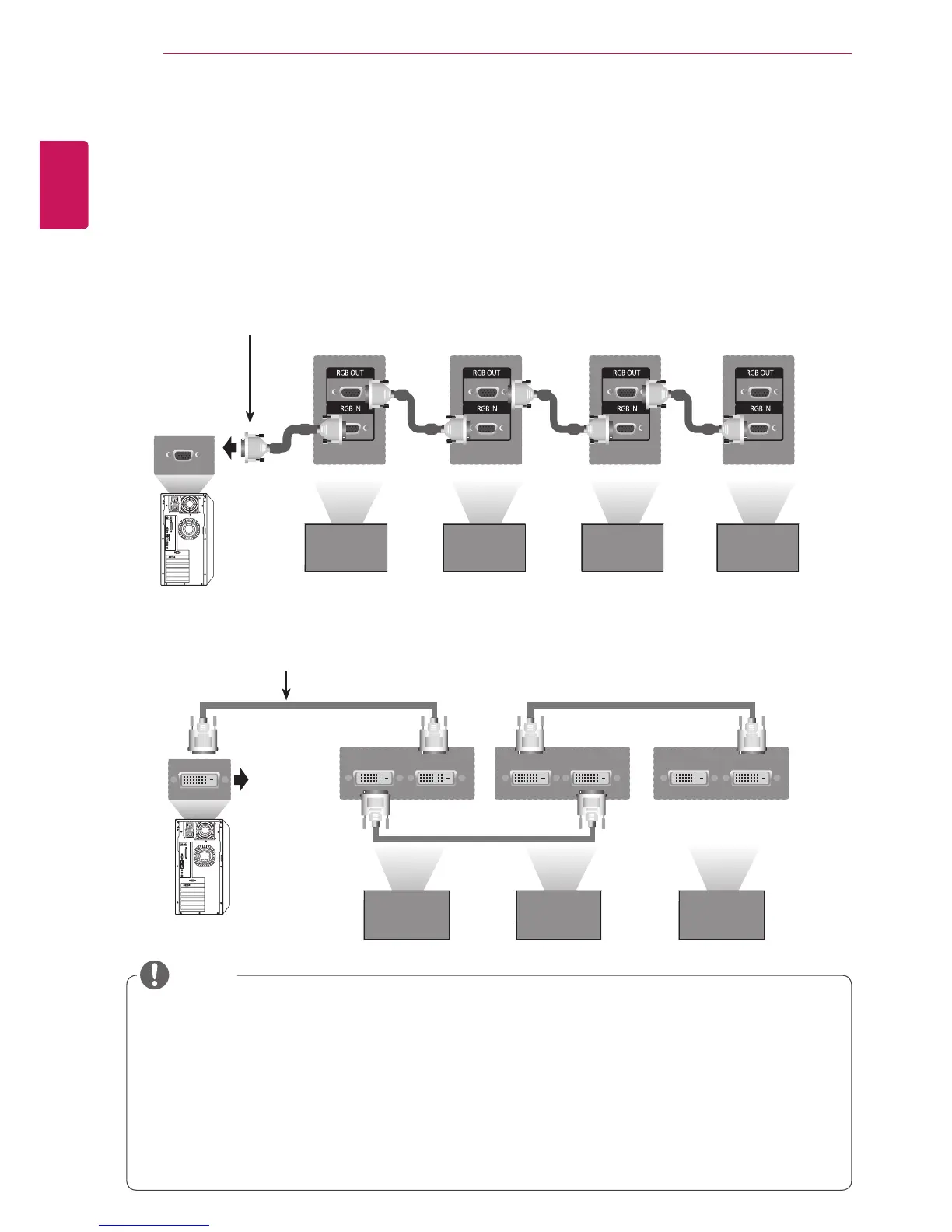
Daisy Chain Monitors
Use this function to share the RGB video signal with other monitors without having to use a separate signal
splitter box.
• To use different products connected to each other Connect one end of the signal input cable (15-pin
D-Sub Signal Cable) to the RGB OUT connector of product 1 and connect the other end to the RGB IN
connector of other products
RGB Cable
15-pin D-Sub Signal Cable
(Max 3m)
Set 1 Set 2 Set 3 Set 4
DVI Cable
Set 1 Set 2 Set 3
DVI Cable
(Max 3m)
y "Input signal may be degraded or lost when multiple monitors are connected. For DVI, in general, up
to 12 monitors can be connected via the DVI Out port (at the recommended resolution) if the signal
is stable and there is no cable loss. (If you want to connect more than this number of monitors, we
recommended that you use a distributor.)
y When the tile mode is configured via DVI cables, only the monitor that receives first signals can play
HDCP-encrypted content. (The DVI Out port does not support HDCP).
y If the signal cable between the product and your PC is too long, make sure to use the DVI (RGB)
booster or DVI (RGB) optical cable.
y If input signals are received through the HDMI/DP cable, multiple monitors cannot be connected via
the DVI Out port"
NOTE



 To Next Page