27
ENTERTAINMENT
ENTERTAINMENT
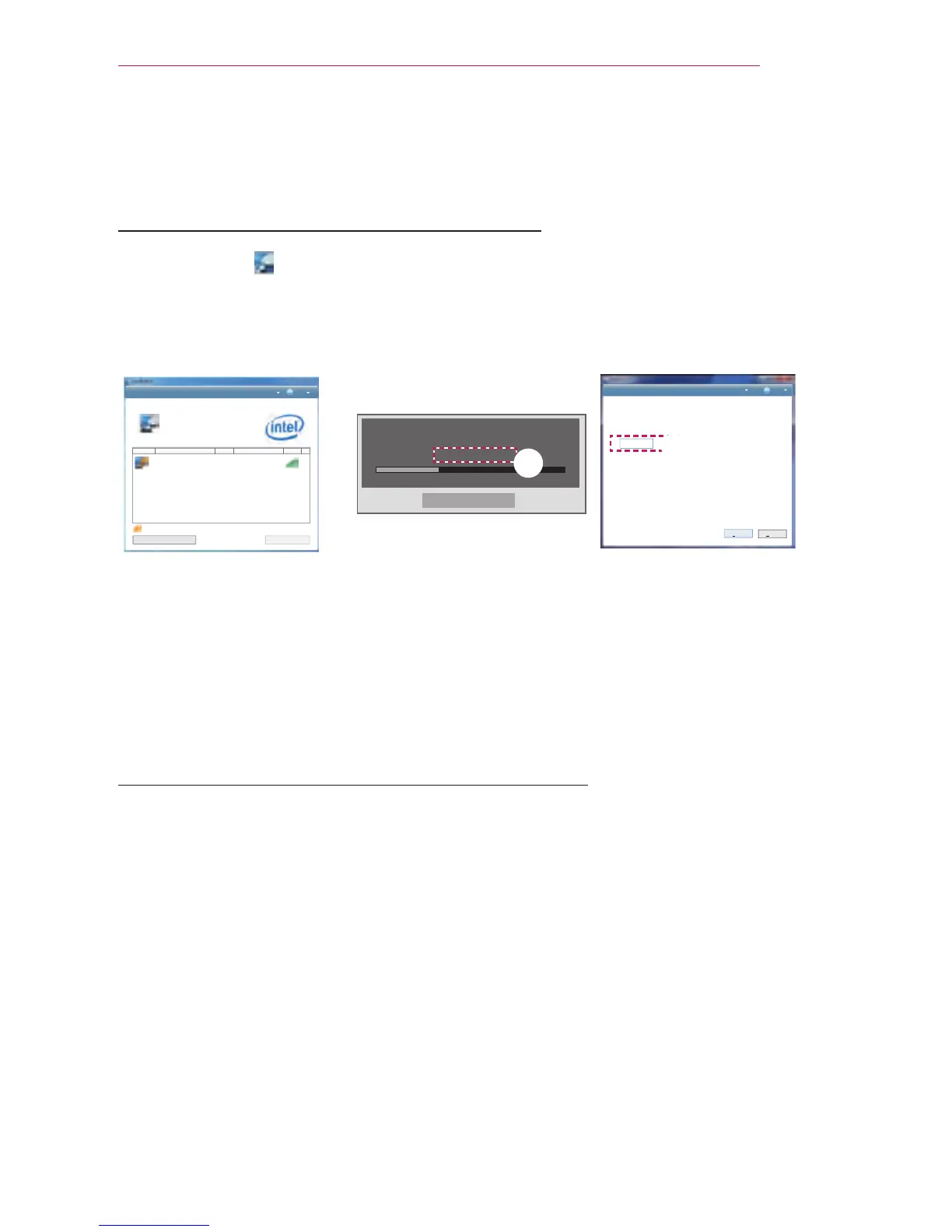
Wireless Display Setup (Notebook)
1 Run the WiDi ( ) program on your notebook.
2 After running the WiDi program on your notebook, a list will show all available de-
vices that were detected. In the list, select the Projector you want and click Connect.
Enter the number shown() on the screen () and then click Continue
$POOFDUFEBEBQUFS
zaGuGGU
%FUFDUFEBEBQUFST
1SPQFSUJFT )FMQ
{GGGGGGGGGGuGGGGGGGGGGGGGGGGGGGGGGGGGGGGGGGGGGGGGGGpkGGGGGGGGGGGGtGGGGGGGGGGGGGGGGGGGGGGGGGGGGGz
snG~kGw km^Y ujGZUW
,QGLFDWHVDQDGDSWHU\RXKDYHSUHYLRXVO\FRQQHFWHGWR
zGGG
&RQQHFW
Request connection
To connect, enter the PIN
My PIN********
Cancel
Remain: 92 second(s)
1SPQFSUJFT )FMQ
'PVGTUGEWTKV[EQFG
7KLVLVWKHILUVWWLPH\RXĜUHFRQQHFWLQJWR/*:L'L3URMHFWRU
3OHDVHHQWHUWKHGLJLWVHFXULW\FRGH\RXVHHRQ\RXU3URMHFWRUVFUHHQ
&RQWLQXH
&DQFHO
Projector screen
Laptop screen
3 The Notebook screen will appear on the projector screen soon. Note that the wire-
less connection speed will affect the quality of the video displayed on the notebook.
If the connection is poor, the Wireless Display connection may be lost or quality of
the video may be poor.
* Only laptops that support Intel's WiDi can be connected.
* For more information on Intel's WiDi, visit http://intel.com/go/WIDI.
Wireless Display Setup (Moblie phone)
1
Run the Wireless Display program on your mobile phone.
2
After running the Wireless Display program on your mobile phone, a list will show all
available devices that were detected.
3
In the list, select the Projector you want and click Connect. If you need to enter the PIN
number, Enter the number on the screen and then click Continue.
4
The mobile phone screen will appear on the projector screen soon.
- Note that the wireless connection speed will affect the quality of the video displayed on
the mobile phone. When the wireless environment is poor, Wireless Display connection
may not be established or may be lost.
* Only devices that support mirroring function can be connected via Wireless Display.
*
If you change the input signal while watching in Wireless Display mode, the Wireless
Display connection will be disabled.
* Some menus may not work while Using Wireless Display.
Laptop screen



 To Next Page