EasyManua.ls Logo

LG BC775 - Audio and Video Connections

LG BC775
71 pages
Print Icon
To Next Page IconTo Next Page
To Previous Page IconTo Previous Page
Loading...
54
CONNECTING EXTERNAL DEVICES
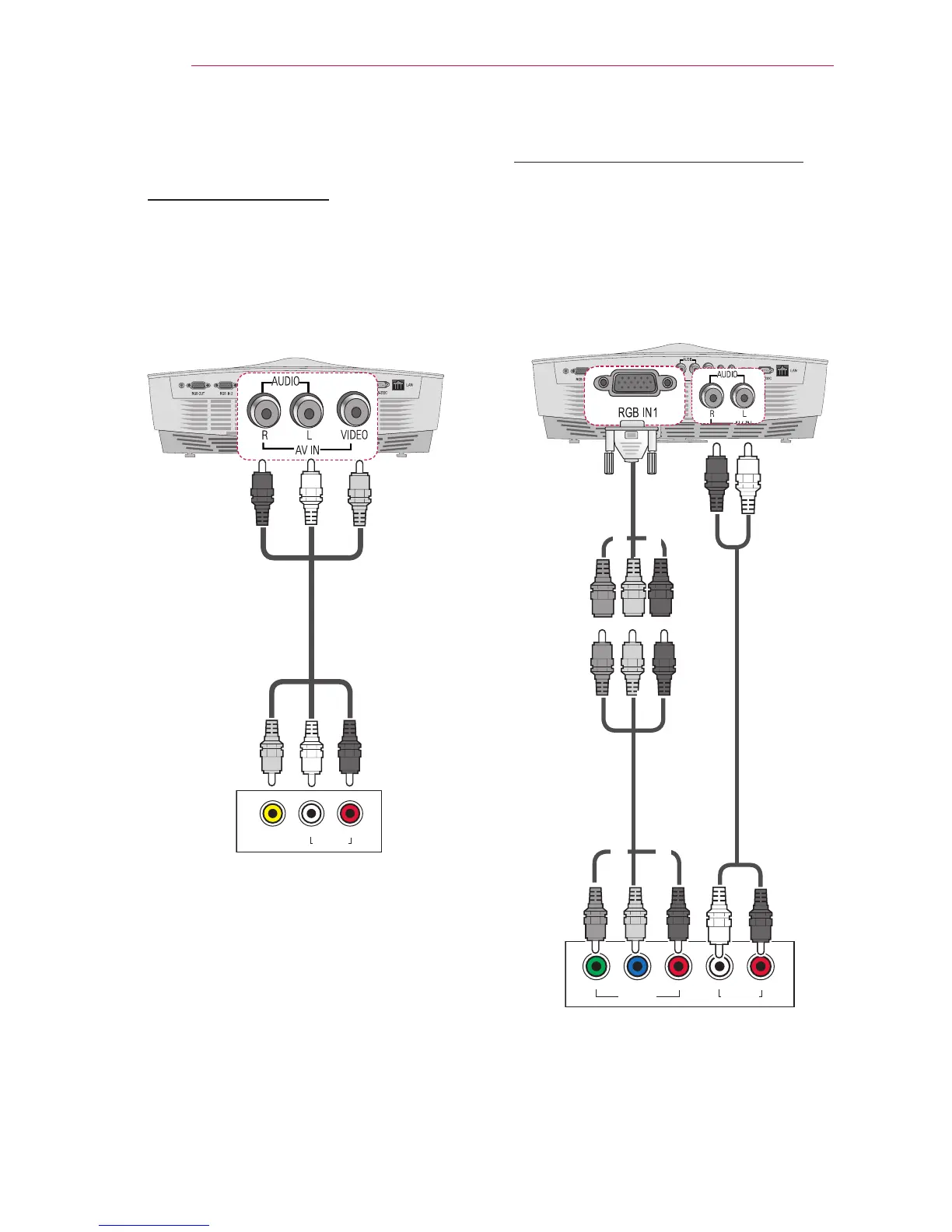
Component Connection
Enjoy vivid images when you connect an
external device with a component port to
the RGB In port of the projector. Press
the INPUT button on the remote control
to select Component.
GREEN
RED
BLUE
RED
WHITE
YELLOW
White
Red
$9287
/HIW< 3
% 35 5LJKW
$8',2287
Red
White
Red
Blue
Green
GREEN
RED
BLUE
RED
WHITE
YELLOW
Green
Blue
Red
Green
Blue
Red
AV Connection
AV Connection
Connect the output ports of an external
device and the AV INPUT port of the
projector. Press the INPUT button to
select AV.
$9287
/HIW 5LJKW
$8',2287
Yellow
White
Red
Yellow
White
Red
Optional
Accessories
Optional
Accessories
Optional
Accessories
Optional
Accessories

Table of Contents

Related product manuals