3-5
Copyright © LG Electronics Inc. All rights reserved.
Only training and service purposes
COMPONENT ACCESS
1. Turn off the electrical supply and gas supply going
to the range.
2. Remove the cooktop plate. (see “Remove the
cooktop plate” on the 3-4 Page)
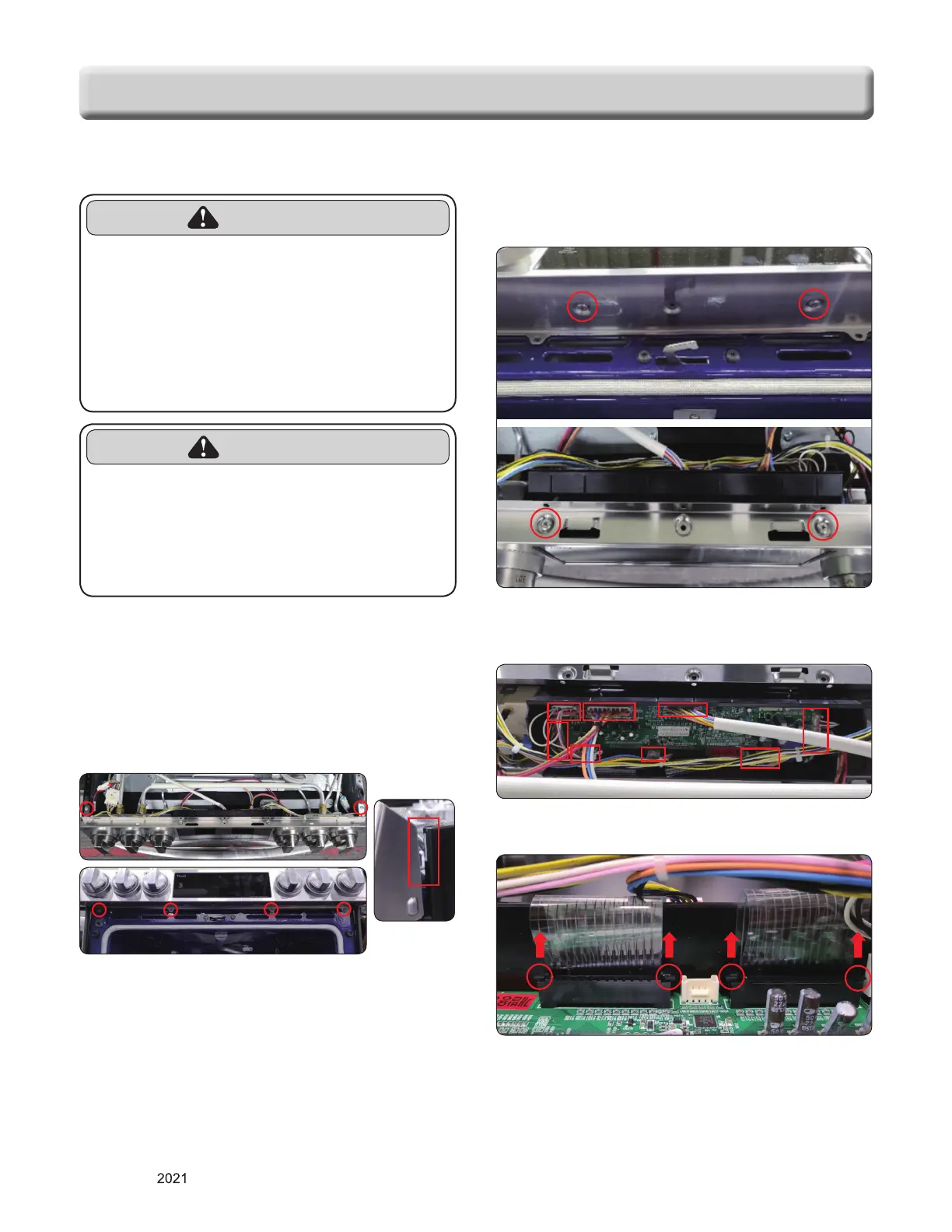
3. To disassemble controller panel, remove 6 screws
and take out the hook hanging from the side
panel.
4. To remove the main PCB supporter, remove 4
screws.
5. After disconnecting the 9 connectors, remove the
PCB from the PCB supporter.
6. Disconnect key pad wiring.
REMOVING THE CONTROLLER PANEL AND MAIN PCB
WARNING
• DISCONNECT power supply cord
from the outlet before servicing.
• Replace all panels and parts before
operating.
•
RECONNECT all grounding devices.
- Failure to do so can result in severe personal
injury, death or electrical shock.
CAUTION
• Be careful when you work on the
gas range handling the sheet metal
part.
- Sharp edge may be present and you can cut
yourself.


 To Next Page