Device Basics 8
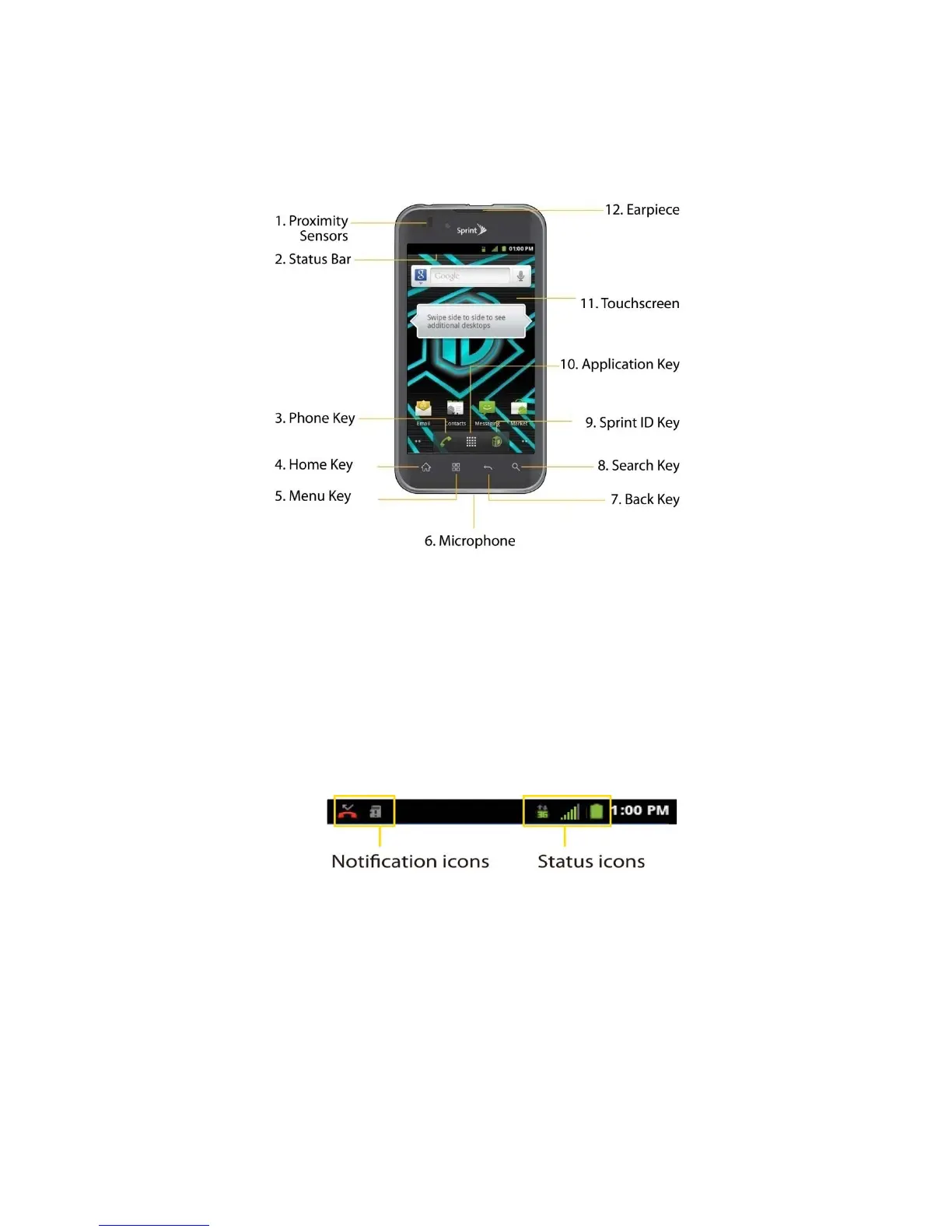
Your Device Overview
Front View
1. Proximity Sensors sense proximity towards other objects (such as your head) so that
touch commands are not accidentally activated during a call.
Note: Please be careful not to cover the sensors with a protective film, pouch, or a protective
case not authorized by LG.
2. Status Bar provides information about your device’s status and options, such as signal
strength, roaming, ringer setting, messaging, and battery charge. The Status Bar displays
icons indicating that you’ve received notifications (on the left) and icons indicating the
device's status (on the right), along with the current time.
3. Phone Key displays the dialpad so you can dial a number. Also provides additional tabs
to access Call log, Contacts, and your Favorites.
4. Home Key returns to the Home screen. If you're already viewing one of extension panes,
it opens the central Home screen. Press and hold to display recently used applications.
5. Menu Key allows you to access your device's main functions menu from the Home
screen: Add, Wallpaper, Settings, Switch ID, Search, and More (Manage apps and
Notifications). While using an application, press to open a list of options available.
6. Microphone allows other callers to hear you clearly when you are speaking to them.



 To Next Page