43
Video Camera
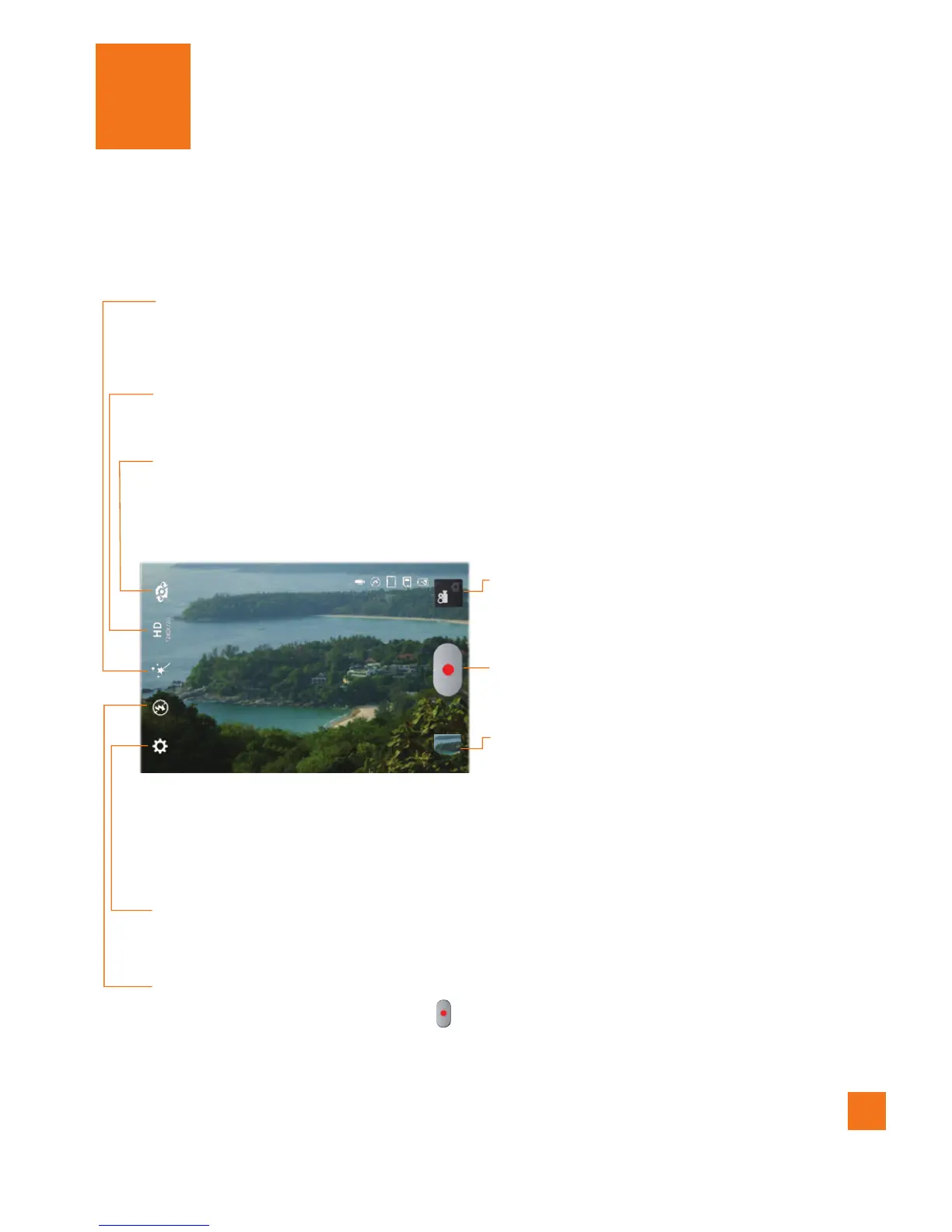
Getting to know the viewfinder
Resolution
– Define the resolution from Full HD (1920x1080), HD (1280x720),
TV(720x480), VGA(640x480), QVGA(320x240), MMS(QCIF-176x14).
Brightness
– Defines and controls of the amount of sunlight entering the lens.
Slide the brightness indicator along the bar towards “-” for a lower
brightness video, or towards “+” for a higher brightness video.
Settings
– Tap this icon to open the settings menu. See
Using the advanced
settings
on page 44.
Mode Switch
– Tap this icon to switch
between Camera mode and
Video mode.
Record
– Allows you to start recording.
Gallery
– This enables you to access your
saved photos and videos from
within the video camera mode.
Simply tap and your Gallery will
appear on the screen.
Live Effect
– Allows you to put various effects when recording a video. Choose
an effect and tap
.
Swap lens
– Allows you to swap between the rear camera lens and the front
camera lens.



 To Next Page