50
5.3.1 LED State for Battery Setting
The LED indicators on the front of the battery pack show the battery setup
state as follows:
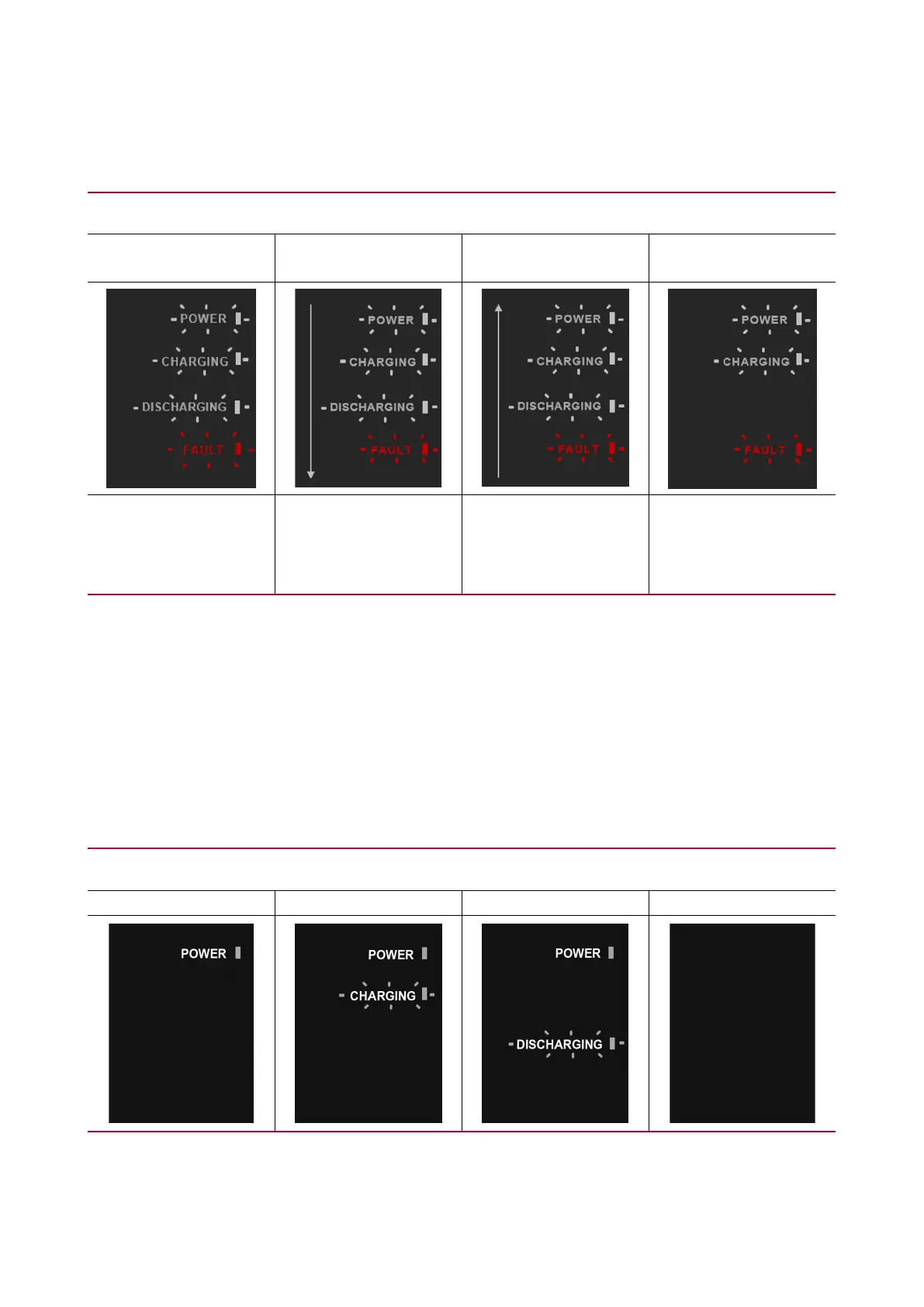
During initial battery setup
Initial setting
not performed
Initial setup error 1* Initial setup error 2** Initial setup error 3***
When all LEDs are
blinking
When the LEDs are
blinking from Power
to Fault sequentially
When the LEDs are
blinking from Fault to
Power sequentially
When POWER,
CHARGING and
FAULT LEDs are
blinking
* Initial setup error 1: The number of BMA connected to BPU is higher than humber of BMA set within
the RESU Monitor App.
** Initial setup error 2: The number of BMA connected to BPU is less than the number of BMA set within
the RESU Monitor App.
*** Initial setup error 3:The SW versions of the BMAs are different.
5.3.2 LED state for operation
After the Battery is setup via RMD, the Battery will be operated as below.
Battery Operation
STANDBY CHARGE DISCHARGE POWER SAVING


 To Next Page