21
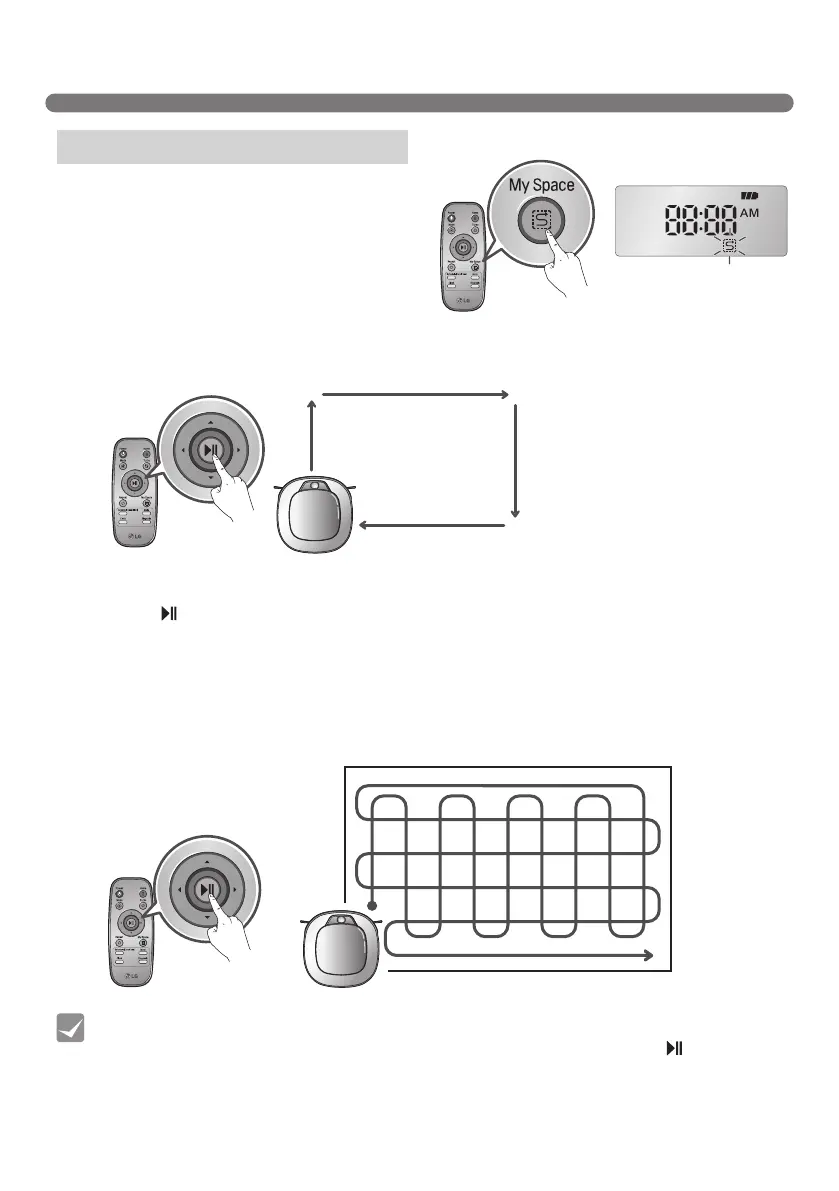
Pressing 'My Space' on the Remote Controller will set
the My Space cleaning mode with a voice message.
For cleaning of particular spaces, select this mode.
The 1st stage:
Use the Remote Controller to manually set the
parameters of each cleaning block.
※
This cleaning mode will be accepted when the distance of the start and end position is less than 1 m in
area.
CLEANING MODES
• While recharging, you cannot activate ‘My Space’ mode.
• To change the cleaning mode while the Robot Cleaner is in operation, press button first
then select a cleaning mode. The cleaning will then start from the begining.
Tip
My Space
The 2nd stage:
Pressing the ‘ ’ button will then make the Robot Cleaner clean the manually outlined area by itself.
※
Upon failure to correctly outline a zone, a voice will announce, which says "Area does not meet the
specified conditions. Please continue to make specified area for cleaning process."
Use the Remote Controller to assign a zone, again.
※
Upon completion of cleaning for all selected areas, the Robot Cleaner will resume the cleaning mode
(Zigzag or Cell by Cell) which it was last set to.
My Space Cleaning



 To Next Page