20
CLEANING MODES
• Once set up, the cleaning mode(Zigzag, Cell by Cell) setting will be maintained even after the
power supply is turned off.
• During operation, if a mode change is required, press the button and then select the mode.
Cleaning will then start from the beginning.
Tip
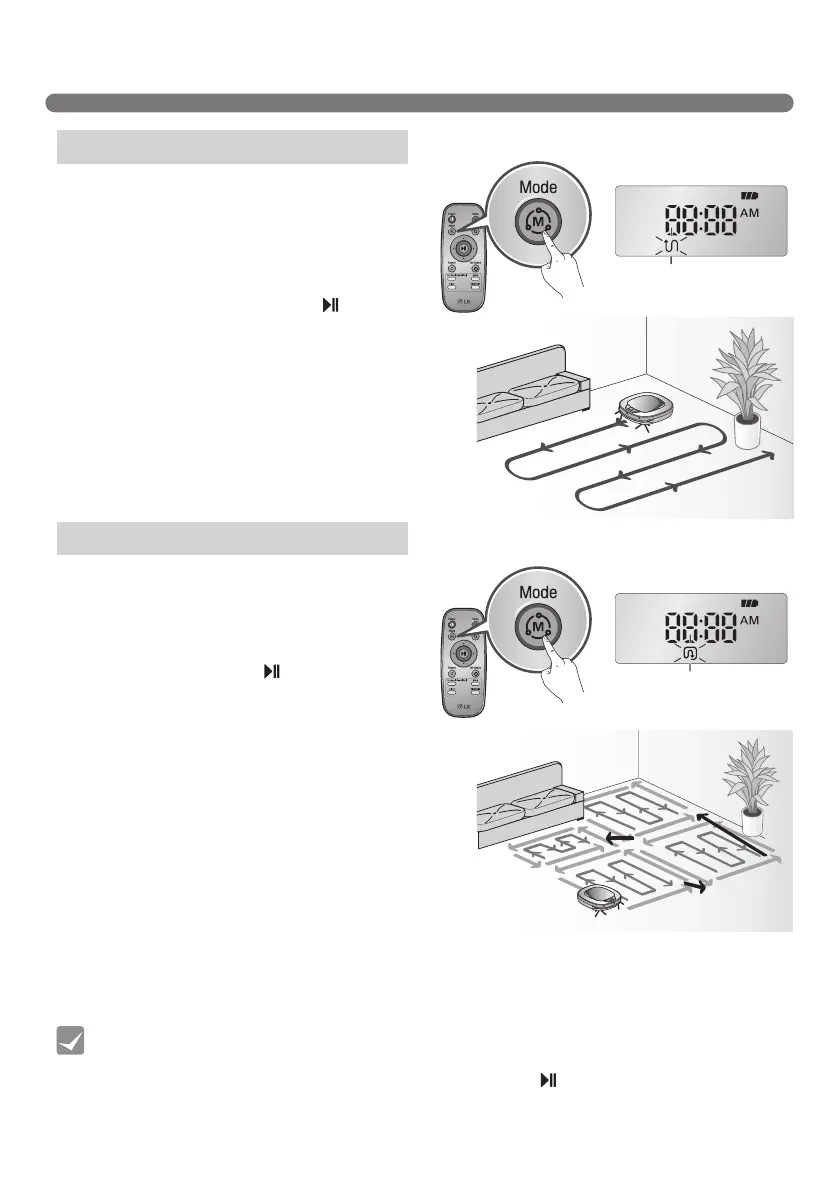
In ‘Zigzag’ mode, Robot Cleaner repeats a zigzag
operation to clean each and every spot in the
cleaning area.
If you need to quickly clean an area choose ‘Zigzag’
mode.
Press ‘Mode’ button on Remote Controller or main
unit to select ‘Zigzag’ mode and press ‘ ’ button.
※
Factory release default setting is 'Zigzag'.
In 'Cell by Cell' mode, Robot Cleaner cleans the
area by dividing it into rectangular spaces.
For meticulous cleaning, select this mode.
Press ‘Mode’ button on Remote Controller to select
'Cell by Cell' mode and press ‘ ’ button.
The 1st stage:
The maximum outline of 3 m x 3 m of cleaning
area will be cleaned. (The size of the outline may
vary in accordance with the shape of the area to
be cleaned.)
The 2nd stage:
The 2nd stage of Cell by Cell cleaning engages a
Zigzag mode automatically.
When the 1st, and 2nd stages are completed, the
cleaned area will be cleaned again through the
repetition of the above cleaning method as the
device advances to the next part of cleaning area.
Zigzag Cleaning
Cell by Cell Cleaning



 To Next Page