64
[IEC 62929 STANDARD] SETTING FOR CLEANING PERFORMANCE TEST
1. Put fully charged Robot Cleaner down on start point and turn on.
2. Push ‘TURBO’ button on the Robot Cleaner or ‘Turbo’ button on the Remote Controller and Robot
Cleaner will be set Turbo Mode.
3. Push ‘Repeat’ button on the Remote Controller and Robot Cleaner will be set Repeat Mode.
4. Push ‘START/STOP’ button on the Robot Cleaner or ‘
’ button on the Remote Controller and Robot
Cleaner will be operated.
1. Put fully charged Robot Cleaner down on start point and turn on.
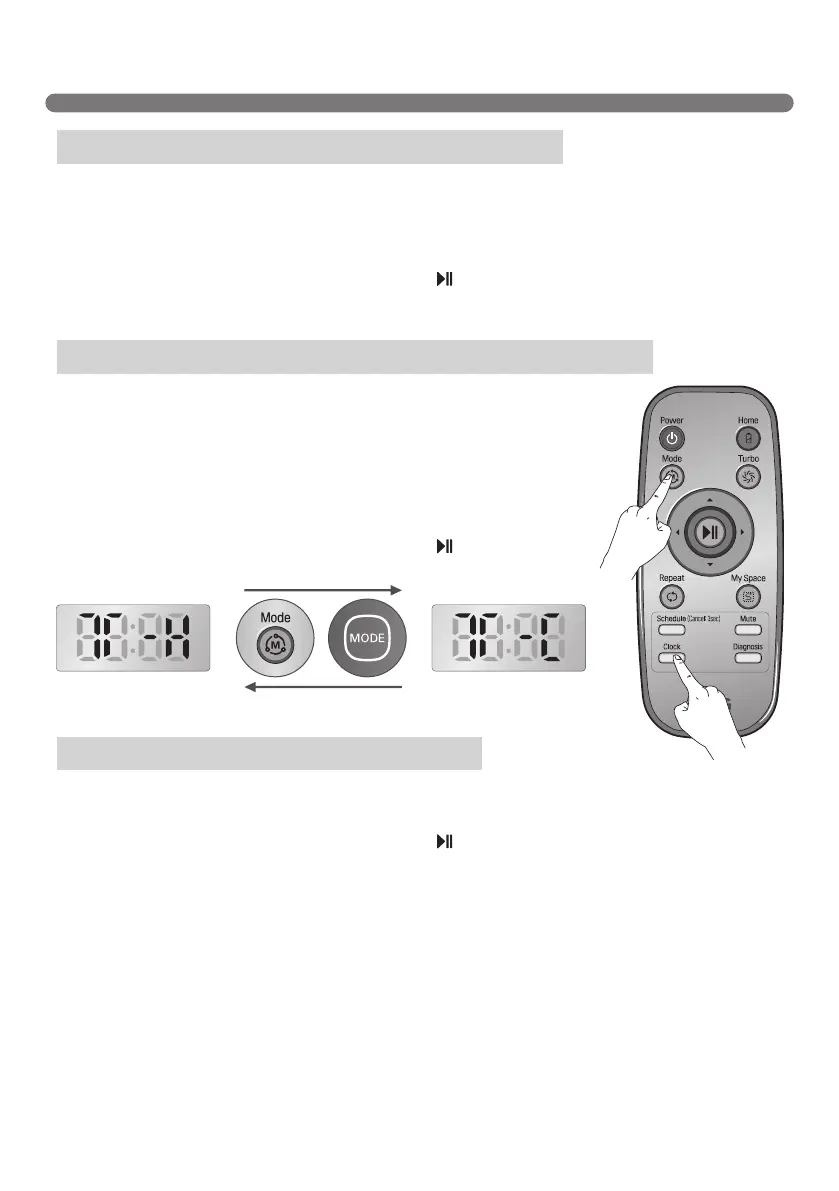
2. Push both ‘Schedule’ button and ‘Mode’ button for 3 seconds to access Test
Mode(Straight).
3.(1)IncaseoftestingonHardFloor,LEDexpression:T-H.
(2)IncaseoftestingonCarpet,LEDexpression:T-C.
※
Change LED expression by pushing ‘Mode’ button on the Remote
Controller or ‘MODE’ button on the Robot Cleaner.
4. Push ‘START/STOP’ button on the Robot Cleaner or ‘
’ button on the
Remote Controller and Robot Cleaner will be operated.
1. Put fully charged Robot Cleaner down on start point and turn on.
2. Push ‘Repeat’ button on the Remote Controller and Robot Cleaner will be set Repeat Mode.
3. Push ‘START/STOP’ button on the Robot Cleaner or ‘
’ button on the Remote Controller and Robot
Cleaner will be operated.
※
Use this mode only when organizations test cleaning performance or driving performance according to
IEC62929
Dust Removal Test - Box(Hard Floor & Carpet)
Dust Removal Test - Straight Line(Hard Floor & Carpet)
Autonomous navigation/coverage test
[Hard Floor Test mode] [Carpet Test mode]



 To Previous Page