55
CLEANING THE BRUSH
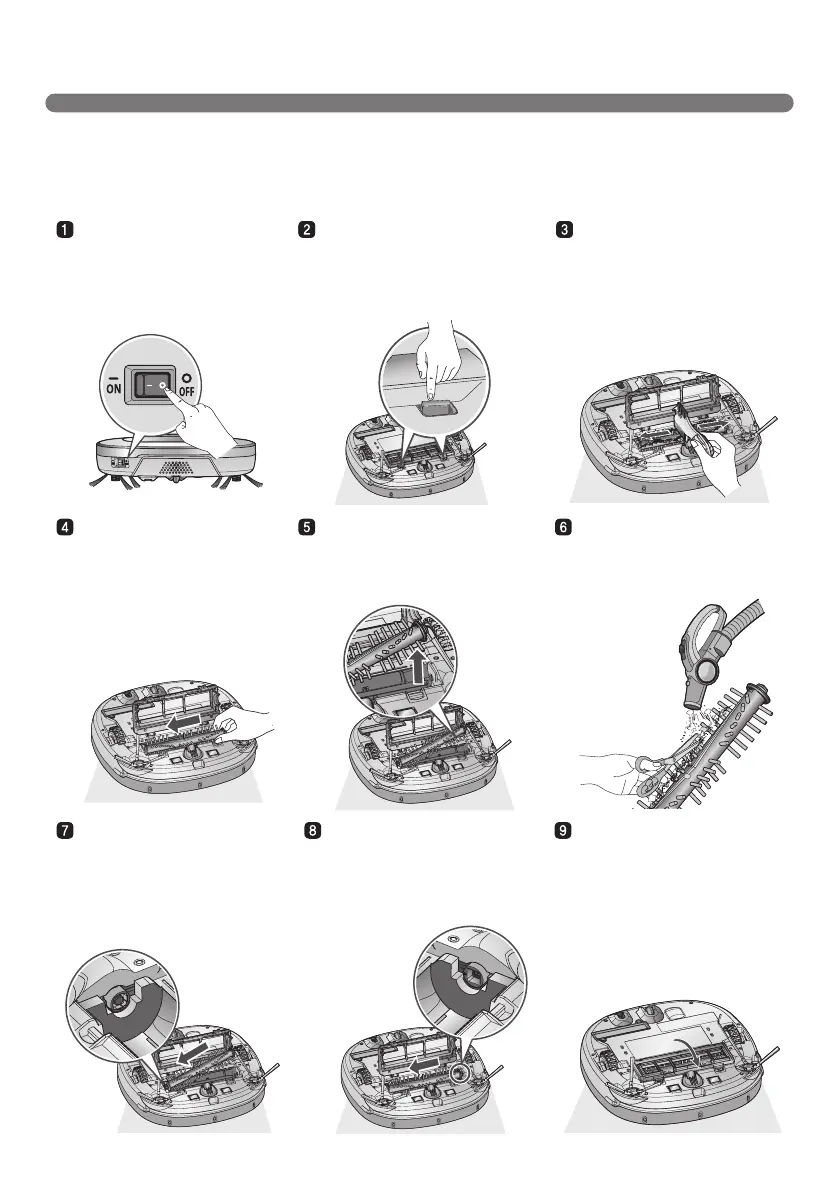
Fit the Fixing Hook
(rectangular shape) on
the side of the Brush into
the slots, with the colors
matching.
While pushing the Brush to the
arrow direction, fit the Fixing
Hook (rectangular shape) on
the opposite side into the slot.
Press down and close the
Cover until a 'crack' sound
is heard from both sides of
Fixing Hook.
※
Be careful not to trap the
side brush bristles under the
cover when closing it.
Push the Brush all the way
into the yellow protrusion.
While pushing the Brush, lift
the white protrusion part up to
separate it from the main unit.
Carefully clean the Brush with
a vacuum cleaner or scissors.
Turn the Main Power Switch
OFF before starting the clean.
Put the Robot Cleaner upside
down on a soft cloth.
After checking for foreign
materials, press down the
Fixing Hook and pull it up to
separate the brush Cover.
By using the cleaning tool,
clear hairs and other debris
and foreign materials on the
Brush and from the 2 smaller
jockey wheels.
The rotating Brush, located on the bottom of Robot Cleaner, helps collect the dust. Clean the Brush as per
the following sequence.
※
Before turning over the main unit, lay a soft cloth on the oor and remove the Dust Bin.
Otherwise, the main unit can get scratched and dust will fall from the Dust Bin.



 To Next Page