27
LOCATION SEARCH FUNCTION
• If the power is turned off after the location search function is set, the location search function
will be canceled.
• Location search will be more effective when the Robot Cleaner is closer to the location where
it was moved from.
Tip
※
The navigating function will be activated after
the Robot Cleaner adequately recognizes the
cleaning environment.
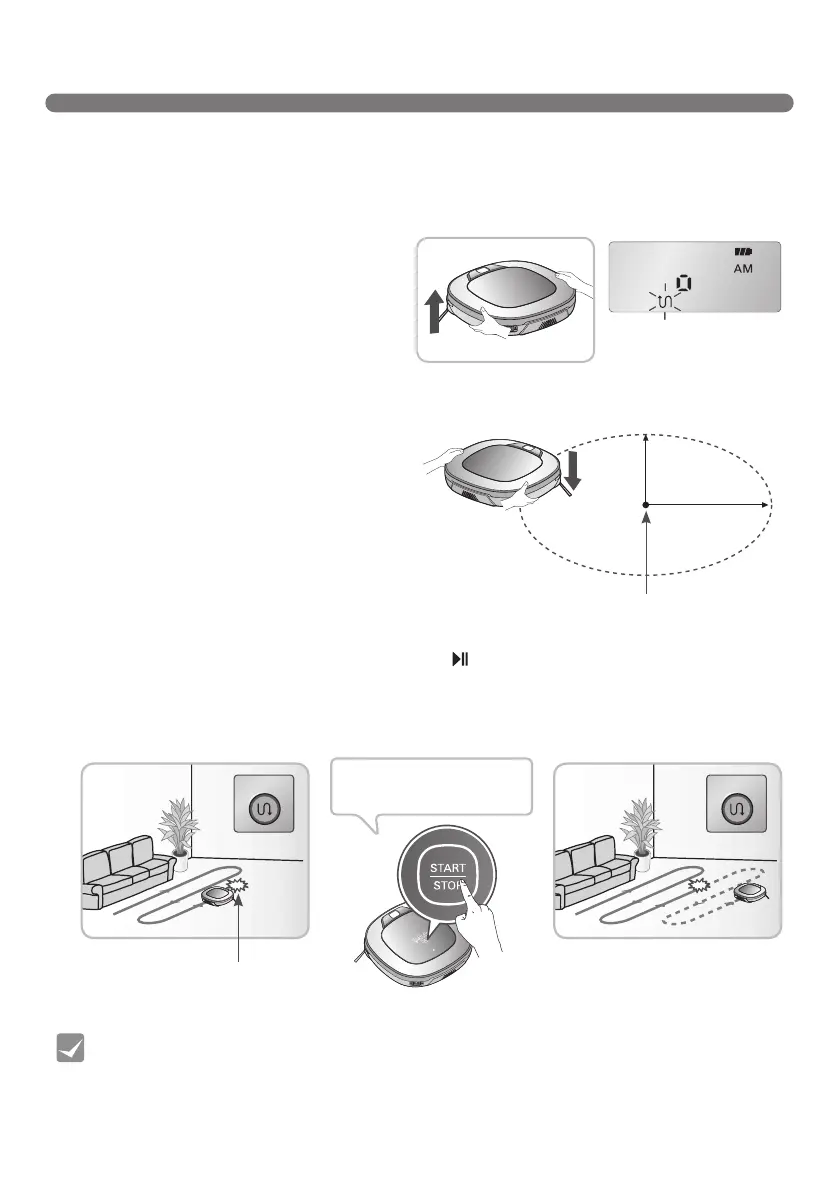
Manual Relocation.
1. With the power off, locate the Robot Cleaner near
the location where it was originally moved from.
※
The location search is more effective when the
Robot Cleaner is closer to the location where it
was moved from.
※
If it is moved from its original cleaning position
by more than 1 m, it becomes difficult for
the Robot Cleaner to search for it's previous
location.
2. Press the START/STOP button on the Robot Cleaner or
button on the remote controller.
Robot Cleaner will then start the location search function along with an audio guide.
※
When the location search is successfully completed, it will continue cleaning from where it was moved.
If the location search fails, it will start again from the beginning.
The Robot Cleaner remembers its location while cleaning.
If the user moves the Robot Cleaner while it is operating, it will search for the location it was
moved from by using its navigational location search function before continuing to clean.
Change location
Location of incident
Location of incident
1
m
1
m
When the location search
function is activated, the
cleaning mode of the status
indicatorwillash
To find exact location,
please step away from the
Roboking.
Zigzag Zigzag



 To Next Page