24
TIME SETTING
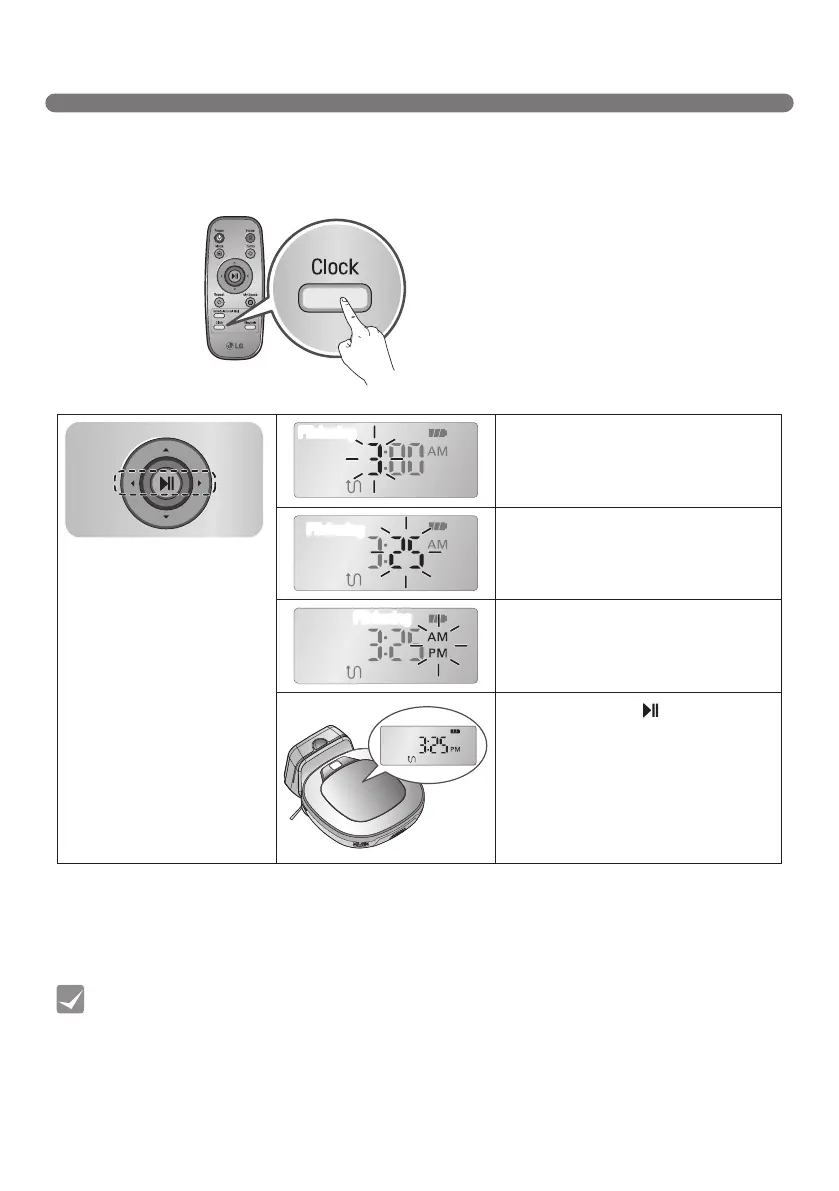
You can set or change the current time on the Robot Cleaner.
Pressing ‘Clock' button on the Remote Controller, when the Robot Cleaner is in standby mode,
will start the clock setting mode.
• Any scheduled cleaning will be activated based on the time on the Robot Cleaner. You must
set the clock before setting scheduled cleaning.
• If there is no input for 10 seconds, the clock setting is canceled.
Tip
Selectbyusing‘◄►’buttons
on the Remote Controller.
The function can be heard
through the voice guide.
Flickering
Setthehourbyusing‘▲▼’buttonson
Remote Controller.
Flickering
Settheminutesusing‘▲▼’buttonson
Remote Controller.
Flickering
SettheAM/PMusing‘▲▼’buttonson
Remote Controller.
Pressing ‘Clock’ or ‘ ’ button on
Remote Controller will complete the
time setting process.



 To Next Page