26
MOP CLEANING (OPTION)
• To avoid odors, wash any foreign material or dust off the mop after cleaning is completed.
• To avoid staining floors, do not use the ultra microfiber mop to clean when dirt is contaminated
with liquids such as coffee or ink.
• To avoid damage to carpets from the Velcro or dirt transfer from the mop, do not attempt to
clean the carpet while the mop plate or mop is attached.
• Keep the ultra microfiber mop dry. Do not use it on wet surfaces.
If there is moisture on the floor, it can interfere with the navigation and damage the unit.
• Smart Diagnosis feature is not available, when the Mop Plate is attached.
Tip
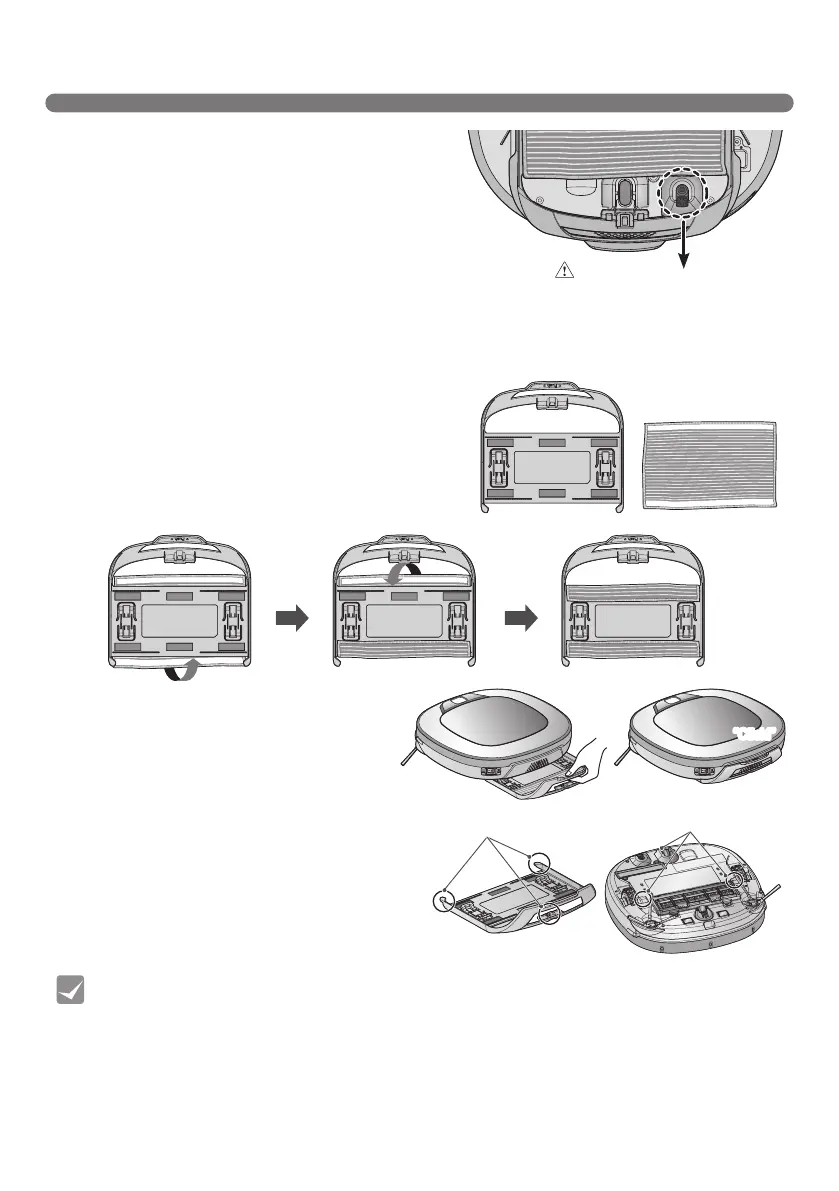
1. Attach the ultra microfiber mop to the Velcro
of the mop plate as shown in the figure.
2. Firmly slide the Mop Plate into the furrows
until you hear a 'click' sound.
※
Note that, if the Mop Plate is not secured
correctly, it may separate during the
cleaning.
3. It is essential that the fixing hooks on the
Mop Plate align correctly on to the fixing
grooves on the underside of the cleaner.
Formopcleaning,mountthemopandmopplatetotheRobotCleaneraccordingtothefollowinginstructions:
By attaching the ultra microfiber mop, you can
effectively use the Robot Cleaner to remove dust on
hard floor surfaces.
When the mop plate is attached, the Robot Cleaner
will not climb on to carpets or over thresholds, in
order to prevent transferring dirt from the mop.
Fixing hook
Fixing groove
“Click!”
Caution
Do not cover the bottom camera
sensor by mop.



 To Next Page