31
SMART APPLICATION FUNCTION
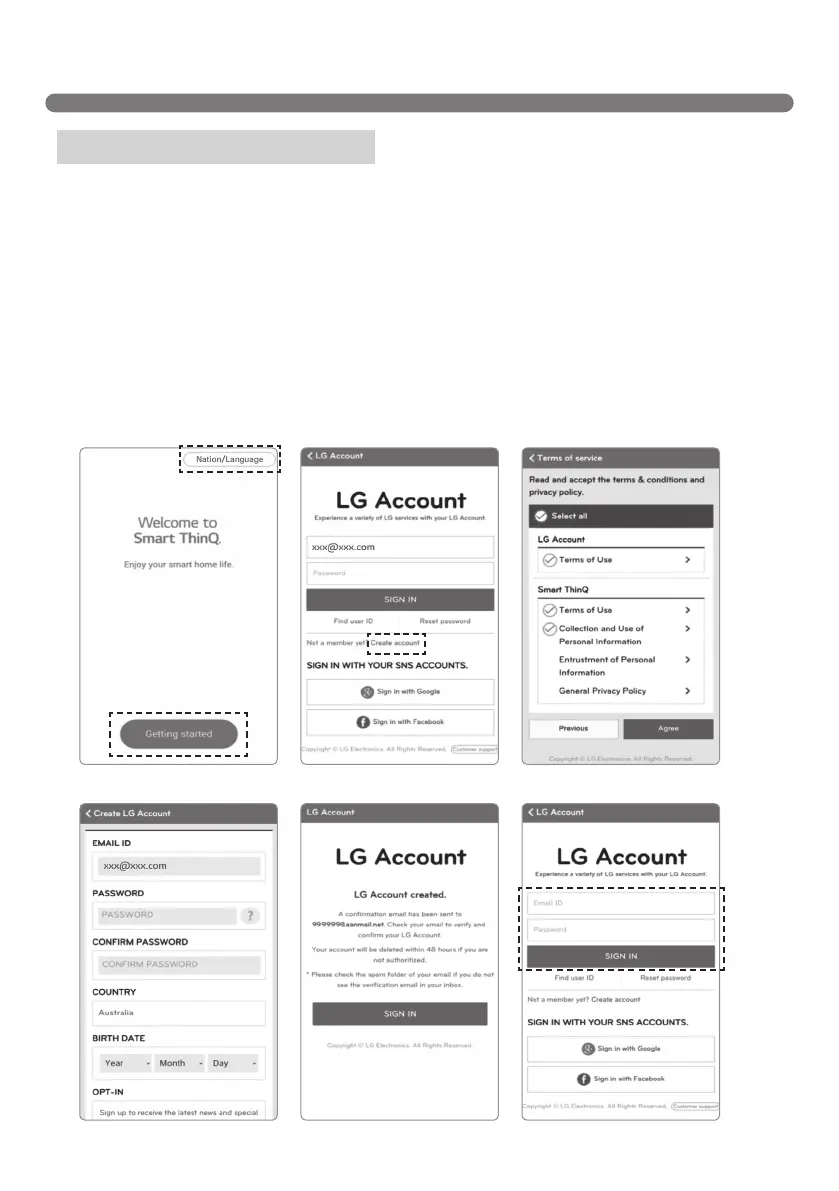
[Startup screen] [Terms of service][Sign in screen1]
[Conrmemail][Create Account] [Sign in screen2]
You need to subscribe your personal login ID on the server to control the Robot Cleaner from your
smartphone.
1. The [Startup Screen] opens when you run the "Smart ThinQ" application. Select “nation / Language” and
click “Sign in”.
2. You can sign up with the [Create account] button on the "sign in screen" page.
Fill the Blanks on [create account screen] page to create account.
3. If you have successfully created an account, try to sign in on the “Sign in” page after receiving an
authentication sign in e-mail.
※
Don’t change ‘Nation/Language’ in the [Startup Screen] page. If you change it, you will not be able to
register your robot cleaner that you purchased in nation. If it is set to another country, change it to Nation/
Language.
※
You can also sign in with google and facebook at the [Log in screen] page.
Signing up for membership



 To Next Page