36
SMART APPLICATION FUNCTION
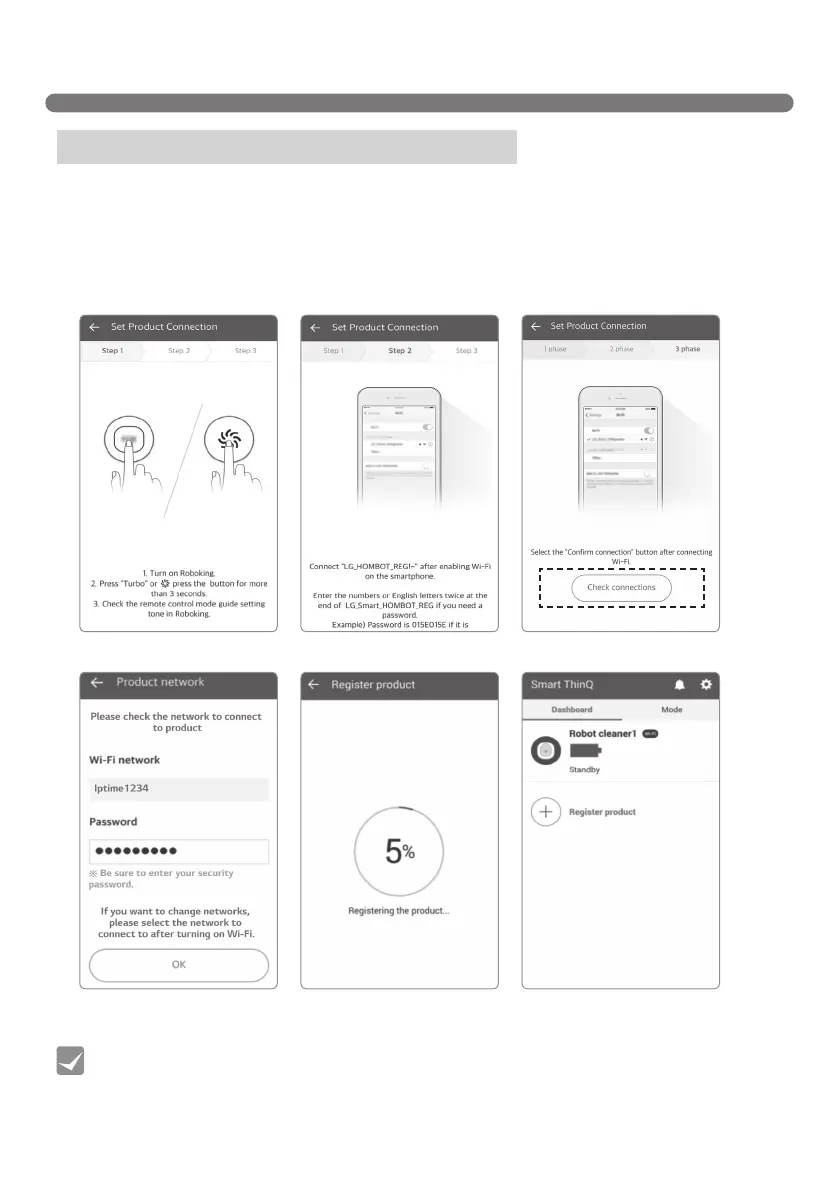
Product network / Register product (iOS)
• With the network function enabled on the Robot Cleaner, press “Access" to connect to the
Robot Cleaner.
• Use a 2.4GHz bandwidth.
• Special characters in the ID of the router may hamper product connection or registration.
Tip
1. Please long-press the “Turbo” button for 3 seconds while the Robot cleaner is turned on.
The [Select ‘LG_HOMBOT_REG~’ Wi-Fi] screen will open soon.
2. Please turn on the “Wi-Fi connection” function in iPhone “Settings.”
3. Please press the “Check connection” button on the App screen after connecting to “LG_HOMBOT_REG~”
in the Wi-Fi list.
4. After checking the network, please enter the network ID and password to connect to the product.
[Select network]
[Press ‘TURBO’ button] [Select ‘LG_HOMBOT_REG~’ Wi-Fi]
[Product registration]
[Check connections]
[Product selection screen - when
connection available]



 To Next Page