4. Device Concept MMX4x2 series โ User's Manual 31
๎ฅ๎๎๎๎๎๎๎๎๎๎๎๎๎
๎๎๎๎๎
๎๎๎
๎๎๎๎๎๎๎๎๎๎๎๎๎๎๎ ๎๎ฐ๎จ๎ง๎๎๎๎๎๎๎
๎๎๎๎๎๎๎๎๎๎๎๎๎
๎๎๎๎๎๎๎ฃTCP Recognizer
DIFFERENCE: ๎ ๎ธ๎๎๎๎๎๎
๎๎๎๎๎๎๎๎๎๎๎๎๎๎๎๎๎๎๎๎๎๎๎
๎๎๎๎
๎๎
๎๎๎
๎๎๎๎๎๎๎๎๎๎ค๎๎๎๎
๎๎๎๎๎๎๎๎๎๎๎๎๎
The feature is almost the same as in case of the RS-232, but for the network interface: the incoming TCP
๎๎๎๎๎
๎๎๎๎๎๎
๎๎๎๎๎๎๎๎๎๎๎๎๎๎๎๎๎๎๎๎๎๎๎๎
๎๎๎๎๎๎๎๎๎๎๎
๎๎๎๎๎๎๎๎๎ธ๎๎๎๎๎๎๎๎๎๎
๎๎๎๎๎๎๎๎๎๎๎๎๎ธ๎ง๎ด๎๎๎๎๎๎๎๎๎๎๎๎๎
๎๎๎๎๎๎๎
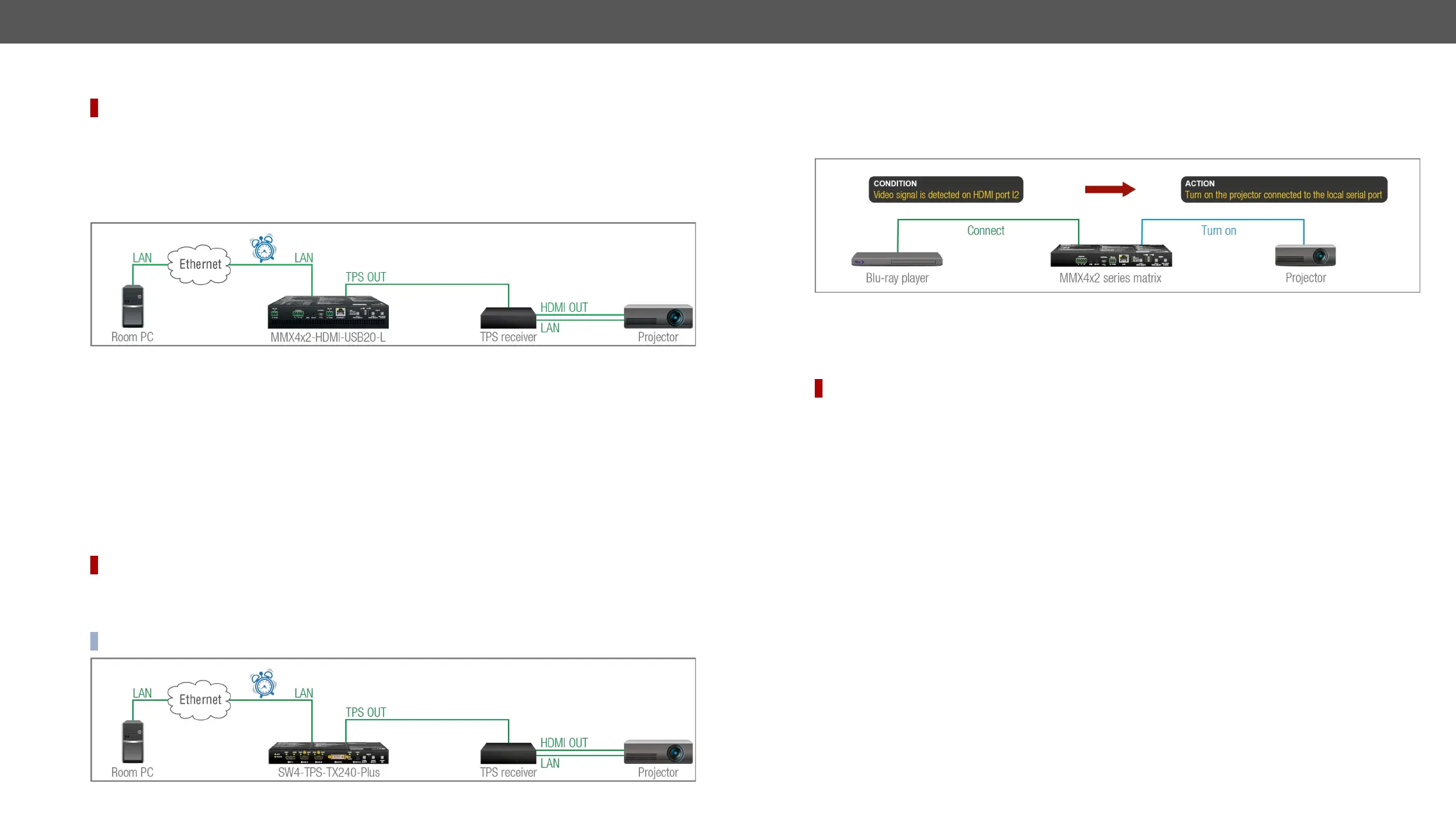
Event Manager gives numerous opportunities for creating automatic room solutions.
TCP Recognizer Example
๎ป๎๎๎๎๎๎๎๎๎ด๎๎๎๎๎๎๎๎๎๎๎๎๎๎๎๎๎๎๎๎๎๎๎๎๎๎๎๎๎๎๎๎๎๎๎๎๎๎๎๎๎๎๎๎๎๎๎๎๎๎๎๎ธ๎ฆ๎ด๎๎๎ฉ๎น๎๎๎๎๎๎๎๎๎๎
๎๎๎๎๎๎๎๎๎๎๎๎๎๎๎๎๎๎๎
๎๎๎๎๎
๎๎๎๎
๎๎๎๎
๎ป๎๎๎๎๎๎๎๎๎๎๎๎๎๎๎๎๎๎๎๎๎๎๎๎๎๎๎๎๎๎๎๎
๎๎๎๎๎๎๎๎๎๎๎๎๎๎๎๎๎๎๎๎๎๎๎๎๎๎๎๎๎๎๎๎๎๎๎๎๎
๎๎๎๎๎๎
๎๎๎๎๎๎๎๎๎ฉ๎๎๎๎๎๎๎๎๎๎ธ๎๎
๎๎๎๎๎๎๎
๎๎๎
๎๎๎๎๎๎๎๎๎๎๎๎๎๎๎๎๎๎๎๎๎๎๎๎๎๎๎ฑ๎ฑ๎ผ๎๎๎๎๎๎๎๎๎๎๎๎๎๎
๎๎๎๎๎๎๎๎๎๎๎๎๎๎๎๎๎
๎๎๎
๎๎ง๎๎๎๎๎๎๎๎๎๎๎๎๎ฉ๎๎๎๎๎๎ฑ๎
๎๎
๎๎๎๎
How to set up the switcher?
Step 1. ๎ง๎๎๎ค๎๎๎๎๎๎๎๎๎๎๎๎๎๎๎๎๎๎๎๎๎๎๎๎๎๎๎๎๎๎๎๎๎๎๎๎๎
๎๎๎๎๎๎๎๎๎๎๎๎๎ฐ๎จ๎ง๎๎๎๎๎๎๎๎๎๎๎Ethernet๎๎๎๎๎๎๎๎๎๎๎๎๎๎๎๎๎ฐ๎ป๎๎
protocol commands (see the ๎ธ๎ง๎ด๎๎ฑ๎๎๎๎
๎๎๎๎ถ๎๎๎๎๎๎๎๎๎๎๎๎๎๎๎๎๎๎๎๎๎จ๎๎ค๎๎๎๎๎๎๎๎๎๎๎๎๎๎๎๎๎๎๎๎๎๎๎
๎๎๎
๎๎ธ๎ง๎ด๎
client. (The Projector is saved as 'C1' in this example.)
Step 2. Create the following event in the Event manager:
E1.๎๎ป๎๎๎๎๎๎๎๎(PWR!001 "On")๎๎๎๎๎๎
๎๎๎๎๎๎๎๎๎๎๎๎๎๎๎๎๎๎๎๎๎๎๎๎๎๎๎ง๎๎๎๎๎๎๎๎๎๎๎๎๎๎๎ซ๎ด๎ญ๎ณ๎๎๎๎๎๎๎๎๎๎๎๎๎๎๎๎๎
low level.
๎ช๎๎๎๎๎๎๎๎๎๎๎๎๎๎๎
๎๎๎๎๎๎
๎๎๎๎๎๎๎๎๎๎๎๎๎๎๎๎๎๎๎๎๎๎๎๎๎๎๎๎ฐ๎จ๎ง๎๎๎๎๎๎๎๎๎๎Event Manager section.
๎๎๎๎๎๎๎ฃWake-on-Lan
DIFFERENCE: ๎ ๎ธ๎๎๎๎๎๎๎
๎๎๎๎๎๎๎๎๎
๎๎
๎๎๎
๎๎๎๎๎๎๎๎๎๎ช๎ป๎๎๎
๎๎๎
๎๎๎v1.6.0b19.
The well-known wake-on-lan feature (sending magic Packet to the target PC) is available. This can be used
๎๎๎๎๎๎๎๎๎๎๎๎๎
๎๎๎๎๎๎๎๎๎๎๎
๎๎๎๎๎
๎๎๎๎
๎๎๎๎๎๎๎๎๎๎๎๎๎๎๎๎
๎๎๎๎๎๎๎๎๎ฐ๎ป๎๎๎๎๎๎๎
๎๎๎๎๎๎๎๎๎๎๎๎Powering on a Computer
๎๎๎๎๎๎ฉ๎๎๎๎๎๎๎๎๎๎ป๎
๎๎๎๎๎๎๎ฐ๎ฅ๎ฒ๎ section.
INFO: ๎ Please make sure the feature is enabled in the target PC and it is powered (but switched off).
๎๎๎๎๎ฃThe Event Manager Feature
The Event Manager feature means that the device can sense changes on its ports and is able to react
๎
๎๎๎๎๎๎๎๎๎๎๎๎๎๎๎๎๎๎๎๎๎๎๎ค๎๎๎๎๎๎๎๎๎๎๎๎๎๎๎ฐ๎๎๎๎๎๎
๎๎๎๎จ๎๎๎๎๎๎๎ง๎๎๎๎๎๎๎๎๎๎๎๎๎๎๎
๎๎๎๎๎
๎๎๎๎๎๎๎๎๎๎๎๎๎๎๎๎๎๎๎๎๎
๎๎๎๎๎๎๎๎๎
๎๎๎
๎
๎๎๎๎๎๎๎๎๎๎
๎๎๎๎๎๎ฉ๎๎๎๎๎๎๎๎๎๎๎๎ค๎๎๎๎๎๎
๎๎ง๎๎๎๎๎๎๎๎๎๎
๎๎๎๎
๎๎๎ฅ๎๎๎๎๎๎
Event Manager Example
See more information about the settings in the Event Manager๎๎๎๎๎๎๎๎๎๎๎๎๎ฐ๎จ๎ง.
Event Manager +
DIFFERENCE: ๎ ๎ธ๎๎๎๎๎๎
๎๎๎๎๎๎๎๎๎๎๎๎๎๎๎๎๎๎๎๎๎๎๎
๎๎๎๎
๎๎
๎๎๎
๎๎๎๎๎๎๎๎๎๎ค๎๎๎๎
๎๎๎๎๎๎๎๎๎๎๎๎๎
The AND Operator
The practical experience has shown that there is a need to examine more conditions (up to four) as follows:
๎๎๎๎๎๎๎๎๎๎๎๎๎๎๎๎๎๎๎๎๎๎๎๎๎๎๎๎๎๎๎๎๎๎๎๎๎๎๎๎๎๎๎๎๎๎๎๎๎๎๎๎๎๎๎๎๎๎๎๎๎๎๎๎๎๎๎๎๎๎๎
๎๎๎๎๎๎๎ค๎๎๎๎๎๎๎๎๎๎๎๎๎๎๎๎๎๎๎๎๎ฅ๎๎๎๎๎๎๎๎๎
launched. For example, in a meeting room we have the following situation:
โช Signal is present on an input port,
โช ๎ฅ๎๎ซ๎ด๎ญ๎ณ๎๎๎๎๎๎๎๎
๎๎๎๎๎๎๎๎๎๎๎๎ญ๎๎๎๎ญ๎๎๎๎๎๎
๎๎๎๎๎๎๎๎๎
๎๎๎๎๎๎๎๎๎๎
If the two Conditions are present at the same time, the Action๎๎๎๎๎๎
๎๎๎๎๎๎๎๎๎ฎ๎๎๎๎๎๎๎๎
๎๎๎๎๎๎๎๎๎๎๎Conditions into
separate Events, then create a third Event, select the two Conditions๎๎
๎๎๎๎๎๎ค๎๎๎๎๎๎๎Action.
See the ๎ง๎๎๎๎๎๎๎๎ฐ๎๎๎๎๎๎๎๎๎๎๎๎๎๎๎๎๎๎๎๎๎๎๎๎๎๎๎๎๎๎๎๎๎๎ฐ๎จ๎ง๎
Event Manager Variables
A brand new area is opened by implementing the variables. You can create custom variables in number
๎๎๎๎๎๎๎๎๎๎๎๎๎
๎๎๎๎๎๎๎๎๎๎๎
๎๎๎๎๎๎๎๎๎๎๎๎๎๎๎๎๎๎ฉ๎๎๎๎๎๎ฑ๎
๎๎
๎๎๎๎๎๎ธ๎๎๎๎๎
๎๎๎
๎๎๎๎๎๎๎
๎๎๎๎
๎๎๎๎๎๎๎๎๎๎๎๎๎๎๎๎๎๎๎๎๎๎๎๎๎๎๎๎
methods:
โช ๎ฒ๎๎๎๎๎๎๎๎๎๎๎๎๎๎๎๎๎๎๎๎๎๎๎๎๎๎๎๎๎๎๎๎๎
๎๎๎๎
๎๎๎๎๎๎๎๎๎๎๎๎๎๎๎๎๎๎๎๎๎๎๎๎๎๎๎๎๎๎๎๎๎๎๎๎๎๎๎๎๎
๎๎๎๎๎
๎๎๎๎
๎๎๎๎
โช ๎ญ๎๎๎๎๎๎๎๎๎๎๎๎๎๎๎๎๎๎๎๎๎๎๎๎๎๎๎๎
๎๎๎๎
โช ๎บ๎
๎๎๎๎๎๎๎๎๎๎๎๎๎๎๎๎
๎๎๎๎๎๎๎๎
๎๎๎๎๎๎
โช ๎ถ๎๎
๎๎๎๎๎๎
๎๎๎๎๎๎๎๎๎๎๎๎๎๎๎๎๎
๎๎๎๎๎๎๎๎
๎๎๎ฐ๎ป๎๎๎๎๎๎๎๎๎๎๎๎๎๎๎๎๎
๎๎๎๎๎๎๎๎๎๎๎๎
๎๎๎๎๎๎๎๎๎๎๎
๎๎๎
๎๎๎๎
๎ธ๎๎๎๎๎๎ค๎๎๎๎๎๎
๎๎๎
๎๎๎๎๎๎
๎๎๎๎๎๎๎๎๎๎๎๎๎๎
๎๎๎๎๎๎๎๎๎
๎๎๎๎๎๎๎๎๎๎๎๎๎
๎๎๎๎๎๎๎๎๎
๎๎๎๎๎๎๎๎๎๎๎๎๎๎๎๎๎
๎๎๎๎๎๎๎
๎๎๎๎๎๎๎๎๎๎ธ๎๎๎
๎๎๎๎๎๎๎๎๎๎๎๎๎๎๎๎๎๎๎
๎๎๎๎๎๎๎๎๎
๎๎๎๎๎๎
๎๎๎๎๎๎๎๎๎๎๎๎๎๎๎๎๎๎๎๎๎๎๎๎๎๎๎๎๎๎๎๎๎๎๎๎๎๎๎๎๎๎๎๎๎๎๎๎๎๎๎
๎๎๎
๎๎๎๎๎๎๎๎
๎๎๎๎๎๎๎๎๎๎
processor.
See the ๎บ๎
๎๎๎
๎๎๎๎๎๎๎๎๎๎๎๎๎๎๎๎๎๎๎๎๎๎๎๎๎๎๎๎๎๎๎๎๎๎ฐ๎จ๎ง๎