MMX4x2 series – User's Manual 44
HDMI Video Output
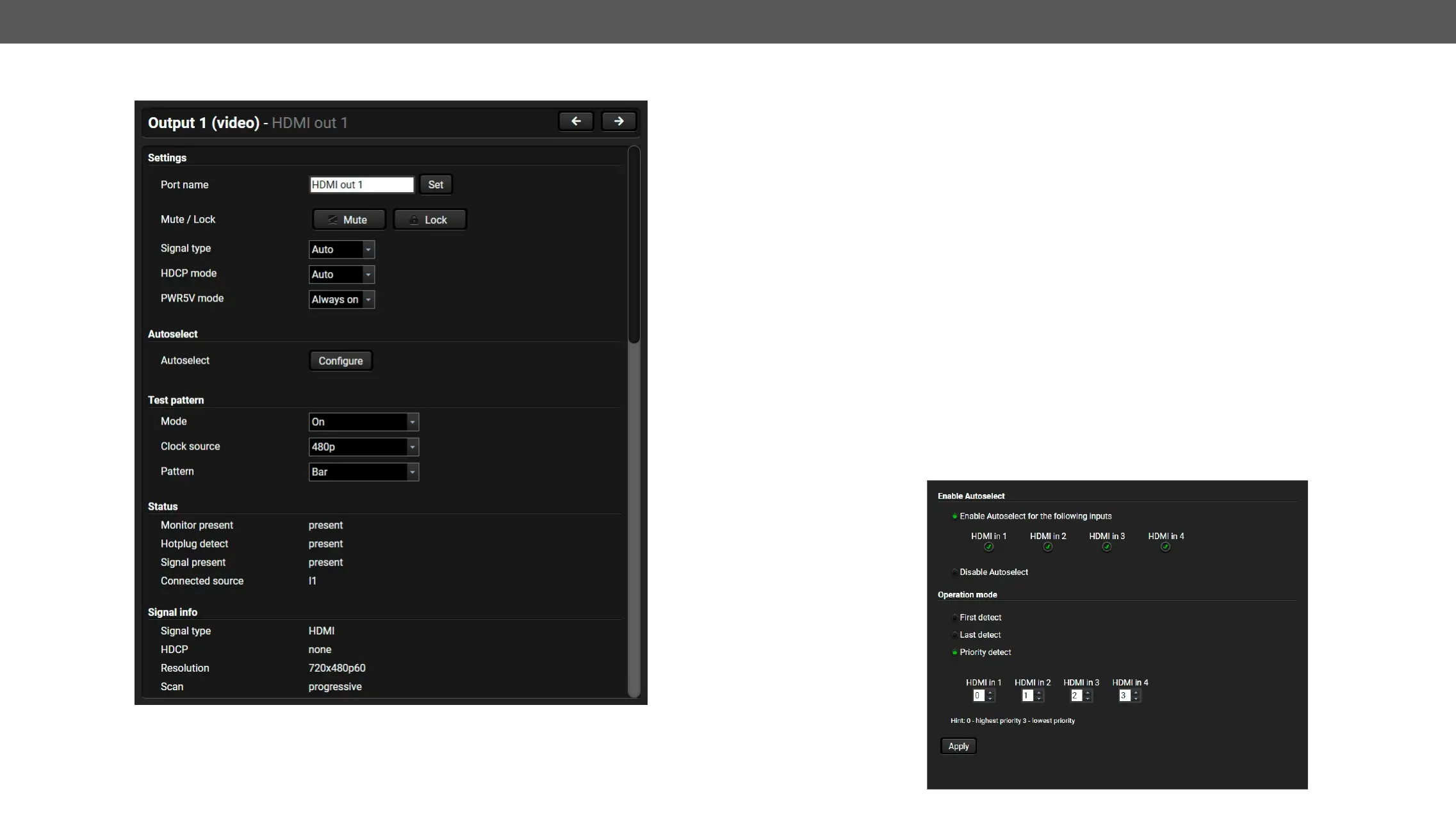
Port properties window of the HDMI video output
Available settings and tools:
▪
▪
▪ Autoselect settings (see below)
▪ Signal type
▪ HDCP mode
the content allows when Auto mode is selected; #signaltype #hdcp
▪ Connected source
▪ Power 5V mode
connected – independently from the transmitted signal;
▪ No sync screenNo Sync Screen (Test
Pattern) section.
▪ Frame detector diagnostic tool (see the Frame Detector section);
▪ Send and receive Consumer Electronics Control (CEC) commands by the CEC Tool,
▪ Reloading factory default settings for the selected port.
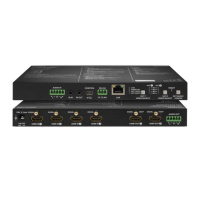
Autoselect Settings #autoselect
Pay attention to the following settings for the proper operation of the Autoselect function:
– Be sure that no input is set to the same priority number;
–
– Be sure that all inputs are enabled with the green tick on the right side;
– Always click on the Set priorities button after the changes to launch the new settings.
– Set the Autoselect settings to Enabled;
(See more details about the feature in The Autoselect Feature section).



 To Next Page