EasyManua.ls Logo

Lindab FDS-M - Communication

Lindab FDS-M
30 pages
Print Icon
To Next Page IconTo Next Page
To Previous Page IconTo Previous Page
Loading...
24
2018-08-01
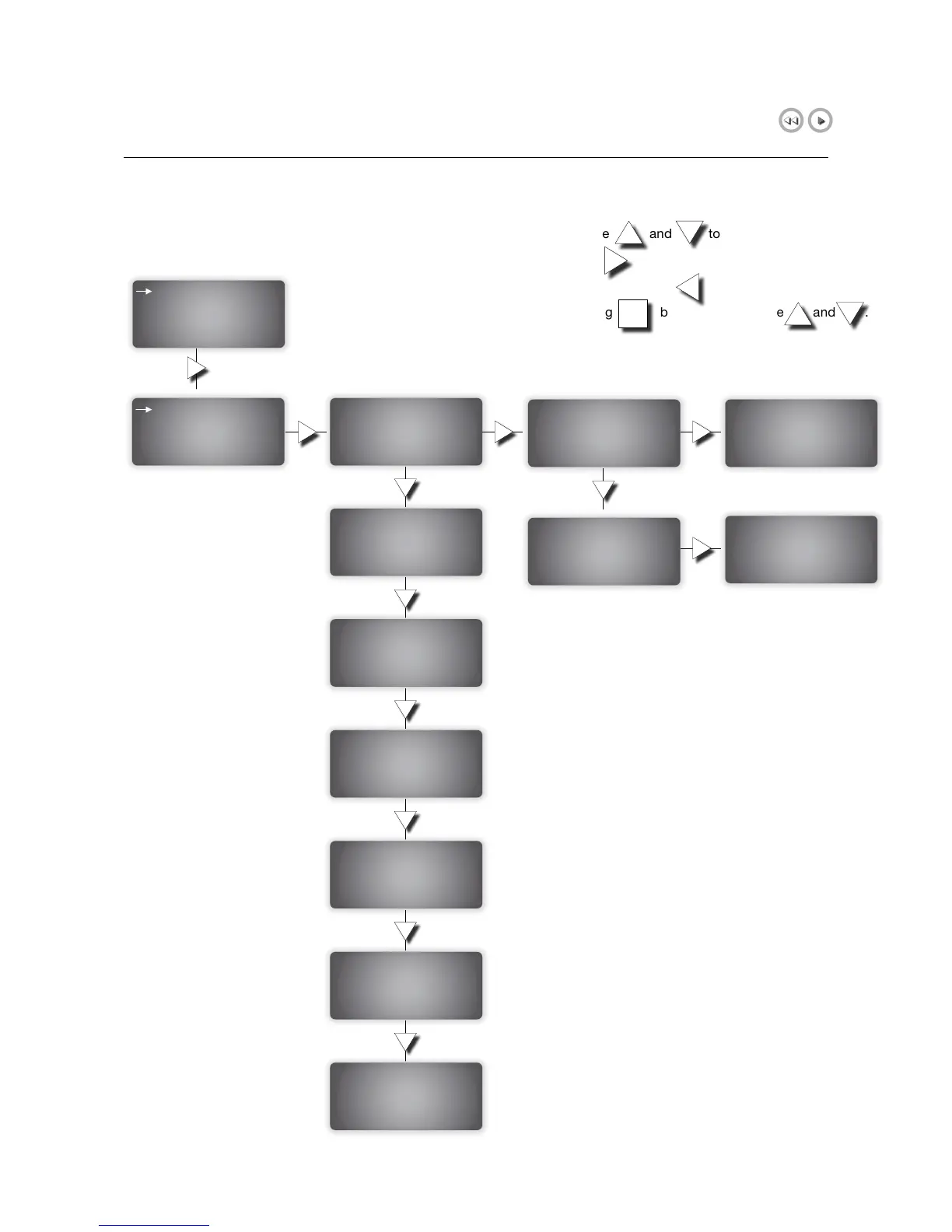
6.5.6 Communication
Communication
TCP-IP
Modbus TCP/RTU
TCP-IP
DHCP: YES
Set static IP-->
Running IP:
0 .0 .0 .0
IP: Write -->
192.168.1 .234
Subnet Mask:
255.255.255.0
Running Subnetmask:
0 .0 .0 .0
Running Gateway:
0 .0 .0 .0
Running DNS:
0 .0 .0 .0
MainComputer Status:
Not connected
Activate connection
to Main Computer
NO
Activate connection
to Main Computer
NO
TCP port routing
to Main Computer
1
EXOline address
PLA: 1
ELA: 241
DNS: Write -->
0 .0 .0 .0
Default Gateway:
192.168.1 .234
Write IP config.:
OK
Write IP config.:
OK
In the menu, use and to scroll up and down.
To select, use button.
To go one step back, use button.
Edit, by pressing button, and then use and .
OK

Related product manuals