4 Operation
Special equipment
NOTE
After a delay time (factory setting = 10 sec-
onds) the red LED (1) lights up briefly, and
the green (2) and red (1) LED then flash for
approx. 3 seconds. During this period the ve-
hicle can be started at any time. The LEDs are
then extinguished, and the PIN number is no
longer stored. The delay time can be set to
between 10 seconds and 10 minutes via the
diagnostic device. Please contact your autho-
rised dealer.
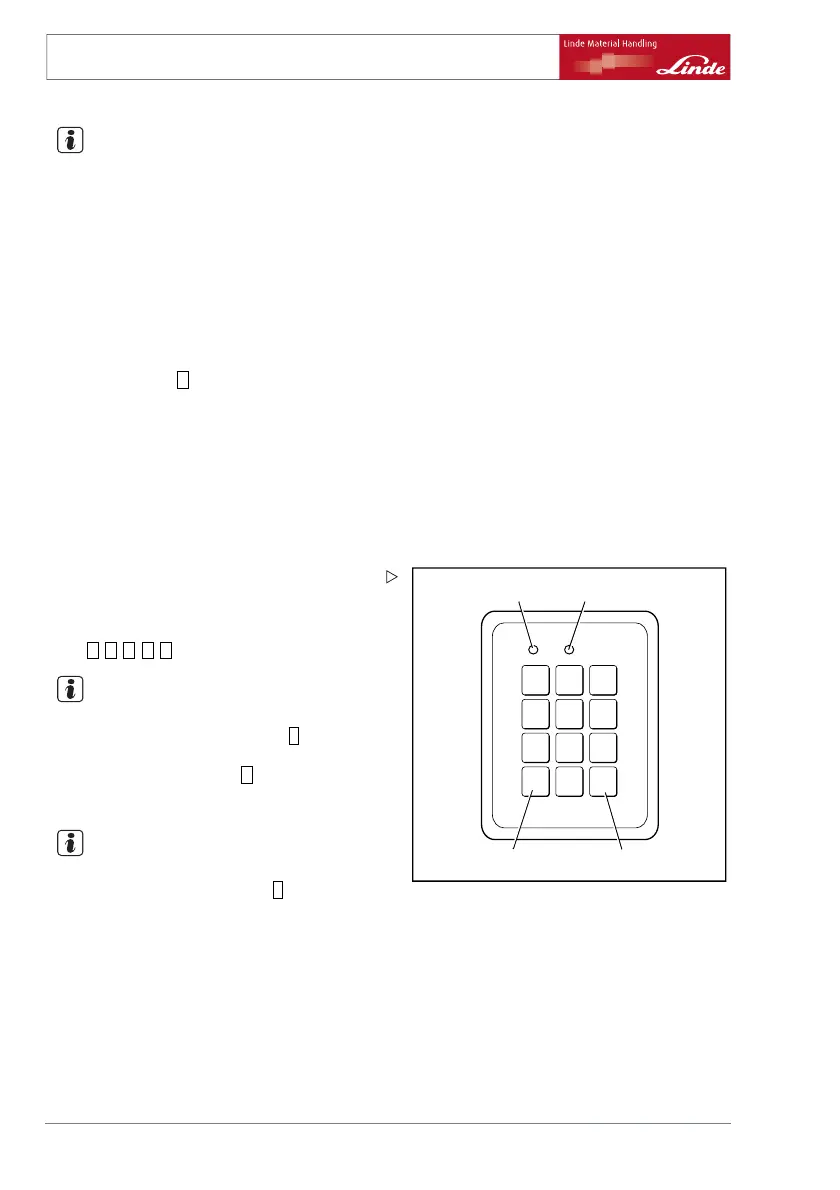
Pressing the key
#
(3) after switching off the
motor will immediately interrupt the delay time
and delete the PIN number .
Forklift Data Acquisition - standard set-
ting (PIN number)
Log on and start vehicle:
¾ Operate parking brake.
e3861325
1 2 3
4 5 6
7 8 9
*
0 #
12
3
4
¾ Press any key to start input device.
Green LED (2) flashes.
¾ Enter personal PIN number (fac
tory setting
=
0 0 0 0 0
).
NOTE
If an incorrect input is made, the PIN number
can be corrected by pressing key
*
(4) .
¾ Confirm input using key
#
(3).
Green LED (2) lights up continuously.
NOTE
If the red LED (1) lights up, an incorrect PIN
number has been input. Press
*
(4) and re-
peat input . If more than three incorrect inputs
are made (factory setting), the red LED (1)
lights up and the green LED (2) flashes. The
input of a valid PIN is blocked for 10 minutes.
The blocking time can be interrupted by enter-
ing a special PIN number. Please contact your
fleet manager.
62 Operating Instructions – 386 807 1001 EN – 03/2006



 To Next Page