Rev:11.08.19 Page 78 CCD-0001573-08
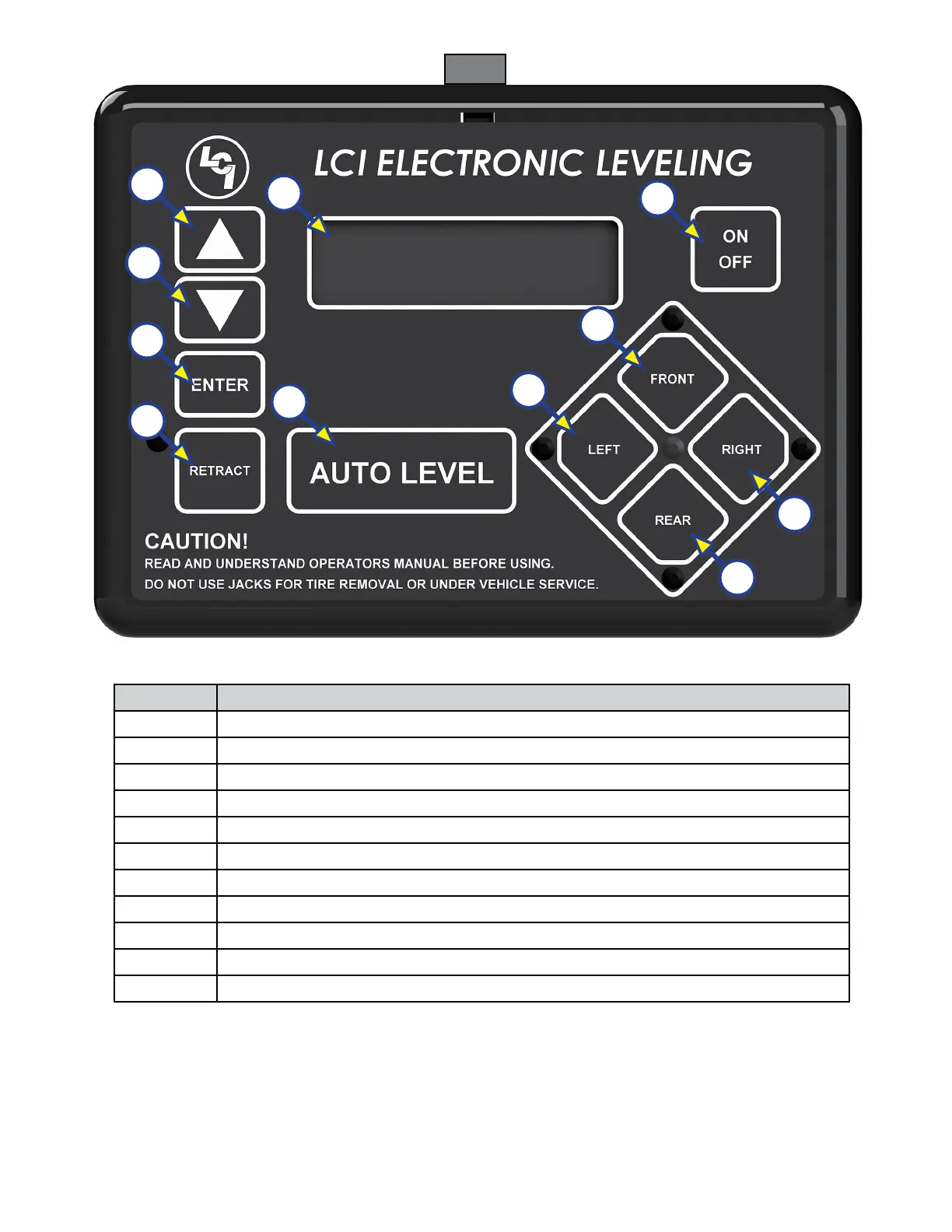
Callout Description
A Up Arrow - Scrolls up through the menu on LCD.
B Down Arrow - Scrolls down through the menu on LCD.
C Enter - Activates modes and procedures indicated on LCD.
D Retract - Places leveling system into retract mode - Manual mode ONLY.
E LCD Display - Displays procedures and results.
F Auto Level - Places leveling system into auto level mode.
G Front Button - Activates both front jacks.
H Left Button - Activates left leveling jack(s) in manual mode.
I Right Button - Activates right leveling jack(s) in manual mode.
J Rear Button - Activates leveling jacks in manual mode.
K Power Button - Turns leveling system on and off.
Fig. 1
Touch Pad Diagram
A
B
E
C
D
F
K
H
G
I
J






 To Next Page