Rev:11.08.19 Page 93 CCD-0001573-08
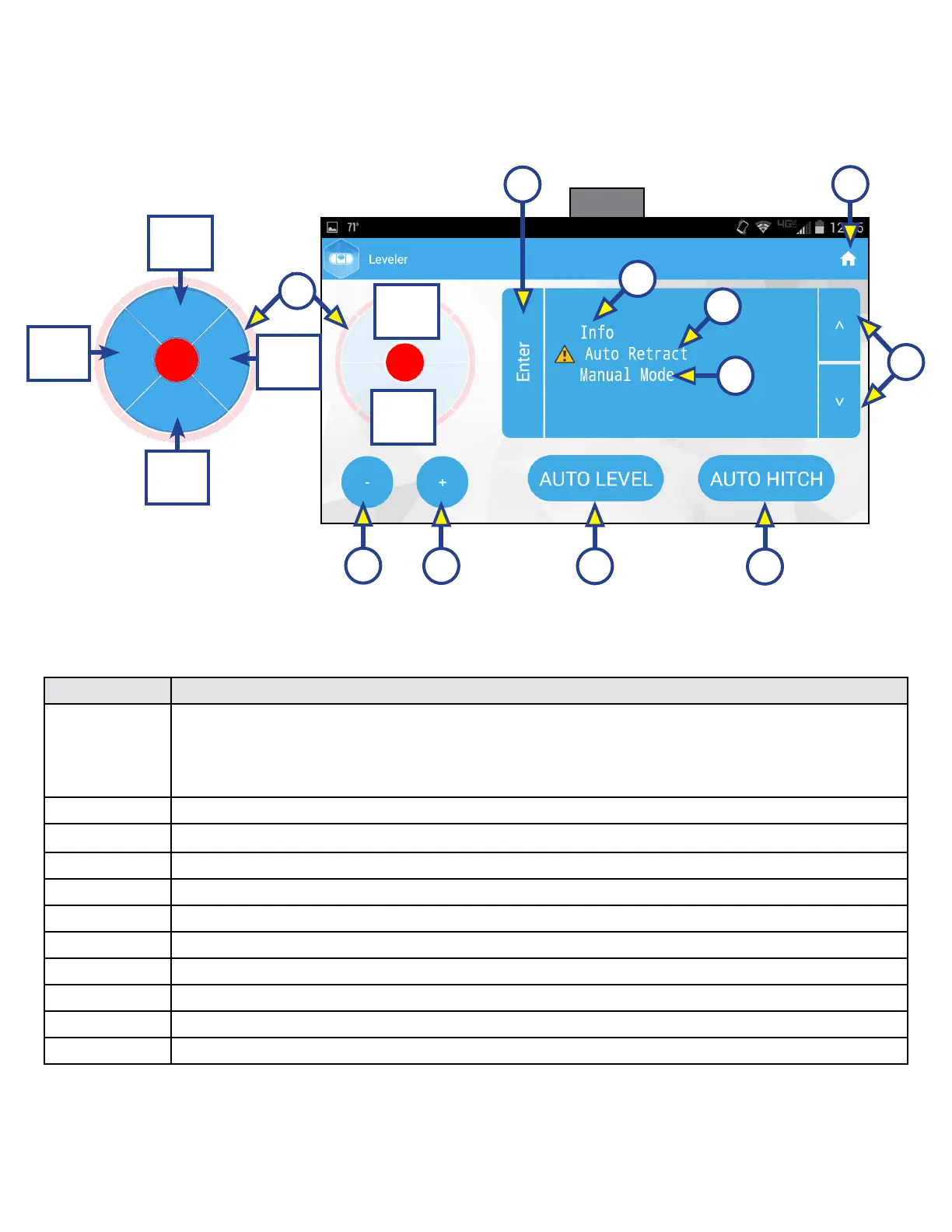
Touch Pad Diagram - OneControl App from MyRV
NOTE: The One Control™ Leveling App is available on iTunes® for iPhone® and iPad® and also on Google
Play™ for Android™ users.
Callout Description
A
Jack Buttons - Select front, rear, right and left jacks to be operated depending on mode.
Jacks available to be operated will be highlighted in blue. In Standard Mode (Fig. 11), only
front and rear jacks are available to be operated. In Manual Mode (Fig. 13), all jacks are
available to be operated.
B Enter - Push to activate various modes.
C Info - Displays system information, e.g., angle, jack stroke, software version.
D Auto Retract - Enters Auto Retract mode to retract all jacks.
E Manual Mode - Enters Manual Mode to manually operate jacks.
F Home Icon - Returns screen to home page.
G Up and Down Arrows - Scroll through options on screen.
H Retract - Retracts jacks in several modes. Jacks available will be highlighted in blue.
I Extend - Extends jacks in several modes. Jacks available will be highlighted in blue.
J Auto Level - Starts the Auto Level sequence.
K Auto Hitch - Returns trailer to previous hitch height for reconnecting to tow vehicle.
C
D
E
H
I
J
K
Fig. 11
F
G
Jack buttons
in Manual Mode
(See Fig. 13)
Front
Jacks
Rear
Jacks
B
Front
Jacks
Left
Jacks
Rear
Jacks
A
Right
Jacks






 To Next Page