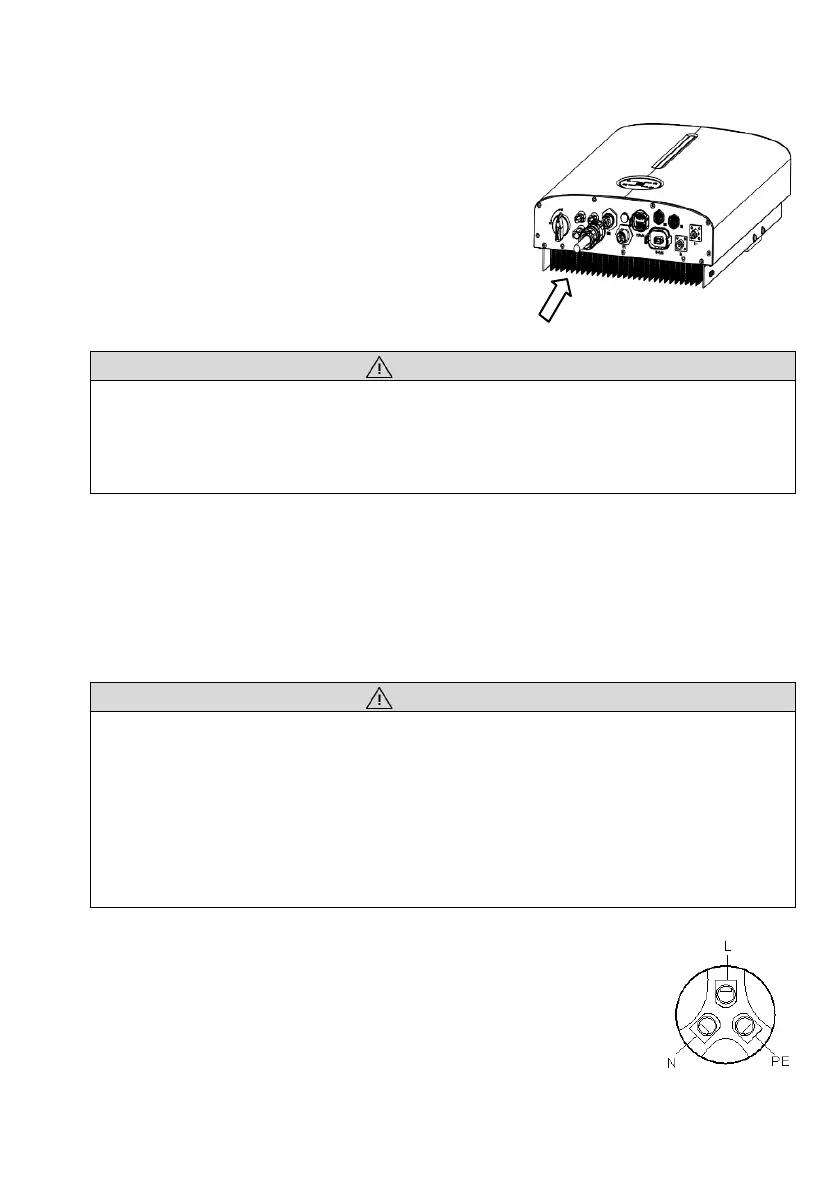
Step 2: Connecting AC Connector
•
After AC wiring, route the AC connector into
the AC terminal of the inverter and double
check it.
•
Connect “PE” conductor to the grounding
electrode. Connect “L” and “N” conductors to
the AC circuit breaker.
•
Make sure all the wires are firmly installed via
the right torque tool or dragging the cables
slightly.
• Ensure all cables are voltage-free before electrical connection.
• Do not connect the AC circuit breaker until all inverter electrical connections are
completed.
6.4 Critical Loads Connection (EPS function)
If you want to use the energy storage system to power the house (as a standalone system
or during Grid failure), the EPS connector should be used and the EPS function should
be enabled during setup. Otherwise you could leave the EPS port disconnected.
The EPS output port is only for critical loads connection.
• The grid voltage and frequency must be in the permissible range.
• Risk of inverter damage due to incorrect cable connection. Do not connect the
grid power wires to EPS port.
• An independent circuit breaker must be installed on the EPS side to cut off the
inverter from EPS loads when necessary.
• Decide which household appliances should be included in the EPS circuit and
carry out any required re-wiring.
6.4.1 Wiring Connection Procedure
Step 1: Assembling the EPS Connector (reference to Grid connector).
•
Make sure Live/Neutral/PE wires are correct.
•
Be sure follow the markings on the connector.




 To Next Page