Connecting up
Cabling BluTechVision Interactive
(from mainframe L271x onwards)
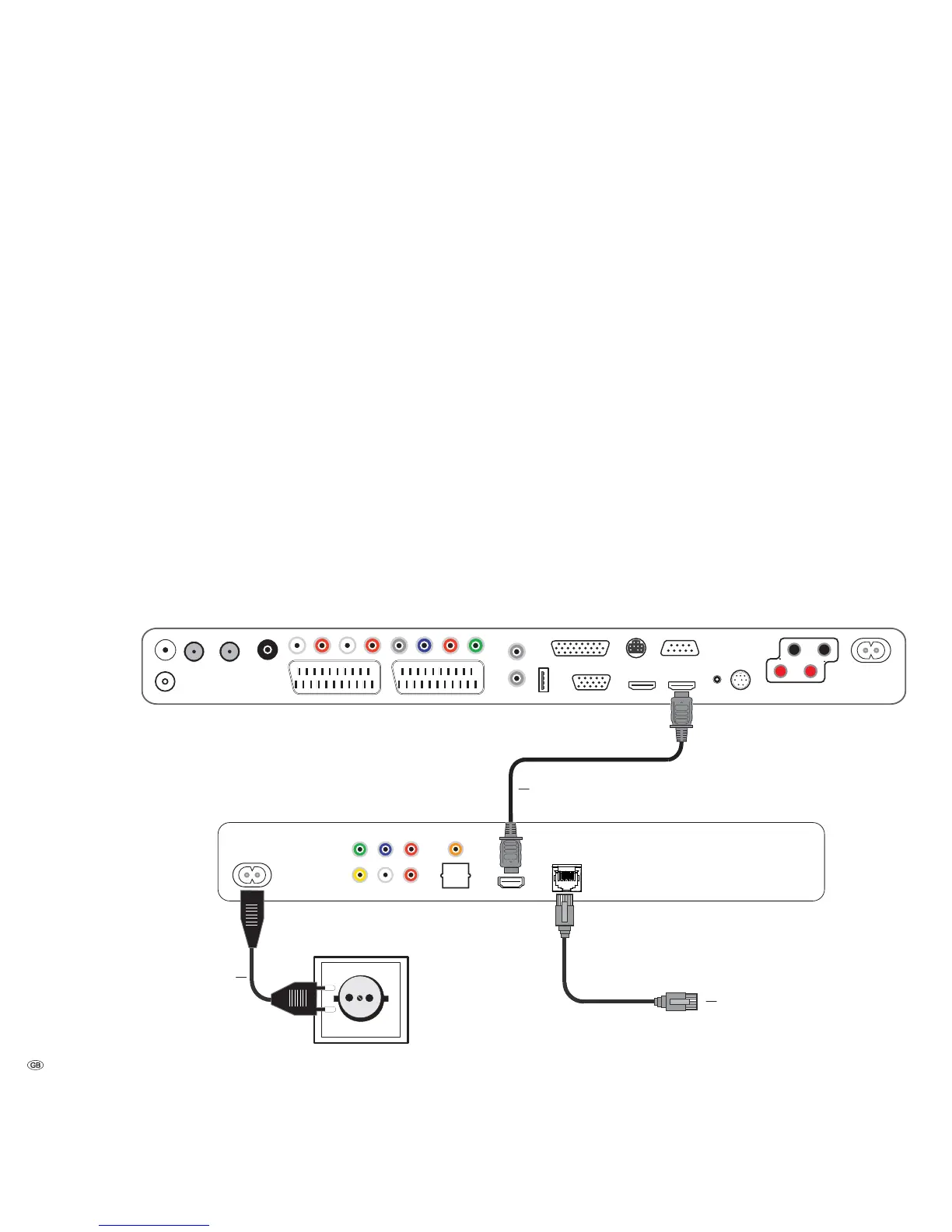
Use the HDMI cable supplied to connect the socket HDMI OUT on the BluTechVision
Interactive with the socket HDMI IN on your TV set.
Using an optional RJ-45 network cable of the BluTechVision Interactive to a
network connection (e.g. Switch or DSL Router) with a connection to the internet.
Plug the small connector of the mains cable into the socket behind the unit
(page 6) and then plug in the large connector of the mains cable into a 220-240 V
50/60 Hz mains socket.
➠ It is possible that your Loewe TV set may need a software update. Please
contact your specialist retailer.
- 10
Loewe Flat TV set (from L271x)
BluTechVision Interactive
Network Cable
Mains cable
HDMI cable


 To Next Page