Playback of Media Files
With your BluTechVision Interactive you can play back digital media files which
are saved on discs or on USB sticks.
Home Menu
Call up Home Menu.
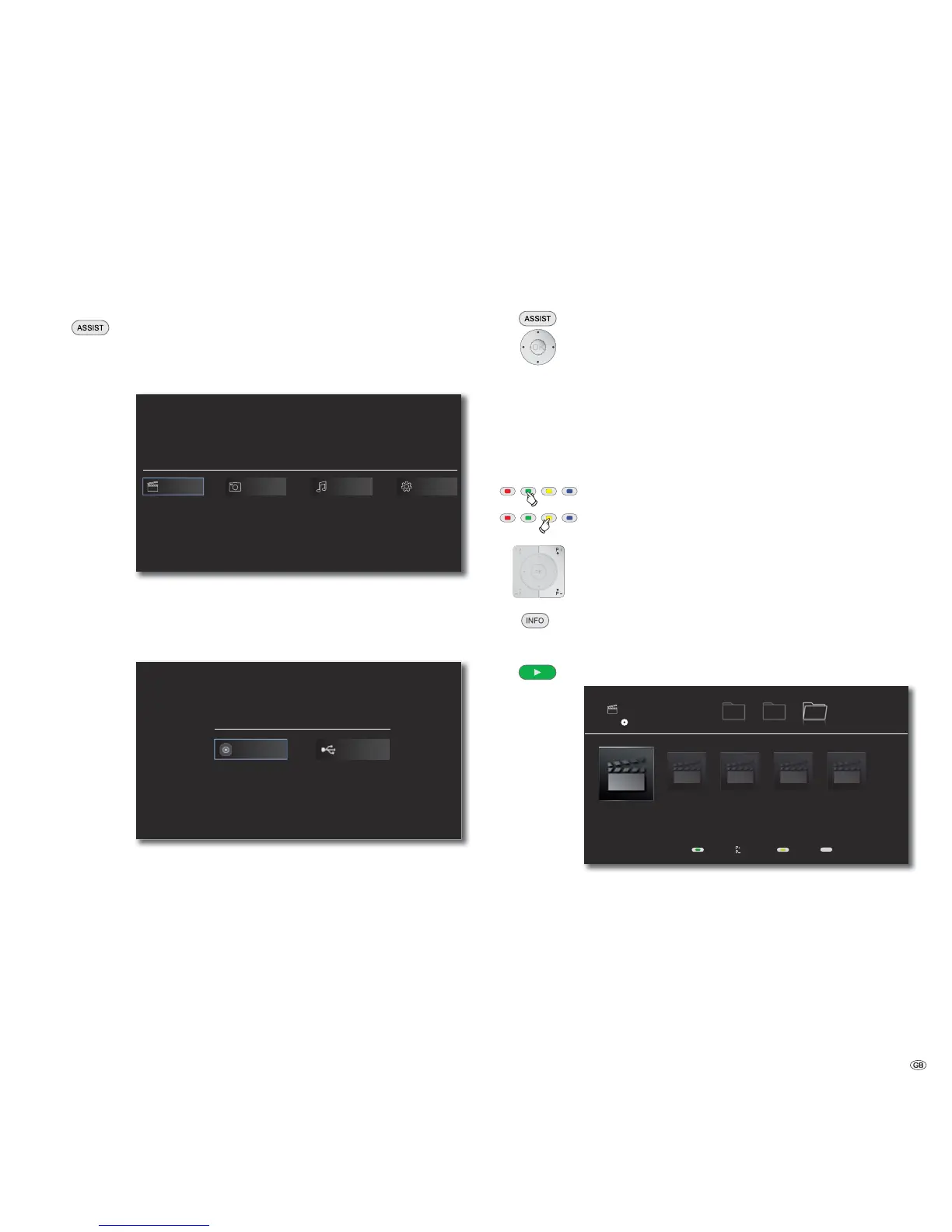
In the Home Menu you can select the desired operating mode
Movie, Photo or Music (page 14).
BluTechVision Interactive
Movie SetupPhoto Music
Select the desired operating mode.
Confirm OK.
If both a disc and a USB Storage are available, a selection menu
appears.
Disc USB
Select desired medium.
Confirm OK.
Video Files
Playback of Video Files
Call up Home Menu.
Select the Option Movie in the Home Menu.
Confirm OK.
If both a disc and a USB Storage are available, a selection menu
appears.
Select desired medium.
Confirm OK.
Select file or folder.
Green Button Jump to the start of the list.
Yellow Button Jump to the end of the list.
P+ or P- browse pages forwards/backwards.
Change view.
OK Start playback or change to folder.
Play Start/continue playback.
INFO
S
S
1/5
Movie
First LastPages View
Disc
Music Photo Movie
Movie 1.avi
22:42
Movie 2.avi
32:12
Movie 3.avi
12:40
Movie 4.avi
30:15
Movie 5.avi
45:02
➠ For how to control playback of media files, see Chapter
"Playback in General" (Page 24).
29 -


 To Next Page