One 55
User manual
12
Preparing the TV set
Installing the TV set
Choose a place for installing your TV set where no bright light or
sunlight shines directly onto the screen. This could cause reflections
which impair the picture.
3 times the screen diagonal can be taken as a guide value for the
viewing distance (e.g., for a 55-inch set approx. 4,2 m for SD signal).
The viewing distance can be reduced with an HD/UHD signal.
Connecting the TV set
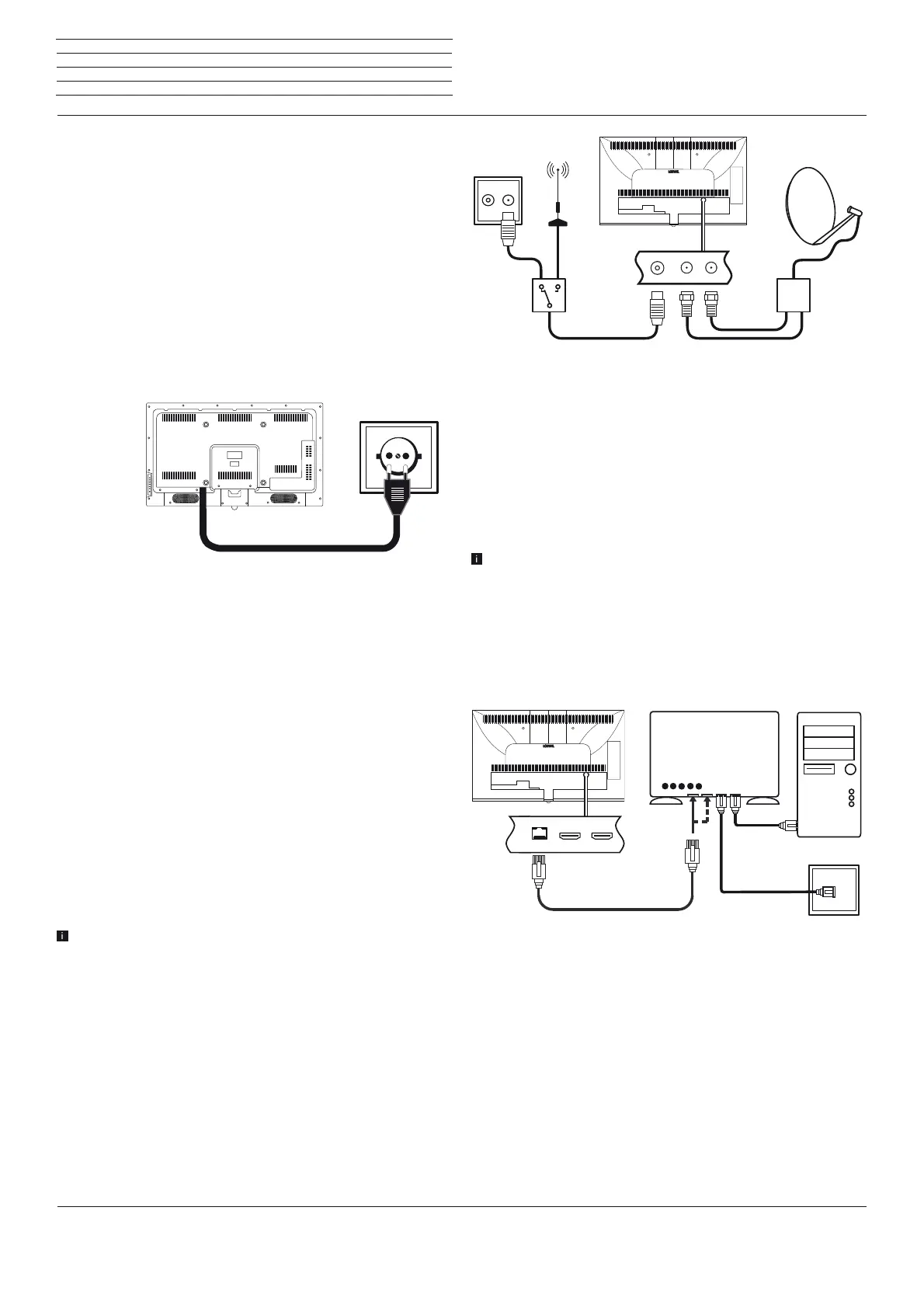
Connecting to the mains supply
Connect the TV set to a 220-240V mains socket:
Connect the plug of the power cord fixed to the TV set with a mains
socket.
Connecting antennas
Cable (analogue) / DVB-C / DVB-T antenna:
Plug the cable of antenna, cable TV system or room antenna into the
ANT TV socket.
If you want to use analogue cables / DVB-C connection and a DVB-T
antenna together, use an external antenna switch (available from
your dealer).
Satellite antenna DVB-S:
Depending on the used satellite system, connect a connecting cable
from the multi-switch or directly from the LNC to the ANT-SAT and
ANT-SAT2 sockets of the TV set respectively.
When connecting the TV set to a single cable community antenna,
connect the ANT-SAT and ANT-SAT2 sockets directly to the
appropriate SAT antenna socket.
When connecting the TV set to a DiSEqC single cable community
antenna (in accordance with EN 50494), connect the ANT-SAT
socket directly to the appropriate SAT antenna socket.
In case of a DiSEqC one cable communal system you require only
one antenna cable. Further distribution of the signal to the two
reception routes is accomplished by the TV set’s satellite tuner.
It is possible, however, to continue using an existing SAT cabling
with two antenna cables in a DiSEqC one cable communal system.
If two transmission channels of the DiSEqC single cable community
exist, one system channel is used per satellite antenna cable (see
also chapter Initial installation, section DiSEqC single cable
community antenna).
Ask your dealer in this regard.
Connecting the TV set to the Home network
You may link your TV set to the home network by a wired connection
(Ethernet, Powerline adapters separately available) or by a wireless
radio connection (WLAN). For wireless connections, the TV set has
an internal WLAN antenna.
In order to play back data from your home network your Loewe TV
supports the UPnP AV standard.
For the network adaptor configuration, see chapter System settings,
section Multimedia / Network– Network settings.
U
nder no circumstances may the TV set be wired and at the
same time connected by a wireless connection to the same
network, e.g. router. This may cause severe operational faults!
Example for a wired connection
Connect the LAN socket of your TV set to the LAN switch/router of
your home network with a network cable (available from your dealer).
R TV
Cable
analogue /
DVB-C
DVB-T DVB-S
DSL
LAN switch/router
TV set
PC









 To Next Page