One 55
User manual
55
n
Video
Video
The item Video gives you access to videos from local (USB, home
network) and online sources.
High definition movie material (HD movies) from format 720p
upwards (resolution 1280 x 720 or higher) should be played back
via a wired connection. If there is a wireless connection, then
technical limitations (e.g., fault liability, bandwidth limitations) can
cause disruptions in the playback right up to a complete breakdown
of the playback.
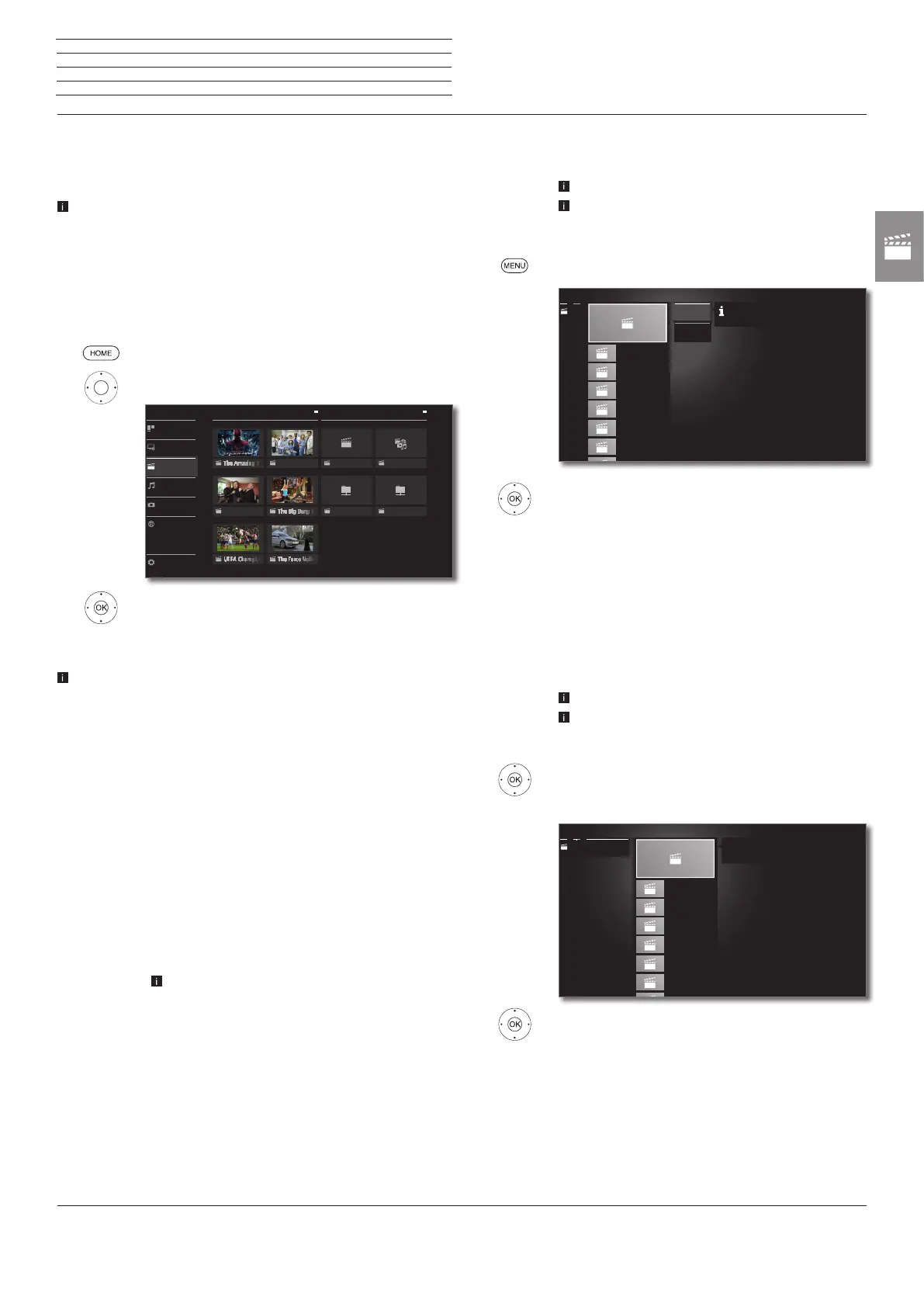
Calling video selection
HOME: Calling the Home view.
3465 Select Video.
3456 Select favourite (if any) or source,
OK call.
Possible video sources
The media sources shown here depend on the devices available/
used.
DR+ archive
Programmes that you have recorded on an external
hard disk with USB connection using the Digital
Recorder are compiled in the DR+ archive. Via
the DR+ archive you can replay, edit or delete your
recorded programmes.
For further information see chapter TV, section
Digital Recorder – DR+ archive.
MediaNet
Call MediaNet.
For further information see chapter Web, section
MediaNet.
USB
USB storage media on the USB connections of your
TV set.
The exact designation depends on the relevant
storage medium.
Please also observe the notes regarding USB
sticks in chapter Miscellaneous, section Soft-
ware update!
Tatort
Media_NAS
Media01
DR+
Grey´s Anatomy
Medianet
Web
Photo
Audio/Radio
Video
TV
System settings
Home
Favorites
Sources
DR+ archive
Video function list
The video function list contains the individual functions for your videos.
A video source has been selected.
The menu items available in the function list depend
on the currently marked object (data source,
directory, file).
MENU: Call function list.
6 5 Select desired function,
OK confirm selection.
Sorting Sort media files in the opened directory in alphabeti-
cal (ascending A-Z or descending Z-A) order, file size
or date (newest entries first).
Favourite Add marked media file to the Favourites in Home
view.
Select video
A video source has been selected.
The directory structure and the form of presentation
of the title selection is dependent on the selected
source.
65 Select desired directory,
OK open directory.
Repeat procedure if necessary.
65 Select desired video,
OK start or continue playback of the selected video.
See chapter Video, section Video playback for
further information.
Video_2.avi
0.68 GB
Video_3.avi
1.03 GB
Video_4.avi
0.04 GB
Video_5.avi
0.29 GB
Video_6.avi
0.19 GB
Video_7.avi
0.74 GB
......
Sorting
Favourite
......
Here you can sort entries according to specific criteria.
Video_2.avi
0.68 GB
Video_3.avi
1.03 GB
Video_4.avi
0.04 GB
Video_5.avi
0.29 GB
Video_6.avi
0.19 GB
Video_7.avi
0.74 GB
USB1
......
Source: USB1
Title: Video_1.avi
Size: 0.47 GB









 To Next Page