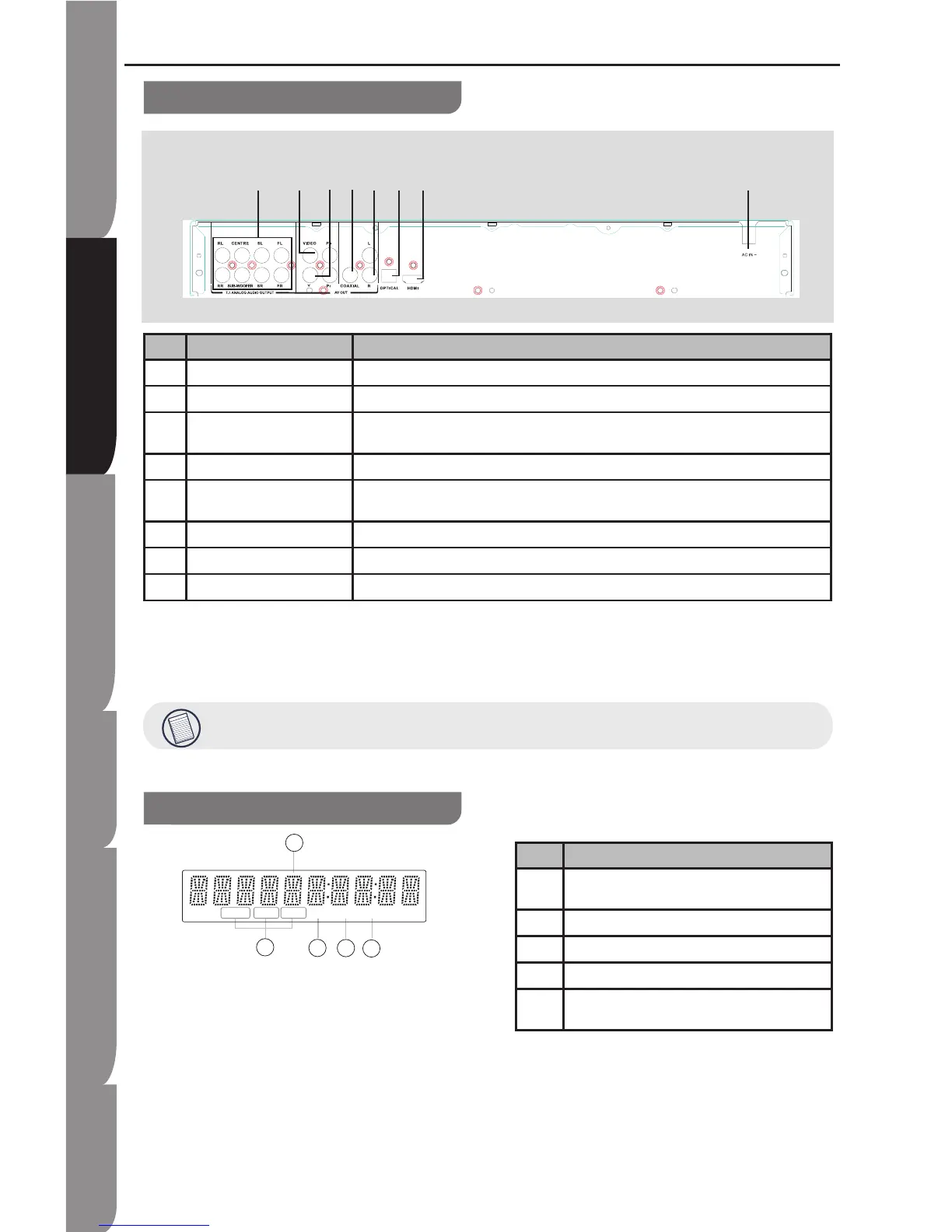
NO Control Function
1 AC IN socket Connect the supplied power cord.
2 COAXIAL socket Output digital audio signals when connecting the coaxial digital cable.
3 HDMI OUTPUT jack Outputs video/audio signals to a connected TV, monitor or AV amplifier.
Connect to a TV, monitor or AV amplifier equipped with HDMI input.
4 7.1 Analog audio output Outputs 7.1-channel surround sound, and are only available on some Blue-ray disks.
5 COMPONENT VIDEO OUTPUT
jacks
Outputs video signals to a connected TV or monitor.
Connect to a TV or monitor equipped with component video jacks.
6 VIDEO Output video signals to a connected TV.
7 ANALOG AUDIO OUTPUT jacks Outputs audio signals to a connected TV or AV amplifier.
8 OPTICAL Output digital audio signals when connecting the optical digital cable,fit the connector into the jack firmly.
Display
NO Function
1 Displays the video output resolution currently selected.
(i: interlaced, p: progressive)
2 A BD is loaded.
3 A DVD is loaded.
4 A CD is loaded.
5 Displays the total playing time of the disc, a number of
title, chapter or track.
Functions and Controls
HDMI plug with bulky dimension cannot be inserted when an LAN cable is connected.


 To Next Page