11
Safety Information and
Table of Content
Product Introduction and
Setting the Player
Playback Functions and
Special Playback Features
System Set-up
Troubleshooting and
Specification
Important
Notice
Remote control
Remote control
|
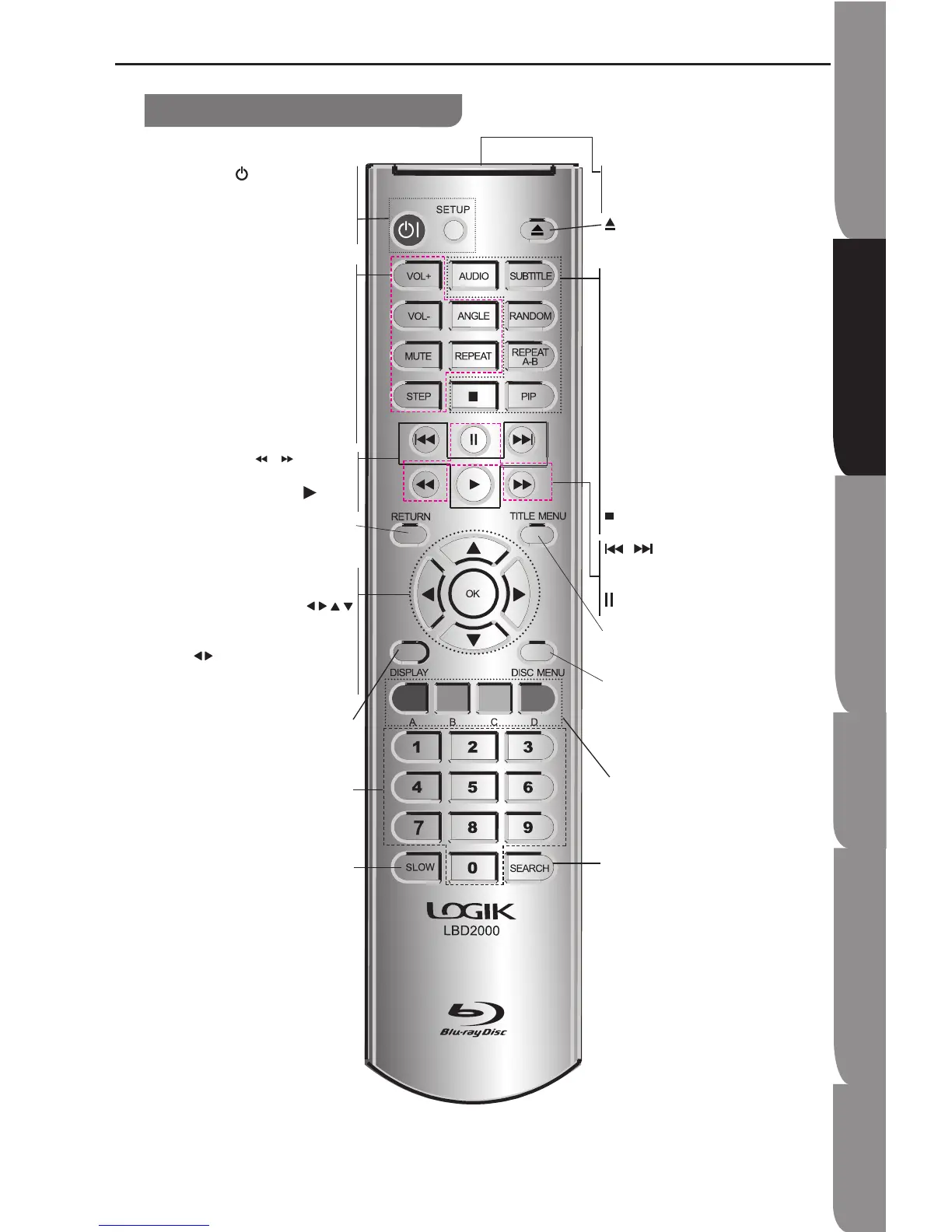
ON / STANDBY
To switch the DVD player to ON or
standby mode
SETUP
Enters or exits the system setup menu
VOL +/-
To turn up/ down the volume
ANGLE
Switch the camera angle during
playback
MUTE
Mutes the sound output from player
REPEAT
Selects various repeat mode
STEP
Step -by-step playback
/
F.R & F.F
Fast Reverse/ Forward search
PLAY
Start playback
RETURN
Return to previous menu
OK
Acknowledge/ Confirm menu selection
Navigation/ Cursor buttons for moving
to the left. right/ up/ down
Press during JPEG playback to skip
back/ forward to the previous / next
photo track.
DISPLAY
To display a window to locate a title,
chapter or track
Number Buttons
Select numbered items in a menu
Press to enter track/ chapter/ title
numbers/password directly
SLOW
Do a slow forward
•
•
•
•
•
•
•
•
•
•
•
•
•
•
•
•
REMOTE SIGNAL EMITTER
Point remote control to the sensor on
the front panel
OPEN/CLOSE
Open/ Close the disc tray
AUDIO
To select the sound stream; press
repeatedly to select different audio
streams availble in your disc
SUBTITLE
To display subtitle; press repeatedly
to select different subtitles available
in your disc
RANDOM
To play in random (for CD)
REPEAT A-B
To repeat from A to B
PIP (Picture in Picture)
Switch on or off the secondary video
and audio
STOP
Stop playback
/
PREV & NEXT
Skip to prevvious. next chapter/ titlel/
track
PAUSE
Pause playback
TITLE MENU
To display the disc title during
playback
DISC MENU
To display a menu include on many
BD/DVD video discs
To display submenu during navigating
JPEG thumbnails
A/B/C/D
To operate as indicated by the video
display during playback (BD Video)
SEARCH
To search a title, chapter to track or
playing time
•
•
•
•
•
•
•
•
•
•
•
•
•
•
•


 To Next Page