9
Safety Information and
Table of Content
Product Introduction and
Setting the Player
Playback Functions and
Special Playback Features
System Set-up
Troubleshooting and
Specification
Important
Notice
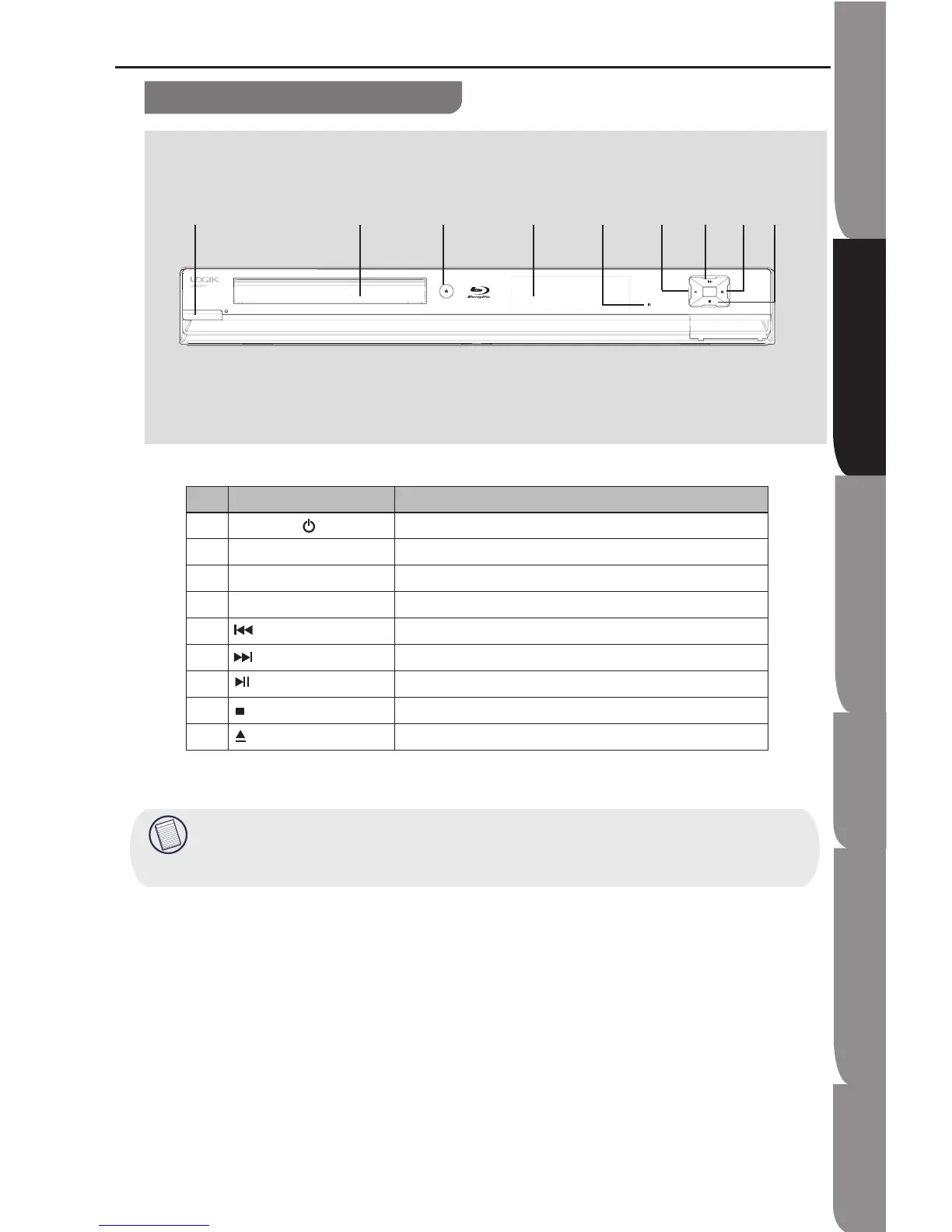
Front panel
Functions and Controls
NO Control Function
1 STANDBY/ ON button Turns the power on or restores the unit to the standby mode.
2 Front panel display Shows information about the current status of this unit
3 Remote sensor Receives infrared signals from the remote control.
4 Disc tray Loads a disc into the disc drive.
5 Skips to the previous title/chapter/track
6 Skips to the next title/chapter/track
7 PLAY/PAUSE Starts playback/Stops playback momentarily.
8 STOP Stops playback.
9 OPEN/CLOSE Opens and closes the disc tray.
This player has auto shutdown function. If it passed the 5 minutes idle time, it will display black screen
safeguard. Press any buttons during this time, and the player will restore to its normal operation state.
If the player passed the 10 minutes idle time, it will shut down.


 To Next Page