15
Safety Information and
Table of Content
Product Introduction and
Setting the Player
Playback Functions and
Special Playback Features
System Set-up
Troubleshooting and
Specification
Important
Notice
Please turn the volume down when you turn on
the amplifier. Sudden loud sound may cause
damage to the speakers and your ears.
Please set the audio in the menu screen
according to the amplifier.
The position of terminals may vary depending
on the amplifier. Please refer to the
instructional manual of your amplifier.
When using this connection discs with LPCM
audio soundtracks will only be heard over the
front two channels.
Additional number of channels that SPDIF can
support (5.1 Channels only).
The SPDIF digital audio output can support
maximum 5.1 channels only. For those discs
carrying 7.1 channel audio stream, it will be
downmixed to 2.1 or 5.1 channels before
output.
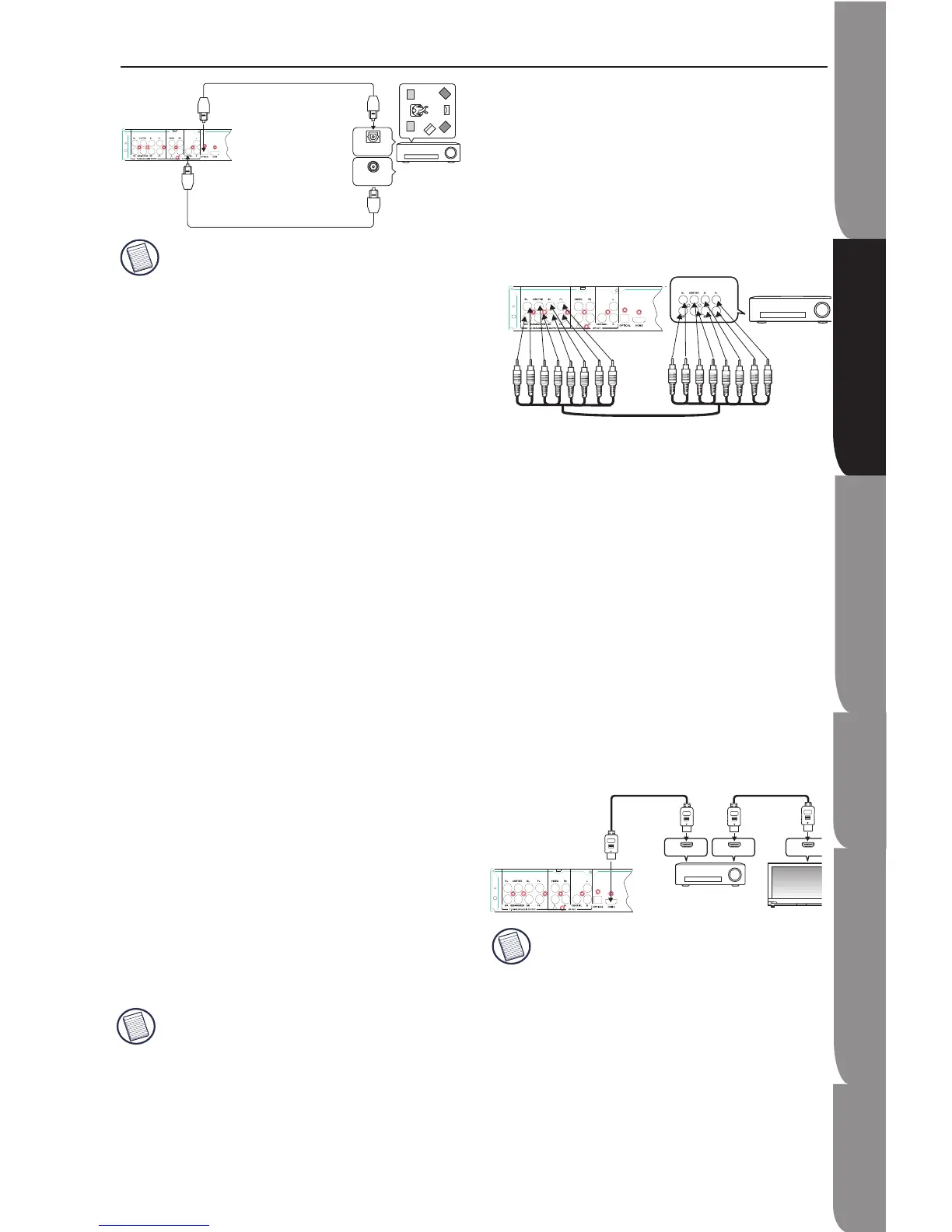
Connecting to an Audio System via 7.1 Analog Audio
Output
1. Using the audio cables, connect the 7.1 ANALOG
AUDIO OUT terminals on the rear of the Blu-ray Disc
player to the 7.1 CHANNEL ANALOG AUDIO
IN(Front R, Front L, CENTRE, SUBWOOFER, Surround
L, Surround R, SURR. BACK L, SURR.BACK R)
terminals of your Amplifier.
2. Using the video signal cable(s), connect the HDMI,
COMPONENT, or VIDEO OUT terminals on the rear
of the Blu-ray Disc player to the HDMI, COMPONENT
or VIDEO IN terminal of your TV.
3. Turn on the player, TV and Amplifier.
4. Press the input select button of the Amplifier to
select external input in order to hear sound from the
Blu-ray Disc player. Refer to your Amplifier' s user
manual to set the Amplifier's audio input.
Please turn the volume down when you turn on
the Amplifier. Sudden loud sound may cause
damage to the speakers and your ears.
The position of terminals may very depending
on the Amplifier. Please refer to the user's
manual of your Amplifier.
The front left and right outputs on your player
•
•
•
•
•
•
•
•
•
and 7.1 channel amplifier must be connected
to hear disc menu audio from certain Blu-ray
disc.
When connecting to a 5.1 channel home
theater or receiver,connect all the Analog
Audio output jacks from the player except for
the Surround Back Left (SL)/ Surround Back
Right (SR)outputs.
Connecting to an High Definition Audio Receiver via
HDMI
1. Using the HDMI-HDMI cable (not included),
connect the HDMI terminal on the rear of the Blu-ray
Disc Player to the HDMI IN terminal of your amplifier.
2. Using the HDMI-HDMI cable, connect the HDMI
OUT terminal of the amplifier to the HDMI IN terminal
of your TV.
3. Turn on the Blu-ray Disc Player, TV, and Amplifier.
4. Press the input selector button of the amplifier to
select the external input in order to hear sound from
the Blu-ray Disc Player. Refer to your amplifier’s
instruction manual to set the amplifier’s audio input.
Please turn the volume down when you turn
on the amplifier. Sudden loud sound may
cause damage to the speakers and your ears.
Please set the audio in the menu screen
according to the amplifier.
The position of terminals may vary
depending on the amplifier. Please refer to
the instructional manual of your amplifier.
•
•
•
•
Setting up the Blu-ray Disc Player


 To Next Page