➤
— — — — — — — — — — — — — — — — — — — — — — — — —
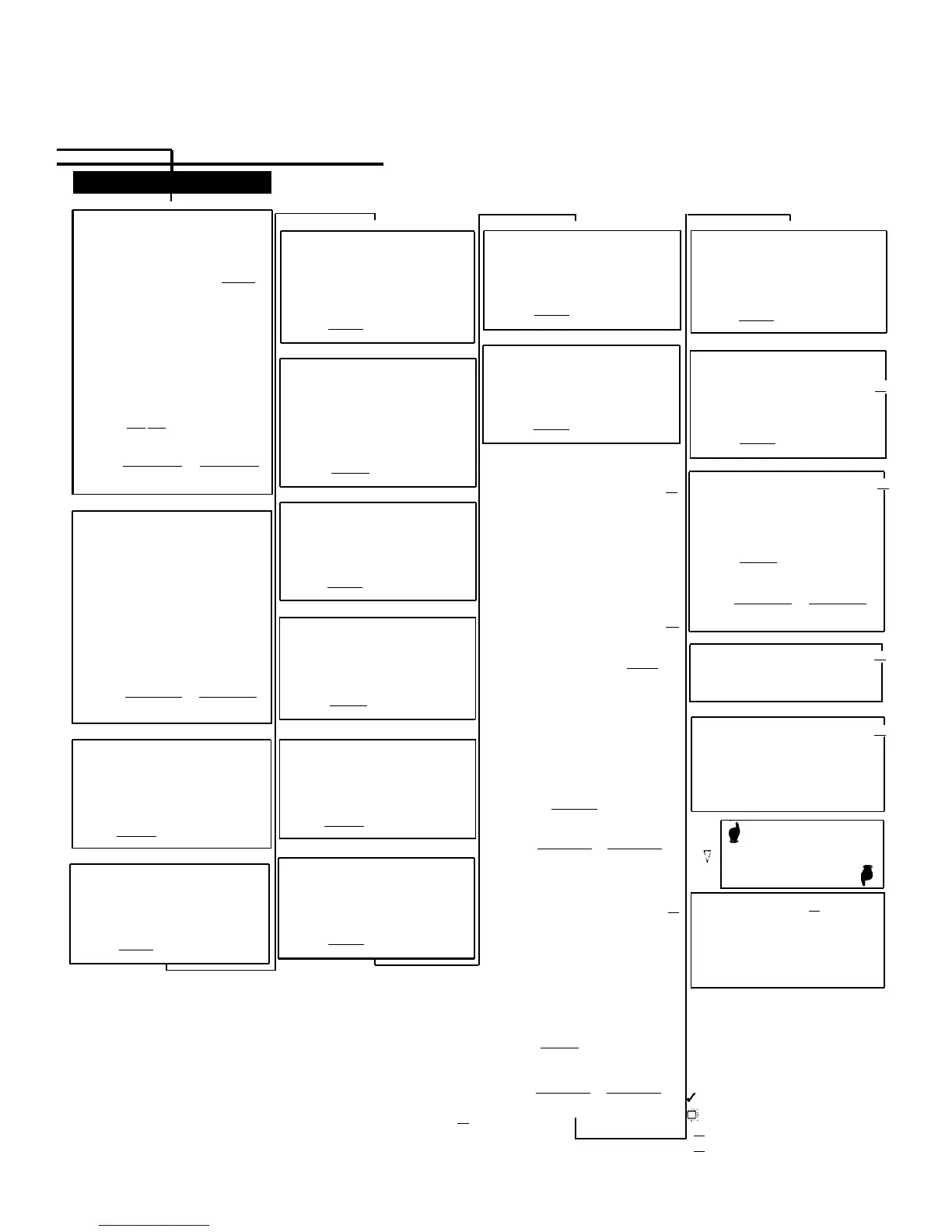
SYSTEM RESET – PROGRAMMING SAVED
(p. 5-263)
IMPORTANT: Using this procedure disconnects any active cqalls but retains system
Extensions
settings. Use it only if the system fails to function correctly after a power failure or down period.
DIAL #728
— — — — — — — — — — — — — — — — — — — — — — — — —
∇
∇
CALL WAITING
(p. 5-61)
▼
LINE ASSIGNMENT
(p. 5-173)
DIAL #301
DIAL a system extension number
To remove all existing line
assignments, press
Remove
before selecting a line.
DIAL
a line number.
DIAL
1 = Assigned ✔
2 = Not Assigned
3 = Select Button then press
a programmable button (to
assign the line to that button).
If you use option 3 after a Iine
has been assigned, the line
moves from the old button to
the new button you select.
PRESS
Next Item to program another
line for this extension.
To program another extension:
PRESS
Next Procedure
Prev Procedure
,
enter a new extension number
and repeat above steps.
∇
ABBREVIATED RINGING
(p. 5-6)
EXTERNAL HOTLINE
(p. 5-132)
DIAL
#311
DIAL a system extension number
DIAL 1 = Assigned
2 = Not Assigned ✔
PRESS
Next Item
to program another
extension
∇
DIAL #316
DIAL
a system extension number
DIAL 1 = Assigned
2 = Not Assigned ✔
DIAL
#305
DIAL a system extension number
DIAL
1 = Active (1 ring) ✔
2 = Not Active (repeated
ringing)
PRESS
Next Item
to program another
extension
∇
PRESS
Next Item
to program another
extension
∇
VOICE INTERRUPT ON BUSY
DIAL
DIAL
DIAL
CALLER ID LOG ANSWERED CALLS
(p. 5-68)
#317
[
2.0
]
a system extension number
1 = Active
2 = Not Active ✔
PRESS
Next Item
to program another
extension
TRANSFER RETURN EXTENSION
DIAL #312
(p. 5-288)
DIAL
#308
(p. 5-271)
DIAL
a system extension number
DIAL a system extension number
DIAL
1 = Assigned
DIAL number of the extension
2 = Not Assigned ✔
(10-57) to which call should
PRESS
Next Item
to program another
return if not answered
extension
Extension transferring call ✔
∇
■
■ ■ ■ ■ ■ ■ ■ ■ ■ ■ ■ ■ ■ ■ ■ ■
PRESS
Next Item
to program another
■
■
LINE ACCESS MODE
extension
(p. 5-169)
■
∇
■
DIAL
#313
[
2.0
]
■
■
FORCED ACCOUNT CODE ENTRY
■
DIAL a system extension number
■
DIAL
#307
(p. 5-138)
■
DIAL
1 = Pooled ✔ all extensions
■
except 10
DIAL
a system extension number
■
2 = Key ✔ extension 10
■
■
■
DIAL 1 = Assigned
only
2 = Not Assigned ✔
■
■ ■ ■ ■ ■ ■ ■ ■ ■ ■ ■ ■ ■ ■ ■
■
∇
CALLER ID CALL LOG LINE
[
2.0
]
ASSOCIATION
DIAL
DIAL
DIAL
(p. 5-70)
#318
a system extension number
a system line number
PRESS
Next Item
to associate another
line with this extension
∇
LINE ACCESS RESTRICTION
DIAL
DIAL
DIAL
DIAL
#302
(p. 5-171)
a system extension number
a system line number
1 = No Restriction ✔
2 = Outgoing Only
3 = Incoming Only
4 = No Access (line appears
on button, but you can
use line only to pick up a
transferred or held call)
PRESS
Next Item
to program another
extension
∇
■
■
■
■
■
■
■
■
■
■
■
■
■
■
■
■
■
■
■
■
■
■ ■ ■ ■ ■ ■ ■ ■ ■ ■ ■ ■ ■ ■ ■ ■
POOL EXTENSION ASSIGNMENT
(p. 5-217)
DIAL
#314
[ 2.0 ]
DIAL a system extension number
To remove all existing pool
assignments, press
Remove
before selecting a line.
■
■
■
■
■
■
■
■
■
■
■
■
■
■
■
■
■
■
■
■
To associate another extension:
PRESS
Next Procedure
Prev Procedure
,
enter a new extension number
and repeat above steps.
DISTINCTIVE RING
(p. 5-120)
DIAL
#308
DIAL
a system extension number
DIAL
1 = Active
CALLER ID LOG ALL CALLS
[
2.0
]
(p. 5-79)
To program another extension:
PRESS
Next Procedure
Prev Procedure
,
enter a new extension number
and repeat above steps.
∇
2 = Not Active ✔
PRESS
Next Item
to program another
extension
DIAL
a pool access code (880,
881, 882, or 883)
DIAL
#319
DIAL
a system extension number
DIAL 1 = Assigned ✔ 880
2 = Not Assigned ✔ 881,
882, 883
3 = Select Button then
press a programmable;
button (auxiliary pools
CALL COVERAGE RINGS
[
3.0
]
DIAL #320
(p. 5-51)
DIAL one digit (1–9) for the number
of rings before the call is sent
to the covering extension
2 rings ✔
∇
INTERCOM DIAL TONE
(p. 5-164)
DISPLAY LANGUAGE
(p. 5-119)
DIAL
#303
DIAL a system extension number
DIAL
1 = English ✔
2 = Spanish
3 = French
DIAL #309
DIAL a system extension number
DIAL
1 = Regular ✔
2 = Machine
only)
PRESS
Next Item to program
another pool for this extension.
PRESS
Next Item
to program another
extension
PRESS
Next Item
to program another
extension
∇
■
■
■
■
■
■
To program another extension:
■
■
■
■
■
■
For Centralized Telephone
Programming, see previous
pages.
■
■
■
■
■
■
■
■
■
■
■
■
■
■
■
■
■
■
■
■
■
■
■
■
■
■
■
■
■
■
■
■
■
■
■
■
VMS COVER RINGS
[
3.0
]
DIAL
#321
(p. 5-289)
DIAL
one digit (1–9) for the number
of rings before the call is sent
to the voice messaging system
3 rings ✔
∇
— — — — — — — — —
COPY SETTINGS
(p. 5-96)
DIAL #399
DIAL
a source extension number
DIAL
target extension numbers
— — — — — — — — —
PRESS
Next Procedure
Prev Procedure
,
enter a new extension number
and repeat above steps.
■ ■ ■ ■ ■ ■ ■ ■ ■ ■ ■ ■ ■ ■ ■
∇
∇
AUTOMATIC VMS COVER
(p. 5-37)
DIAL #310
DIAL
a system extension number
DIAL
1 = Assigned
2 = Not Assigned ✔
PRESS
Next Item
to program another
extension
AUTOMATIC EXTENSION PRIVACY
DIAL
#304
(p. 5-21)
DIAL a system extension number
DIAL
1 = Assigned
2 = Not Assigned ✔
PRESS
Next Item
to program another
extension
DIAL
#315
■ ■ ■ ■ ■ ■ ■ ■ ■ ■ ■ ■ ■ ■ ■
POOL ACCESS RESTRICTION
[
2.0
]
(p. 5-215)
DIAL
a system extension number
DIAL a pool number (880, 881,
882, or 883)
DIAL
1 = No Restriction ✔
2 = Outgoing Only
3 = Incoming Only
4 = No Access
PRESS
Next Item
to program
another pool
To program another extension:
PRESS
Next Procedure
Prev Procedure
,
enter a new extension number
and repeat above steps.
■
■
■
■
■ ■ ■■ ■ ■ ■ ■ ■ ■ ■ ■ ■ ■ ■ ■ ■ ■ ■ ■ ■ ■ ■ ■ ■ ■ ■ ■ ■ ■ ■ ■
■
Procedures #207, #313, #314 and #315—shown in square dotted boxes—
■
■
■■■■■■■■■■■■■■■■■■■■■■■■■■■■■■■■
[
2.0
]
■ ■ ■ ■ ■ ■ ■ ■ ■ ■ ■ ■ ■ ■ ■ ■
= Factory setting
= Button with lights required
= PARTNER ACS Revision 2.0 or later
= PARTNER ACS Revision 3.0 or later
[
2.0
]
[
3.0
]


 To Next Page