Chapter 5 Start Using
<Note>: Please adjust it to be suitable for the local voltage frequency of
50/60Hz. For the frequency in actual use, please refer to the
manual. (Attachment 1)
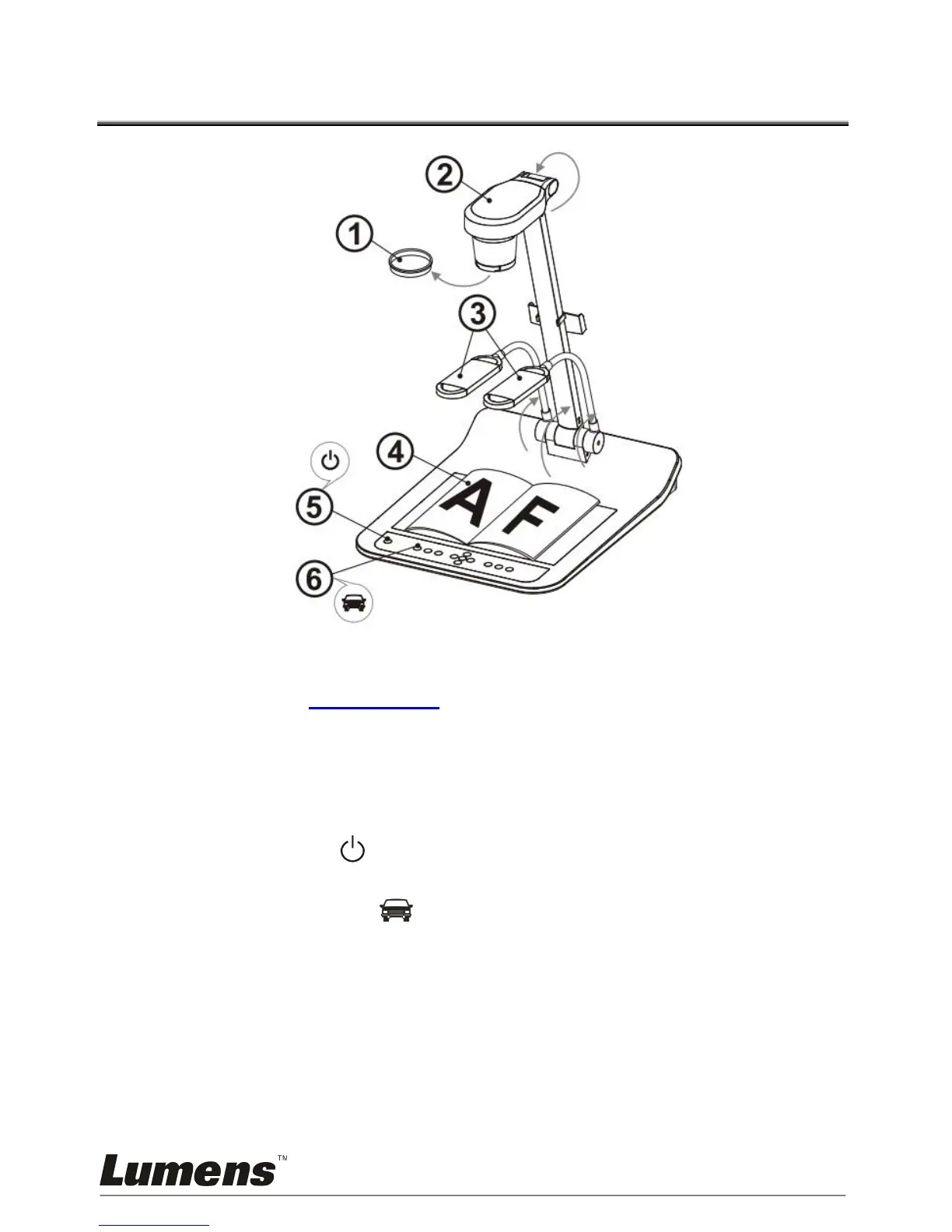
1. Remove the lens cap.
2. Pull up the camera and the camera arm. The camera should aim at the
center of the presenter.
3. Pull up the lamp arm to a proper position.
4. Place an object to be displayed under the camera.
5. Press [POWER] button to turn on the power. (Remark: Do not
press [POWER] button until the red light stays lit)
6. Press [AUTO TUNE] button to optimize the image. You are ready to
teach/present.
<Note>: According to your request, you can adjust the camera head
slightly to aim at the center of the documents when the anchor
of lens was reached.
When using the remote control, aim at the remote sensor on the DC190,
and press the power button.
Once PS760 is turned on, the LED indicator on the control panel will
light up red. Please contact your dealer if the LED is not on.



 To Next Page
 Loading...









