QUICK START
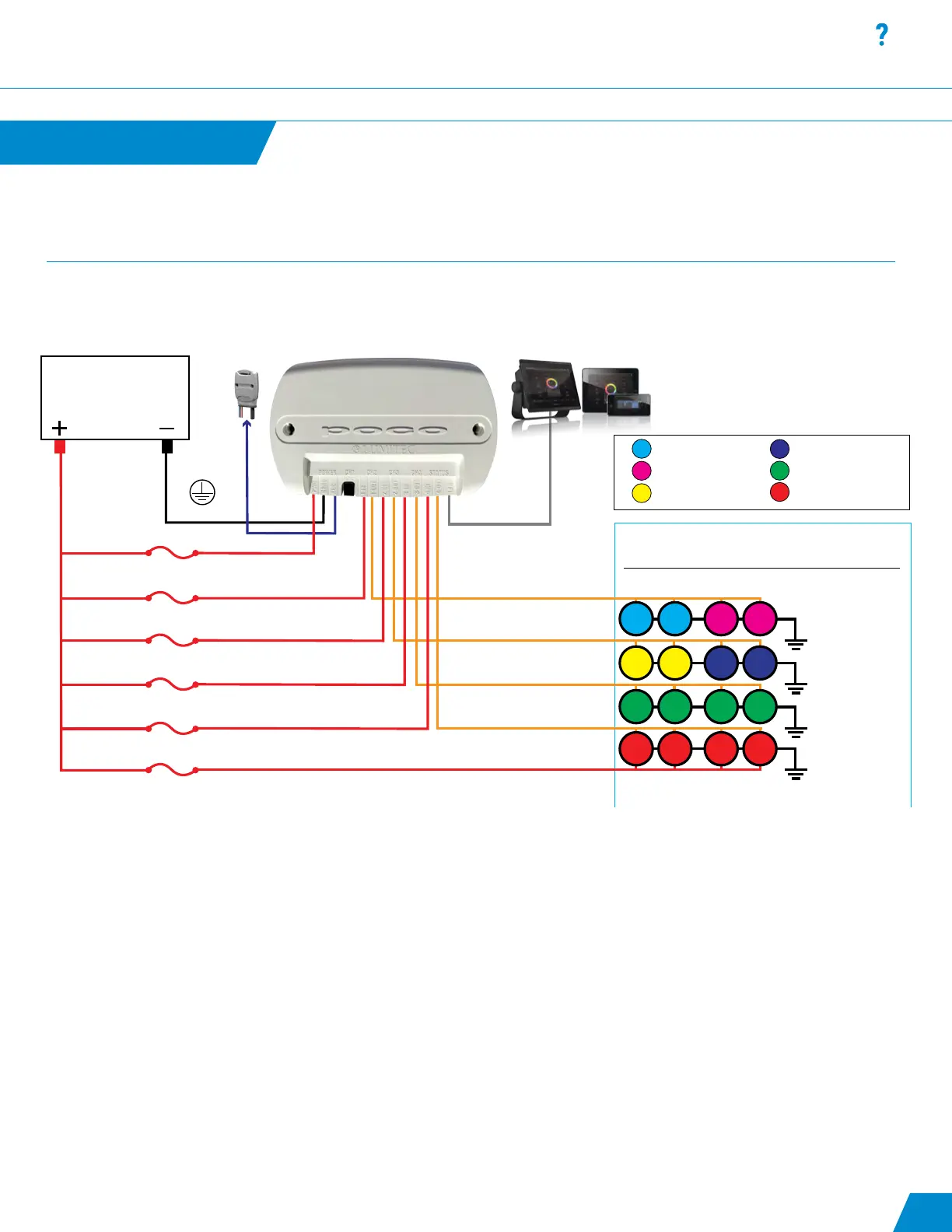
Poco 3 Quick Start Guide
Quick Start continued...
BATTERY
12 or 24 vDC
CH1 IN
CH2 IN
CH3 IN
CH4 IN
ACC IN
Amp Draw at Lights
CALCULATE YOUR AMP DRAW
Total Amps Per/CH
Total amps per channel must be below 10 Amps
3A Fuse
10A Fuse Max
10A Fuse Max
10A Fuse Max
10A Fuse Max
PWR IN
POCO Replaces Physical Switches
Ethernet Connection
(optional)
MFD or Wireless DeviceTo Pico S8 Module
(optional)
Power Wire
Fuse size is based on number
of underwater lights
Amp draw information is available
on product packaging or at
Ground Wire
CH4 OUT
CH3 OUT
CH2 OUT
CH1 OUT
0.5A 0.5A 1.25A 1.25A
= 3.5 Amps
= 3.5 Amps
= 5 Amps
= 0 Amps
0.5A 0.5A 1.25A 1.25A
1.25A 1.25A 1.25A 1.25A
Aft Hardtop Lights
Aft Spreader Lights
Fwd Spreader Lights
Under Gunwale Lights
Underwater Lights
Fwd Hardtop Lights
0A 0A 0A 0A
1. Install Poco Module: Install your Poco module using the wiring diagram below.
2. Connect to Poco:
A. Poco can be connected to a chart plotter (MFD) and/or a mobile device.
B. For an MFD connect the network cable to a compatible display. For a list of compatible displays visit:
http://lumiteclighting.com/poco-quick-start
C. For mobile devices connect using the Lumitec Poco App available on Apple or Google Play stores. You will be prompted to
connect to Poco on launching the app.
3. Create Light Groups:
Select conguration in the setting menu (top right of screen). Assign Channel and Clan for each light location on your boat
(underwater lights, spreaders lights etc.).
Examples:
Name: LG_aft_hardtop
Channel: 1
Clan: 1 - Down Lights
Output: Lumitec Spectrum
Name: LG_aft_spreader
Channel: 1
Clan: 2 – Flood Lights
Output: Blue / White
Name: LG_fwd_hardtop
Channel: 2
Clan: 1 - Down Lights
Output: Lumitec Spectrum
02



 To Next Page