UPDATES
Firmware update must be completed with a WiFi or Ethernet connection from a device that contains the rmware le. Contact Lumitec
for latest rmware le or download form Lumitec website. The device used for update can be a computer, tablet or phone with Chrome,
Firefox or Safari browsers. Standard MFDs do not have the ability to perform this upgrade.
• Open a Chrome, Firefox or Safari browser and navigate to IP address 192.168.4.1 for connecting to poco (AP) (some devices
may support accessing poco via http://poco.local ).
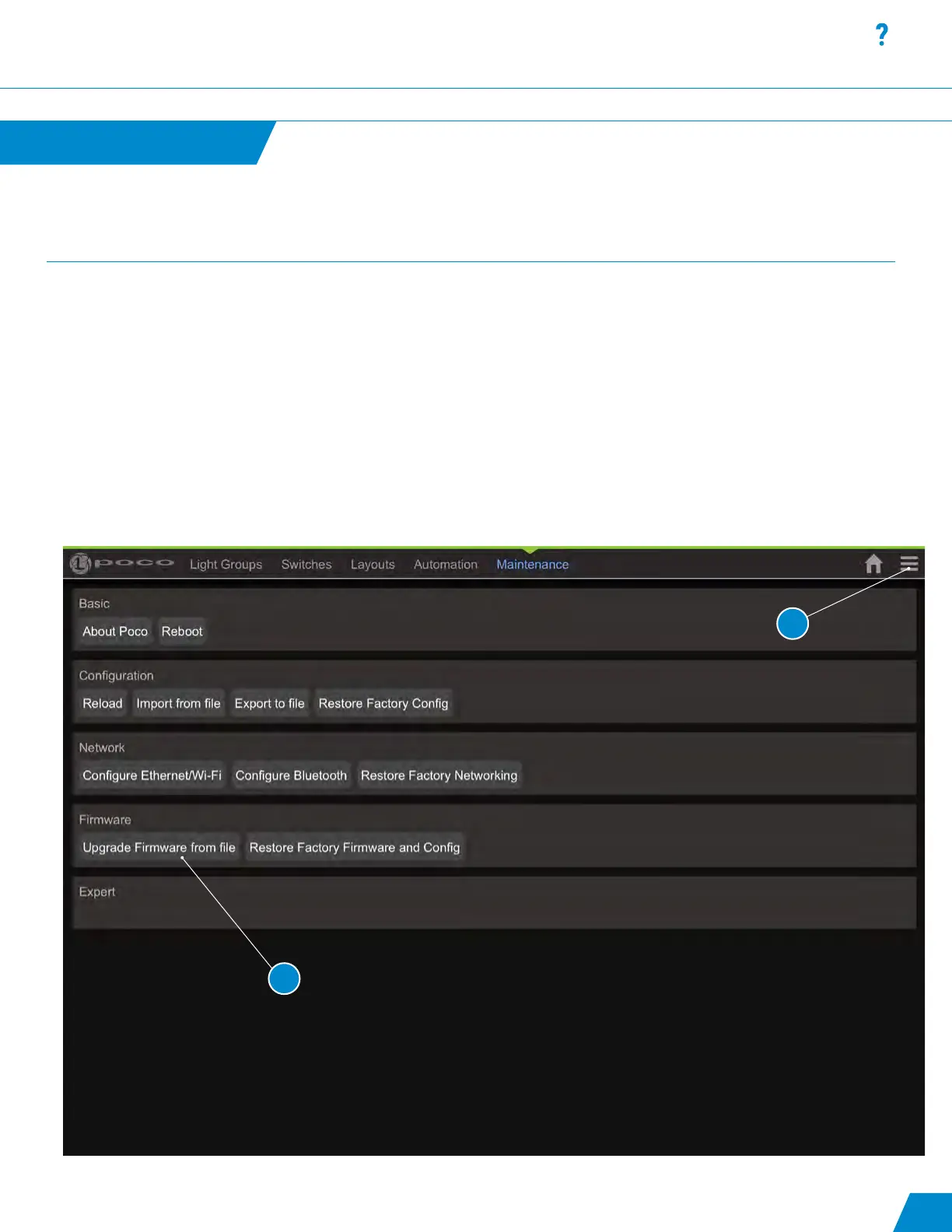
• To access the settings menu select the Hamburger Menu icon in upper right of screen (#1).
• Default maintenance pin is set to “0000”.
• Select “Upgrade Firmware from File” under the Maintenance / Users page within the conguration of Poco (#2).
Updating Firmware
Updates continued...
29
2
1



 To Next Page