UPDATES
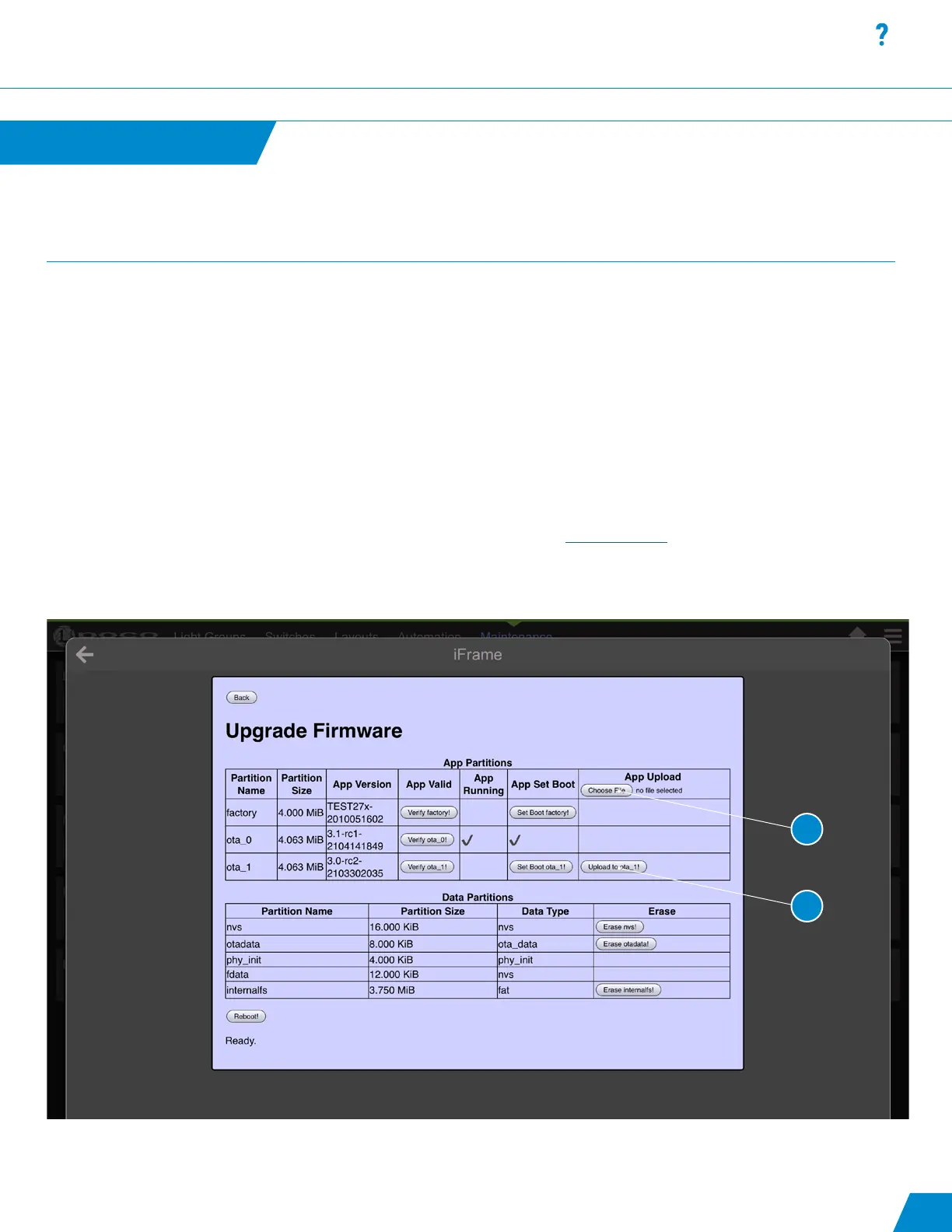
Select “Choose File” (#1) and navigate to the location containing the new rmware le. The le naming format will be similar to “poco-
esp32-ota_xxx-xxxx.bin”. The Poco contains 3 le system partitions. The rst is the original le shipped with Poco under the “factory”
partition. Holding the reset button while powering on will default to this partition. The rmware upgrade can go on either ota_1 or ota_2.
Select “Upload to “ota_x” (#2) and apply reboot once upload has been completed. In the example below this Poco is running off of
ota_0 and the upgrade would need to be applied to “ota_1”. Reboot to complete the upgrade process.
To determine our current version of Poco, click on the Hamburger Menu icon in the top right of the app screen and select “About Poco”.
The Poco rmware version is listed under “Firmware Version”.
For more information watch the Poco rmware update video on our Youtube page. Watch Video>
Firmware Update Page
continued...
30
1
2



 To Next Page