12
The handset will display DTCs from OBDI or OBDII systems. Real-time sensor data can be viewed in data
stream mode. The user can also obtain diagnostic information regarding repairs.
With the purchase of the Tech-Scope, the user is able to test sensors and systems for proper function. Browser
mode allows the user to connect to the internet to find websites that may help with the repair of the vehicle.
The handset comes with wireless communication for ease of use and on-screen help when desired.
SETUP
Docking Station
ss02593
1
2
3
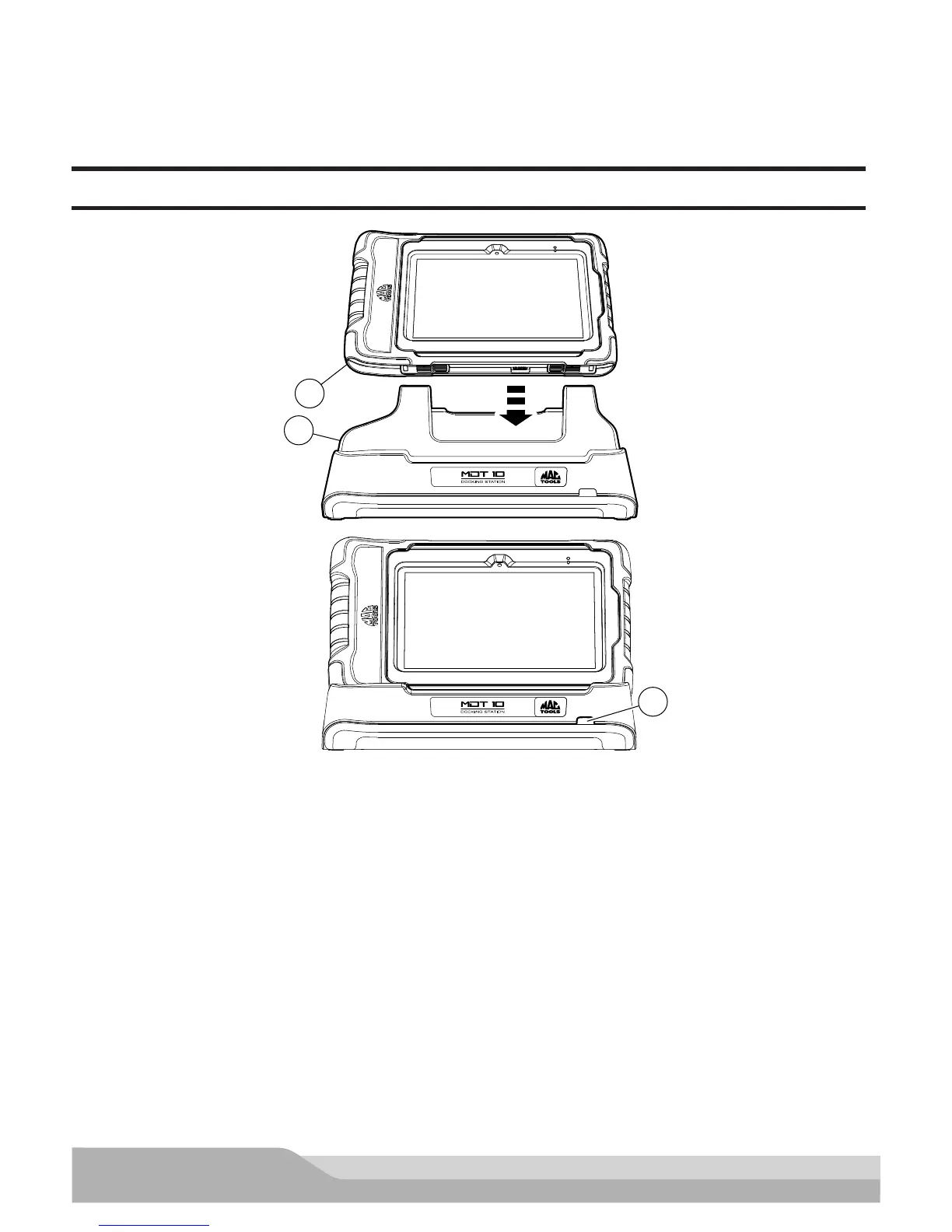
Docking Station
1. Handset
2. Docking Station
3. LED
The Docking Station can be used to store the Handset when not in use. The Docking station can also charge the
handset.
There is a storage bin at the rear of the Docking Station to store the VCI/OBD-II Cable when the handset is char-
ging.
The LED state shall be as follows:
• Off indicates no power connected
• Green flashing indicates charging handset
• Green steady indicates charged handset
Note: LED shall flash momentarily even if the handset is completely charged when the handset is first attached
to the charging station to indicate contact has been made.


 To Next Page