23
The same principle applies to switching vehicles as it did for wireless. Return to the home screen and then
unplug and switch.
Active
Search Google for ...
2013
TIRE PRESSURE
MONI
TOR
BMW
OBD-II
Select Vehicle
Tue, 10 May 2016
xDrive3.0
335I (E92/E93)
BMW
CHECK
CHECK
10100
1
1001
010
1
2:59
Read DTCs Data S
t
ream Special Tests
Diagnostic
Information
SettingsBrowserMaintenance Tests
All System DTC
Scan
Automated System
Test Veiw Saved Tests
View Data St
ream
Recordings
System Wiring
Diagrams
ss02592
4
3
1
2
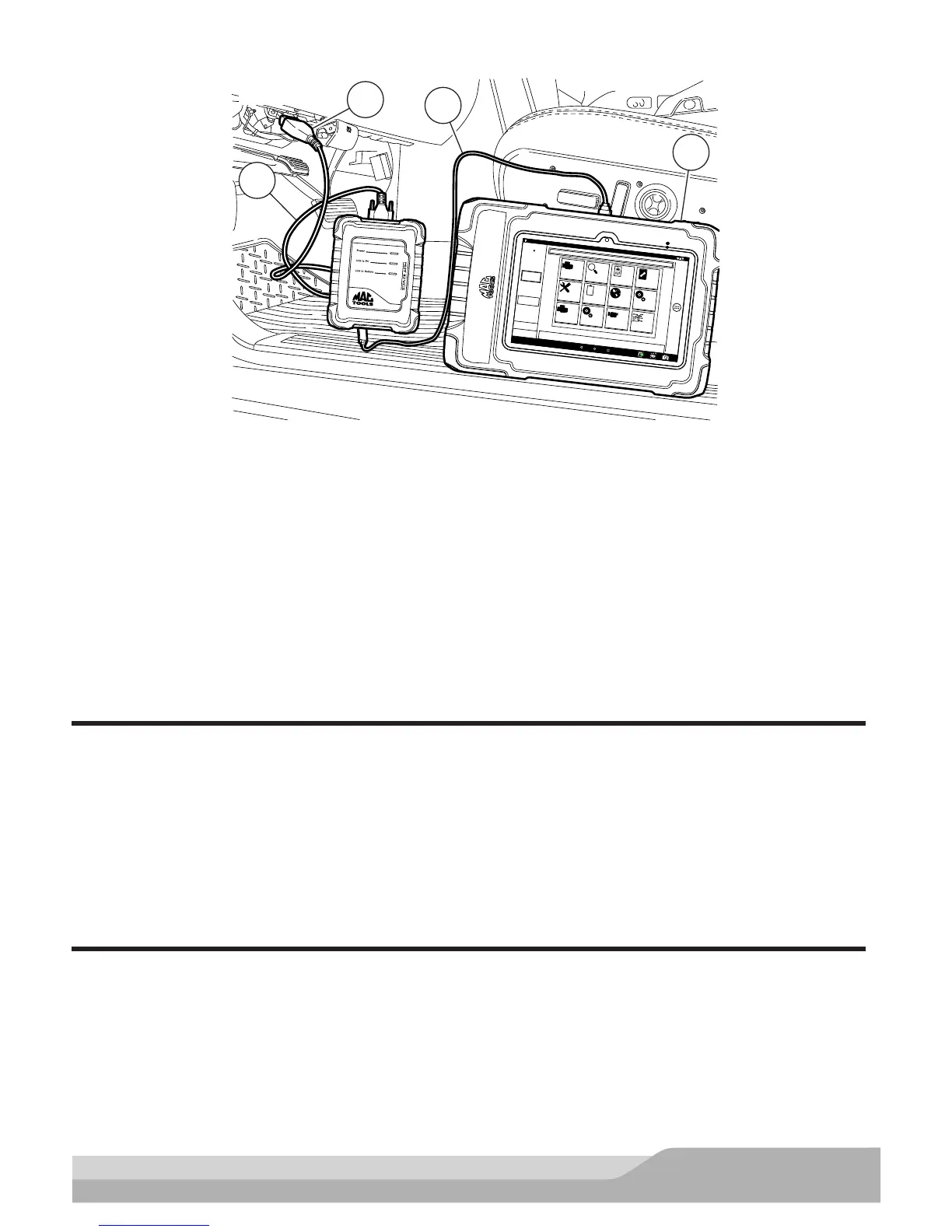
USB Cable
1. OBDII/DLC Cable
2. DLC Connector
3. USB Cable
4. Handset
Wireless Range
The wireless internet capability of the tool is designed to communicate with the router when it is within a range
of roughly 90 feet, depending on the shop environment, even though it is possible to go farther. Every shop
has different noise that can interfere and hamper the distance of a wireless network, such as cordless phones,
certain lighting, other wireless networks in the area, and other signals.
Test Startup and Vehicle Connection
1. Turn ON the handset.
2. Connect the OBDII/DLC cable to the VCI.
3. Connect the OBDII/DLC cable to the DLC on the vehicle.
4. Turn the ignition ON, but keep the engine OFF (KOEO).
5. Select vehicle from the Home screen.
6. Enter the vehicle information one of two ways:
• Auto ID
• Manual entry
7. From the home screen, select any diagnostic function.
Adjust Settings
Settings allow the user to make adjustments to the following:
• Applications
• Software information
• Software update
• Subscriptions
• User Detail
• Language
• Direct-Hit


 To Next Page