EasyManua.ls Logo

MAC TOOLS MDT 10 - Heavy Duty

MAC TOOLS MDT 10
119 pages
Print Icon
To Next Page IconTo Next Page
To Previous Page IconTo Previous Page
Loading...
MACTOOLS.COM
56
Heavy Duty
Search Google for ...
OBD-II
Select Vehicle
CHECK
CHECK
101001
1001
0101
2:59
Read DTCs Data Stream Special Tests
Diagnostic
Information
SettingsBrowserMaintenance Tests
All System DTC
Scan
Automated System
Test Veiw Saved Tests
View Data Stream
Recordings
No Vehicle Selected
Active
Tue, 10 May 2016
System Wiring
Diagrams
ss02432
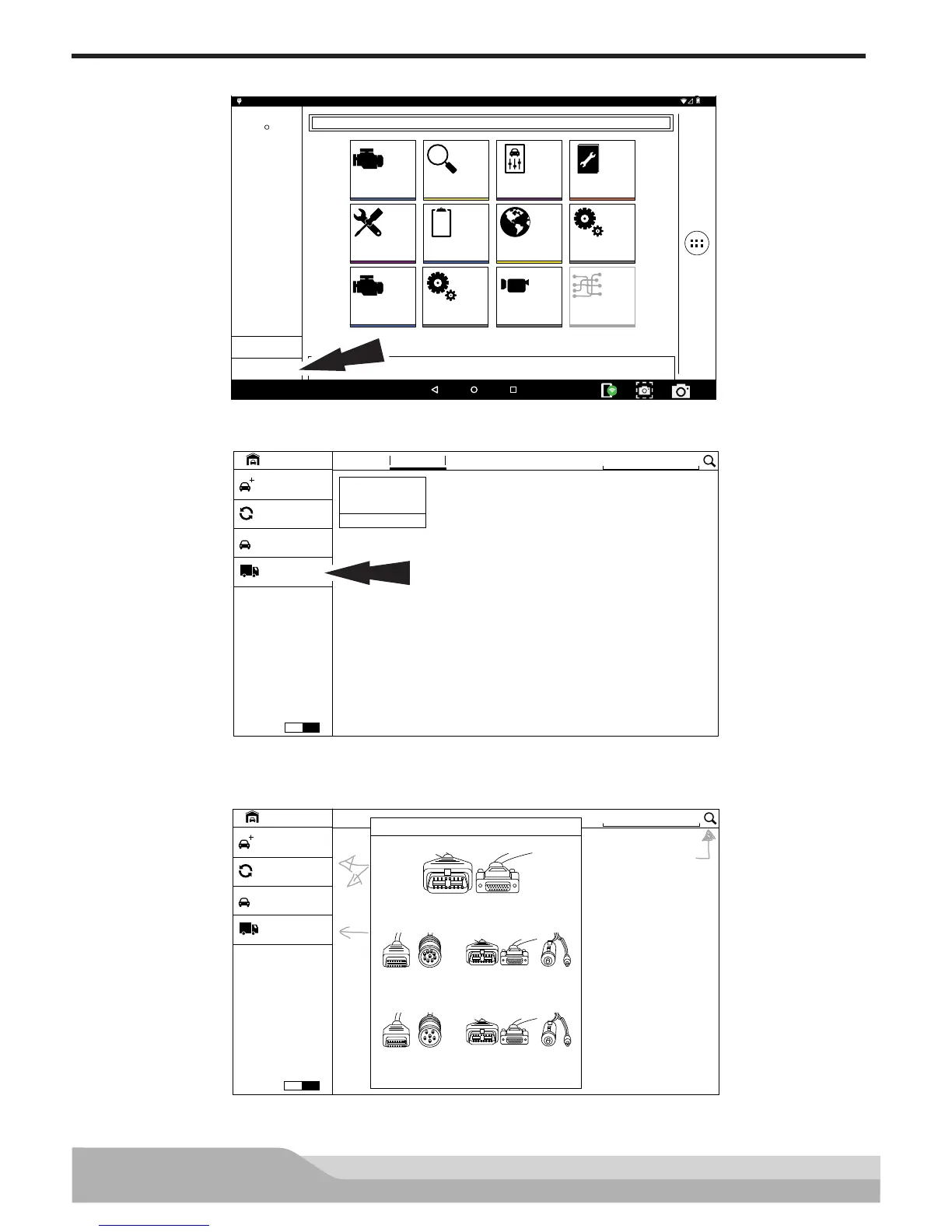
1. Select, Select Vehicle.
VEHICLE BAY
SEARCH BY VIN
Enter New Vehicle
Start AutoID
ENGINE
2008 Chrysler
Limited 3.2
Crossfire
RECENT FAVORITES
OBD-II
Demo Mode
?
Heavy Duty
ON
ss02457
2. Select Heavy Duty.
Note: You need to have a Heavy Duty subscription in order for Heavy Duty to be selectable.
Select Cable
3893-05
3893-05 3825-35
Connect to Scan Tool
3825-30
3893-05 3825-35
Connect to Scan Tool
3825-29
Looks lik
VEHICLE BAY
SEARCH BY VIN
Enter New Vehicle
You can always use the
Vehicle Identification Number.
Start AutoID
RECENT FAVORITES
OBD-II
Demo Mode
?
Heavy Duty
ON
ss02458
3. Select a Cable.