19
2. MDT 10 is ready to use.
Search Google for ...
OBD-II
Select Vehicle
CHECK
CHECK
101001
1001
0101
2:59
Read DTCs Data Stream Special Tests
Diagnostic
Information
SettingsBrowserMaintenance Tests
All System DTC
Scan
Automated System
Test Veiw Saved Tests
View Data Stream
Recordings
No Vehicle Selected
Demo
Tue, 10 May 2016
System Wiring
Diagrams
ss02400
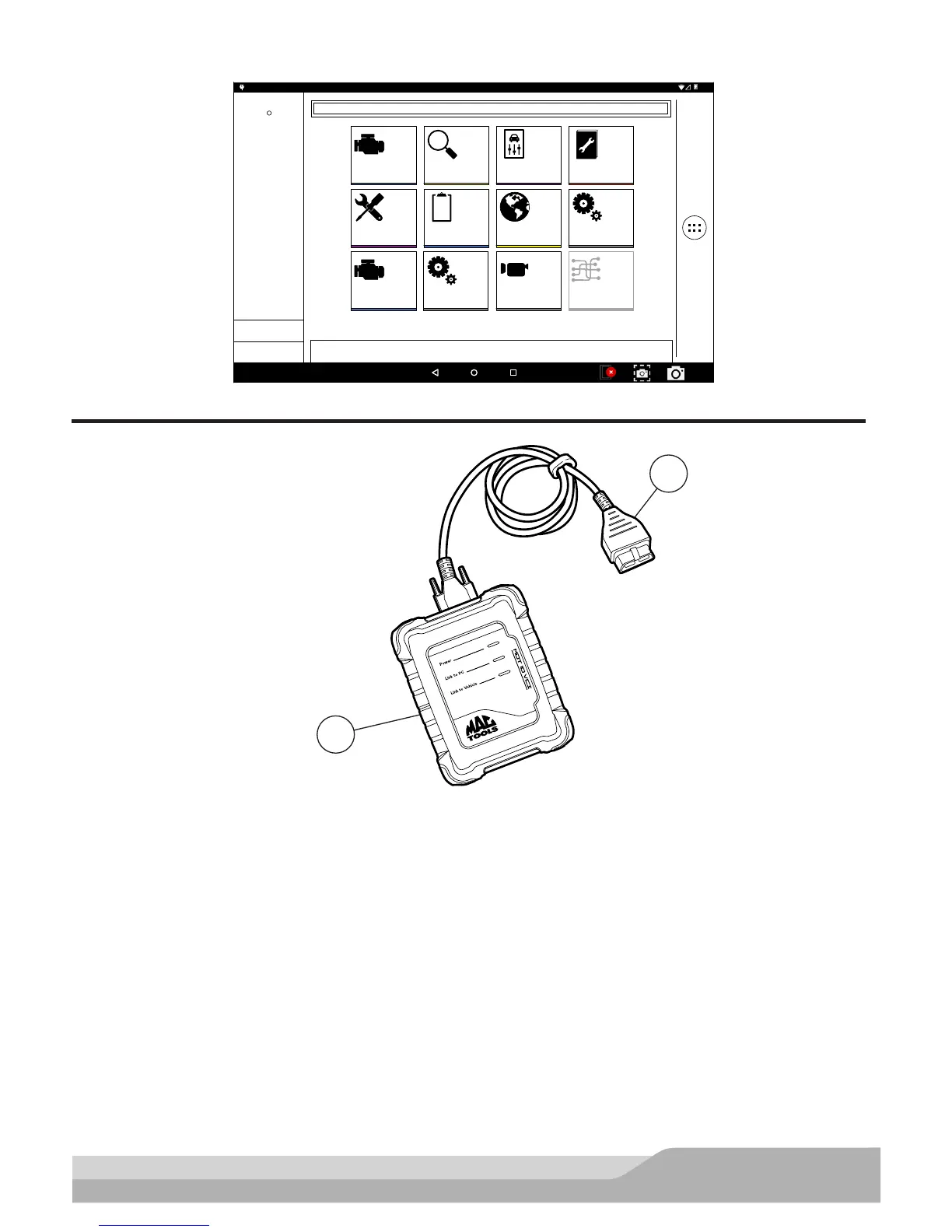
Provide Power to VCI
ss02590
1
2
VCI Cable Connections
1. VCI
2. OBDII/DLC cable
1. Connect the OBDII/DLC cable to the VCI.
2. Connect the OBDII/DLC cable to the DLC on vehicle (typically located on the driver’s side within 18 inches
(45.7 cm) of the steering wheel).
3. Turn ignition ON.
• Power indicator illuminates when the VCI is receiving power.
• PC connection illuminates when the VCI is connected to handset.
• Vehicle connection illuminates when the VCI is communicating with the handset and vehicle.


 To Next Page