47
Manual Entry
The handset must be turned on, be paired with the VCI which is connected to the vehicle and currently dis-
playing the home screen. Once those conditions are met, complete the following:
Search Google for ...
OBD-II
Select Vehicle
CHECK
CHECK
101001
1001
0101
2:59
Read DTCs Data Stream Special Tests
Diagnostic
Information
SettingsBrowserMaintenance Tests
All System DTC
Scan
Automated System
Test Veiw Saved Tests
View Data Stream
Recordings
No Vehicle Selected
Active
Tue, 10 May 2016
System Wiring
Diagrams
ss02432
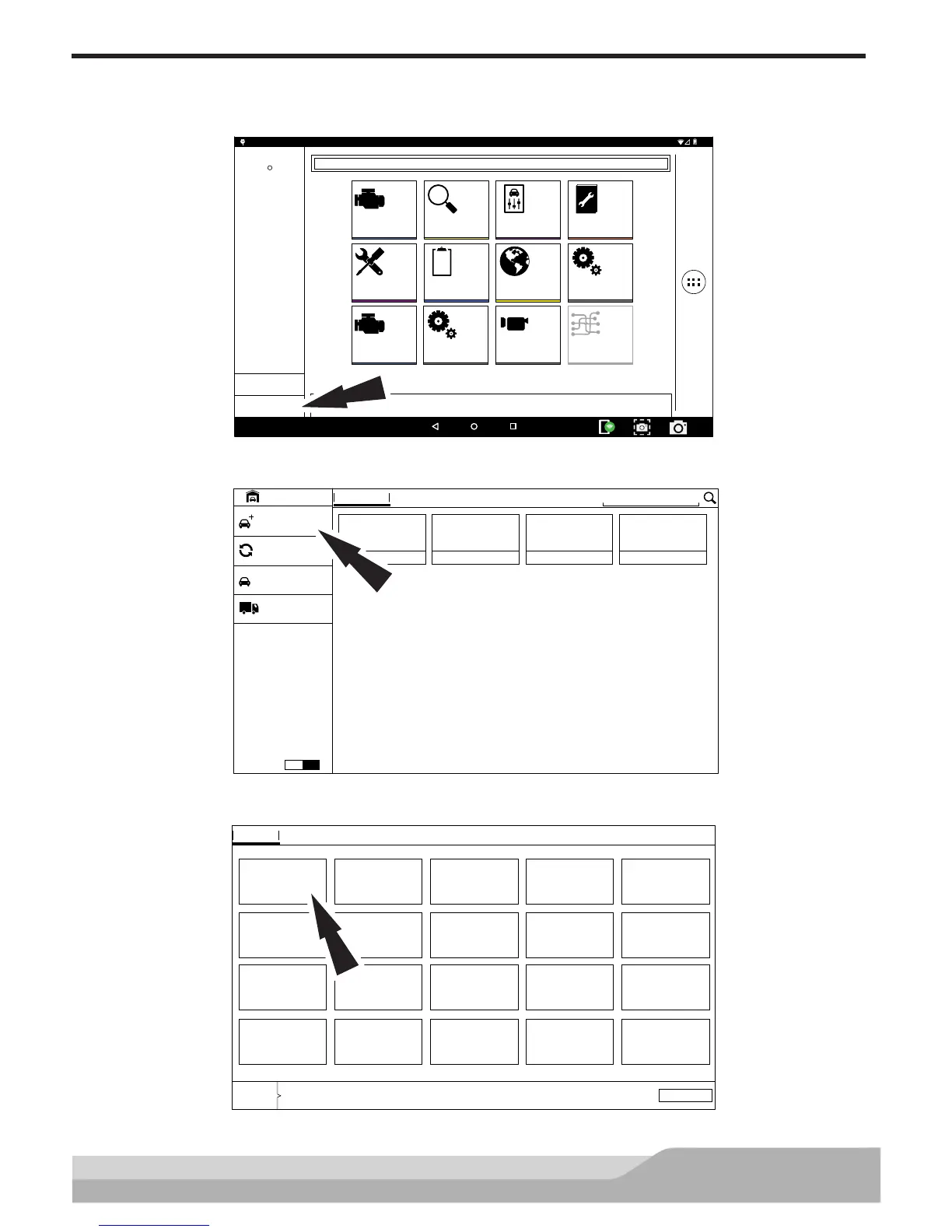
1. Select “Select Vehicle”
VEHICLE BAY
SEARCH BY VIN
Enter New Vehicle
Start AutoID
RECENT FAVORITES
OBD-II
Demo Mode
?
Heavy Duty
ON
ENGINE
2008 Chrysler
Limited 3.2
Crossfire
TRANSMISSION
2015 Acura
Base 2.0
ILX
PCM
1999 Chevrolet
LS 5.7
C2500 2WD
ENGINE
2003 Cadillac
Luxury Sport 3.2
CTS
ss02440
2. From the Vehicle Bay, select Enter New Vehicle.
Cancel
YEAR
Selected
MAKE
To confirm via VIN, use the tenth digit
MODEL SUBMODEL ENGINE CONTROLLER
VIN F
‘15
VIN E
‘14
VIN D
‘13
VIN C
‘12
VIN B
‘11
VIN A
‘10
VIN 9
‘09
VIN 8
‘08
VIN 7
‘07
VIN 6
‘06
VIN 5
‘05
VIN 4
‘04
VIN 3
‘03
VIN 2
‘02
VIN 1
‘01
VIN Y
‘00
VIN X
‘99
VIN W
‘98
VIN V
‘97
VIN T
‘96
ss02441
3. Select the model year of the vehicle.


 To Next Page