MAINTENANCE/SERVICE
Form # 169053 106 Model Year - 2010
7.11 ELECTRICAL
a. Use electrical tape and wire clips as required to
prevent wires from dragging or rubbing.
b. Keep lights clean and replace burnt bulbs.
7.11.1 Light Bulb Replacement
a. Using a phillips screwdriver, remove screws
from fixture and remove plastic lens.
b. Replace bulb and reinstall plastic lens and
screws.
7.11.2 Fixture Replacement
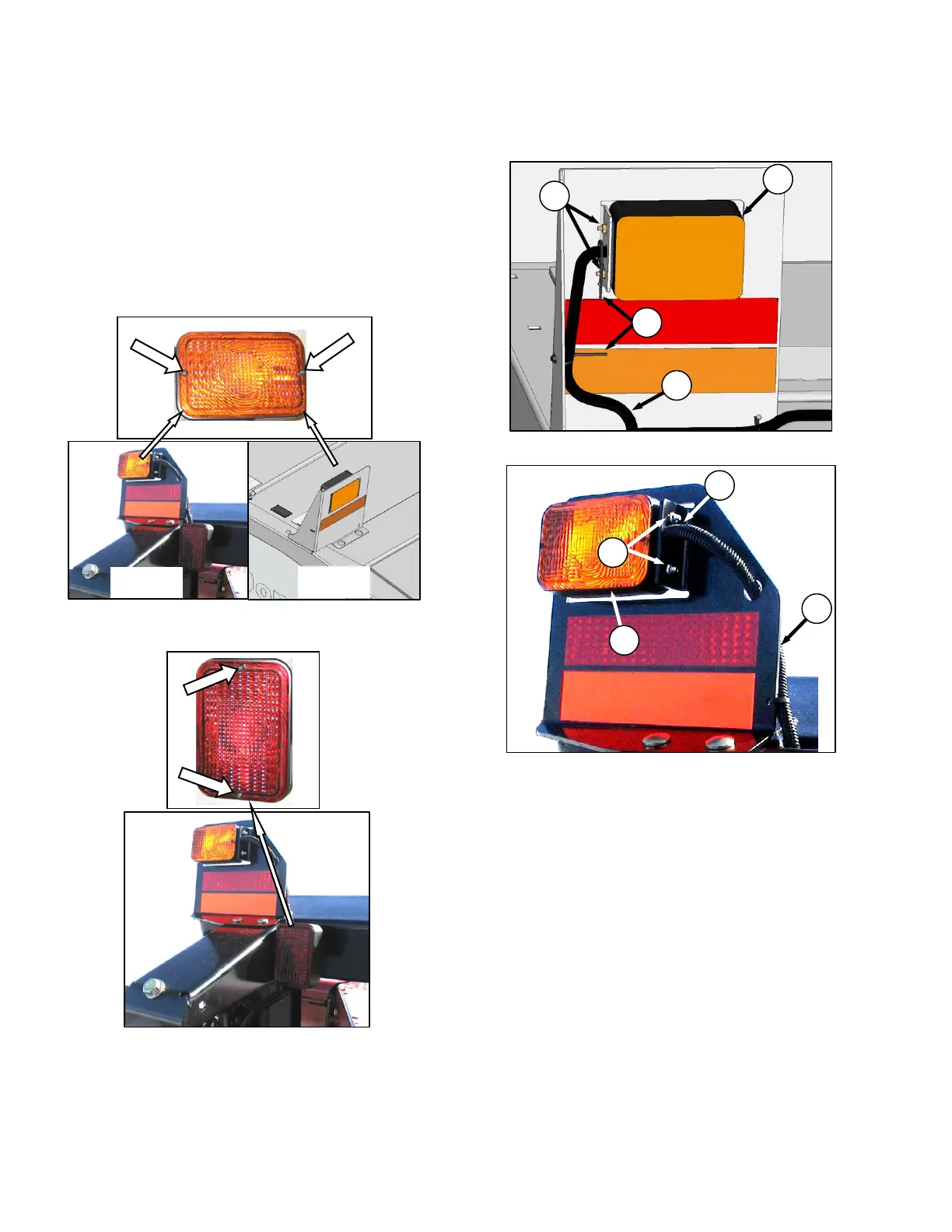
7.11.2.1 Hazard Lights
a. Cut plastic cable ties (A) securing harness
covering to light (B).
b. Retrieve connections (C) from inside harness
covering approximately 6 inches (150 mm) from
light and disconnect wires. Remove tape if
necessary.
c. Remove the two nuts (D) securing light to
bracket and remove light. Pull wires through
hole in bracket.
d. Feed connectors of new light (B) through hole in
bracket and position light onto bracket.
e. Install nuts (D) and tighten.
f. Connect wires to connectors (C) in harness and
re-secure harness covering with tape and plastic
tie (A) as required.
AMBER HAZARD LIGHT – BOTH SIDES
Bulb – Trade #1156
13 FT
16 FT
RED TAIL/BRAKE LIGHT – BOTH SIDES
Bulb – Trade #1157
16 FT
B
D
C
A
13 FT
A
D
B
C



 To Next Page