EasyManua.ls Logo

Macnaught MX Series - User Manual

Macnaught MX Series
32 pages
Print Icon
To Next Page IconTo Next Page
Loading...
Page 1 of 31
INSTRUCTION MANUAL
MX SERIES
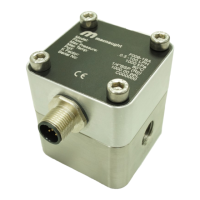
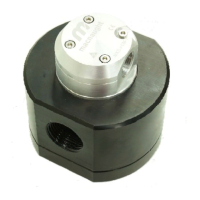
OVAL GEAR FLOWMETER
MXL-INST
Rev 12
12/2020
To the Owner
Please read and retain this instruction manual to
assist you in the operation and maintenance of this
product.
The manual contains operating and maintenance
instructions for the MX-Series Flow Meters. This
covers port sizes from 1/4” to 4”.
Refer to separate instruction manual for information
on operating modes and features of LCD displays.
Contact local representative or distributor for further
assistance.
This Flow Meter has incorporated the oval gear
principle into its design. Exceptional repeatability and
high accuracy over a wide range of fluid viscosities
and flow rates are features of the oval gear design.
With a low pressure drop and high pressure rating
oval gear flow meters are suitable for both gravity
and (in-line) pump applications.
Macnaught offers a comprehensive set of web based
support materials to complement this instruction
manual.
Access the Instruction manual by scanning below QR
code.
www.macnaught.com.au

Other manuals for Macnaught MX Series

Questions and Answers

  • S
    Steve CollierAug 13, 2025
    What to do if fluid will not flow through Macnaught MX Measuring Instruments?
    • O
      Olivia CoxAug 14, 2025
      If fluid isn't flowing through your Macnaught Measuring Instruments, here are a few things to check: * Foreign matter may be blocking the rotors. If so, dismantle the meter and clean the rotors. Also, ensure a strainer is fitted in line. * The line strainer might be blocked. Clean the strainer. * The rotors could be damaged. Replace them, making sure a strainer is fitted in line. * The meter connections may be over-tightened. Readjust the connections. * The fluid might be too viscous. Check the specifications for the maximum viscosity.
  • M
    malikaveryAug 17, 2025
    Why is my Macnaught MX Measuring Instruments meter reading inaccurate?
    • M
      Michael WoodAug 17, 2025
      An inaccurate meter reading on your Macnaught Measuring Instruments could stem from several causes: * The fluid flow rate might be too high or too low. Check the specifications for the minimum and maximum flow rates. * There could be air in the fluid. Bleed the air from the system. * Excess wear caused by incorrect installation. Inspect the meter body and rotors, and replace them if needed. Refer to the installation instructions.
  • N
    nicolegonzalesAug 21, 2025
    What to do if LCD register is not working on Macnaught MX Measuring Instruments?
    • C
      Courtney MckinneyAug 21, 2025
      If the LCD register on your Macnaught Measuring Instruments isn't working, consider these potential causes: * The battery may not be connected properly. Check the battery connections. * The battery might be flat. Replace the battery. * There could be faulty wiring connections. Check the wiring for loose or faulty connections. * The LC Display could be faulty. Replace the LC Display. * There might be a faulty connection from the LC Display. Check the wiring connections.
  • C
    Cynthia RangelAug 25, 2025
    What to do if Macnaught MX Measuring Instruments meter is not giving a pulse signal?
    • D
      Diana ValentineAug 25, 2025
      If your Macnaught Measuring Instruments meter isn't giving a pulse signal, it could be due to: * A faulty hall effect switch. Replace the PCB Board. * A faulty reed switch. Replace the PCB Board. * Failed magnets. Replace the magnets.
  • M
    moorebrentAug 29, 2025
    Why is there reduced flow through Macnaught Measuring Instruments?
    • S
      Sandra PenaAug 29, 2025
      Reduced flow through your Macnaught Measuring Instruments may be due to: * A partially blocked strainer. Clean the strainer. * Fluid that is too viscous. Refer to the specifications for maximum viscosity.
  • D
    David MejiaSep 1, 2025
    What to do if fluid will not flow through my Macnaught Measuring Instruments?
    • J
      jonathan03Sep 1, 2025
      If fluid isn't flowing through your Macnaught Measuring Instruments meter, several issues could be the cause. It could be due to foreign matter blocking the rotors, in which case you should dismantle the meter and clean the rotors, ensuring a strainer is fitted in line. Alternatively, the line strainer might be blocked and needs cleaning. Damaged rotors can also prevent flow, requiring rotor replacement, again with a strainer fitted. Over-tightened meter connections should be re-adjusted, and finally, the fluid might be too viscous, exceeding the meter's specifications. Check the specifications for maximum viscosity.
  • K
    Katherine HodgesSep 5, 2025
    What to do if I have reduced flow through my Macnaught Measuring Instruments?
    • A
      Ashley CollinsSep 5, 2025
      If you're experiencing reduced flow through your Macnaught Measuring Instruments, it might be because the strainer is partially blocked. Try cleaning the strainer. Also, the fluid might be too viscous; check the specifications for maximum viscosity.
  • A
    Austin TaylorSep 9, 2025
    How to fix a Macnaught Measuring Instruments meter that is not giving a pulse signal?
    • L
      Lauren MitchellSep 9, 2025
      If your Macnaught Measuring Instruments meter isn't giving a pulse signal, it could be due to a faulty hall effect switch or a faulty reed switch, in either case, replace the PCB Board. Another possibility is that the magnets have failed, requiring replacement.

Summary

To the Owner

Important Information and Safety

Flowmeter Operating Principle

Installation Procedures

Maintenance and Disassembly

Re-Assembly Instructions

Flowmeter Pictorial Representation

Flowmeter Specifications and Data

Flow Meter Output Types Explained

Standard Pulse Cap Details

Industrial Pulse Cap Guide

DIN Compact Pulse Module Information

PCB Specifications and Diagrams

High Temperature Sensor Specs and Wiring

Flow Meter Data Plates

Flange Installation Guide

Exploded View MX06-MX50

Exploded View MX75-MX100

Troubleshooting Flowmeter Issues

Testing Reed and Hall Switches

Procedure for testing reed and hall effect switches with necessary equipment.

Spare Parts Kits Overview

Wetted Parts Material Guide

Pressure Drop and Viscosity Charts

Wall Mount Adaptor Dimensions

Flowmeter Cap Thread Positions

Flowmeter Dimensions MX06-MX50

Flowmeter Dimensions MX75

Flowmeter Dimensions MX75 with Air Eliminator

Flowmeter Dimensions MX100

Flowmeter Dimensions MX100 with Air Eliminator

WEEE Directive and Product Disposal

Macnaught MX Series Specifications

General IconGeneral
BrandMacnaught
ModelMX Series
CategoryMeasuring Instruments
LanguageEnglish

Related product manuals