Use the following procedure to adjust the
swiveling guide fence:
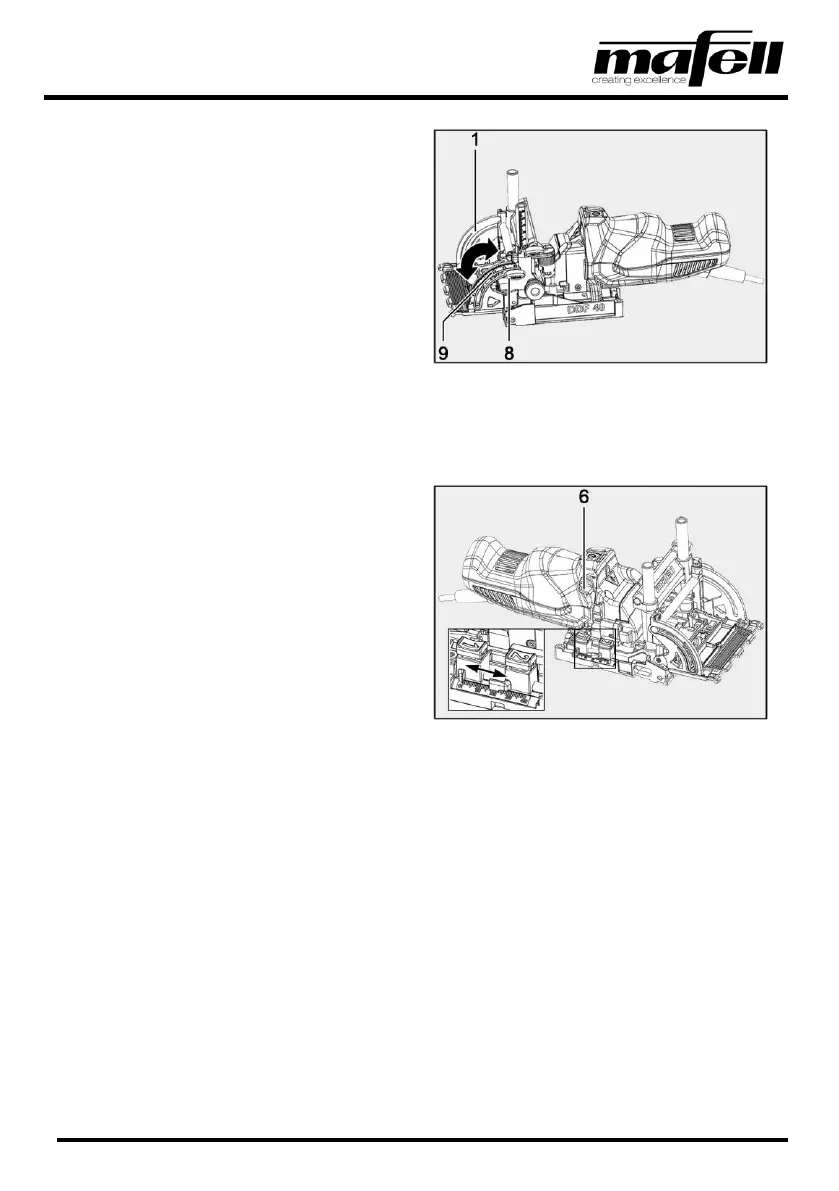
1. Loosen the wing screw (8) for the swivel setting.
2. Swing the swiveling guide fence (1) to the
desired direction.
➢ The angle is indicated by the red pointer
on the scale (9).
3. Tighten the wing screw (8).
✓ Swiveling guide fence adjusted.
Fig. 10: Adjusting the swiveling guide fence
4.6 Drilling depth setting
The drilling depth can be set continuously in a range between 0 and 40 mm [0 to 1.57 in] in 1-mm increments
[0.04 in].
Use the following procedure to adjust the drilling
depth:
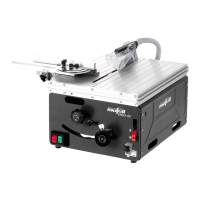
1. Press and hold the button on the depth stop "2"
and move the stop to the larger depth (2 - 40
mm | 0.08 - 1.57 in).
2. Press and hold the button on the depth stop "1"
and move the stop to the smaller depth (0 - 38
mm | 0 - 1.50 in).
3. Set the rotary button (6) as required to drilling
depth "1" or "2".
✓ Drilling depth adjusted.
Fig. 11: Adjusting the drilling depth


 To Next Page