17
English
Setting Up the Rover
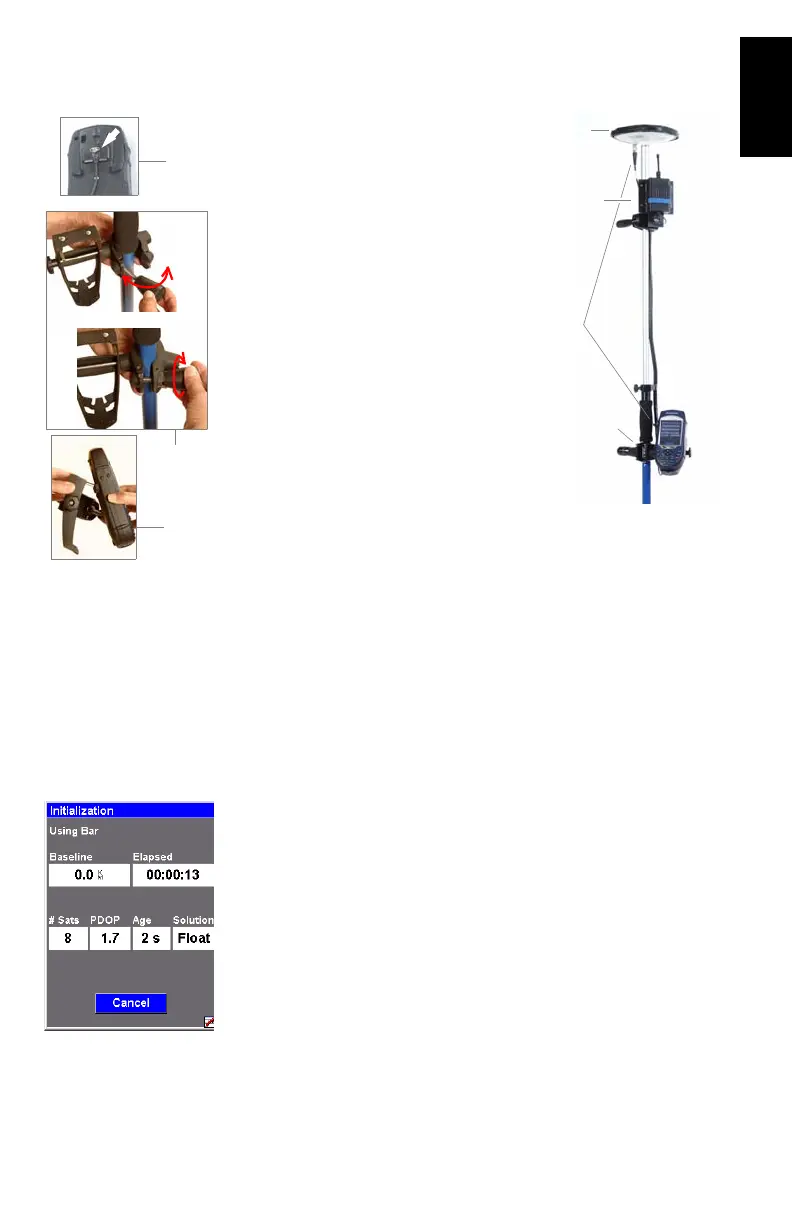
Install the unit on its range pole:
1. Mount the GNSS antenna on top of
the pole using a quick release exten
-
sion.
2. Mount the radio modem onto its
bracket using the screws, nuts and
washers provided.
3. Secure the radio bracket onto the
pole.
4. Connect the GNSS antenna to the
ProMark3 RTK using the cable pro-
vided.
5. Connect the radio cable to the back
of the ProMark3 RTK.
6. Attach the field bracket onto the pole
7. Place the ProMark3 RTK into the
field bracket
8. Measure the antenna height.
Configuring the Rover
1. Turn on the ProMark3 RTK.
2. Double-tap the DGPS Configuration icon. This opens the
DGPS Configuration window.
3. Tap Select Mode, select UHF and tap OK. Tap OK again to
close the DGPS Configuration window.
Initializing the Rover
1. Move the rover antenna from the range pole to the kine-
matic bar (see picture below left), then:
2. On rover side, double-tap the Surveying icon.
3. Press MENU, tap Receiver Mode, then Real-Time.
4. Press MENU and tap Initialize RTK.
5. Select Bar. This opens the Initialization window.
1
2-3
6-7
4
7
6
5











 To Next Page