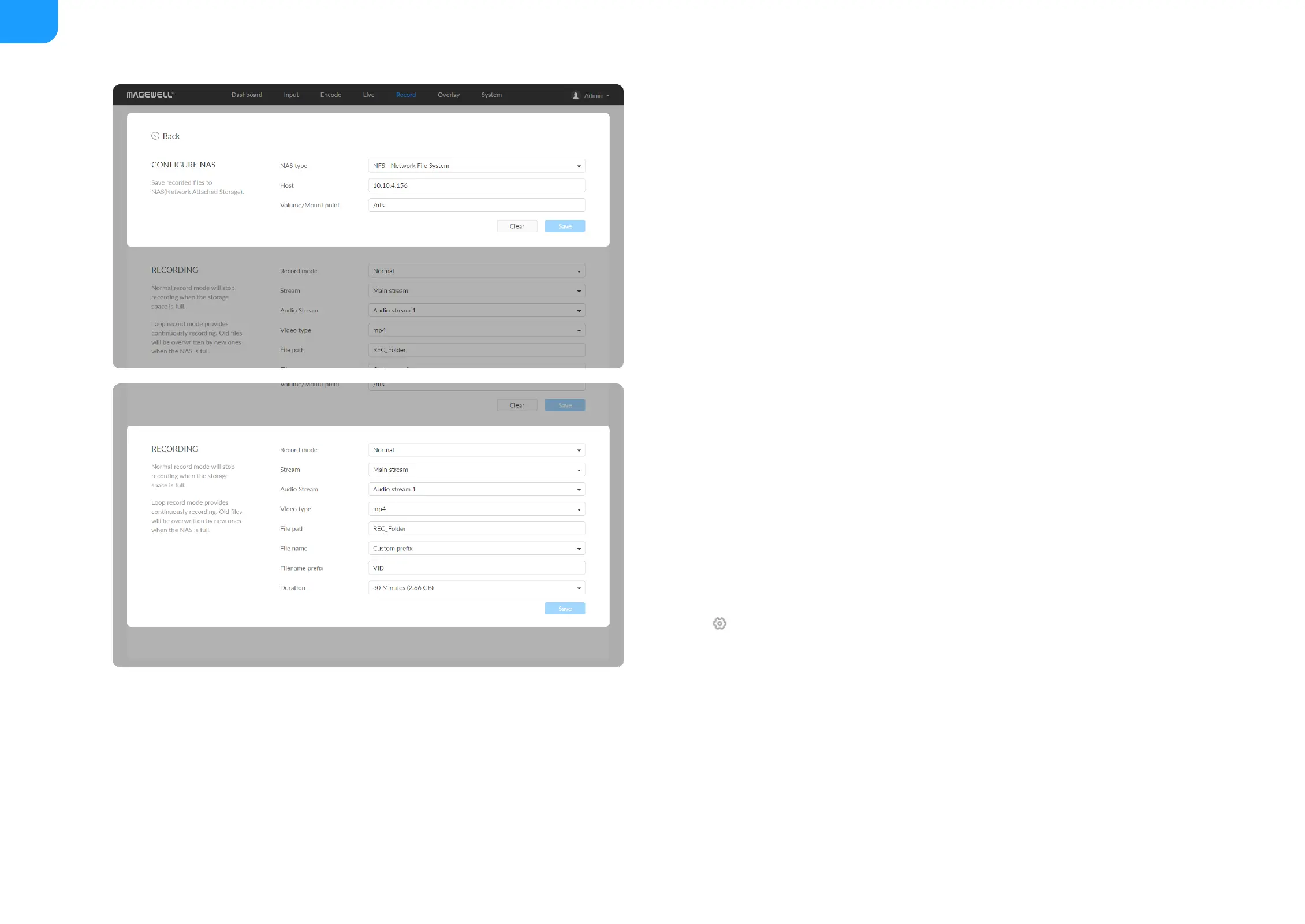
Record to NAS
Add a NAS
Configure recording parameters
Click edit button and set recording parameters.
NAS type: options are NFS- Network File System (default) and CIFS-
Common Internet File System, which also requires User name and
Password.
■
User name: 1 to 64 characters,
■
Password: 1 to 64 characters,
■
Host: IP address of NAS.
■
Volume/Mount point: 1 to 64 characters, and special characters \:"?<>| are
not allowed. By using volume mount points, you can graft or mount a target
partition onto a folder on another physical disk. You can also exceed the
26-letter limitation for drive letter references. Create a dependency in the
mounted volume disk resource that specifies the disk that is hosting the
mount point folder. This makes the mounted volume dependent on the
host volume, and it makes sure that the host volume comes online.
■
Clear: restore all parameters to defaults.
■
Record mode: Options are normal (default) and loop. In normal record
mode, the encoder will stop recording when the storage space is full.
However, loop record mode provides continuously recording which means
that old files will be overwritten by new ones when the storage is full.
■
Stream: Options are main (default) and sub stream.
■
Audio Stream: options are Audio stream 1 ~ 4, and the default is Audio
stream 1. Audio stream parameters can be set in "Encode > AUDIO
■



 To Next Page