11
MENU: STEP BY STEP PROCEDURE – E3 Modulevel: Density control
Screen Action Comment
Configuration
1
0
13
1
4
1
5
1
6
18
Poll Adr
xx
Trim 4
xxxx
1
2
Trim SG
xx.x
11
Loop Mode
(select)
Trim 20
xxxx
Loop Tst
xx.x mA
Capture
4.00 mA
17
Capture
20.00 mA
New Pass
xxx
19
20
Language
E3 ModHT
Ver xx.xx
21
DispFact
(select)
Enter HART ID number. Select a HART poll address (0-15). Enter 0 for a single transmitter
i
nstallation.
E
nable/Disable
L
oop Current Mode
I
f enabled, loop current follows the PV; If disabled, loop current is
fi
xed (i.e., multidrop mode).
Enter SG value
to adjust SG value reading.
Allows to compensate for a fixed deviation.
F
ine tune the 4 mA point.
(
Trim 0-20)
A
ttach a mA meter to the output. If the output does not equal 4.0 mA,
a
djust the value on the display to equal 4.00 mA.
Fine tune the 20 mA point.
(Trim 4-4095)
Attach a mA meter to the output. If the output does not equal
20.0 mA, adjust the value on the display to equal 20.00 mA.
E
nter a mA output value.
S
et mA Output to any given value to perform loop test.
T
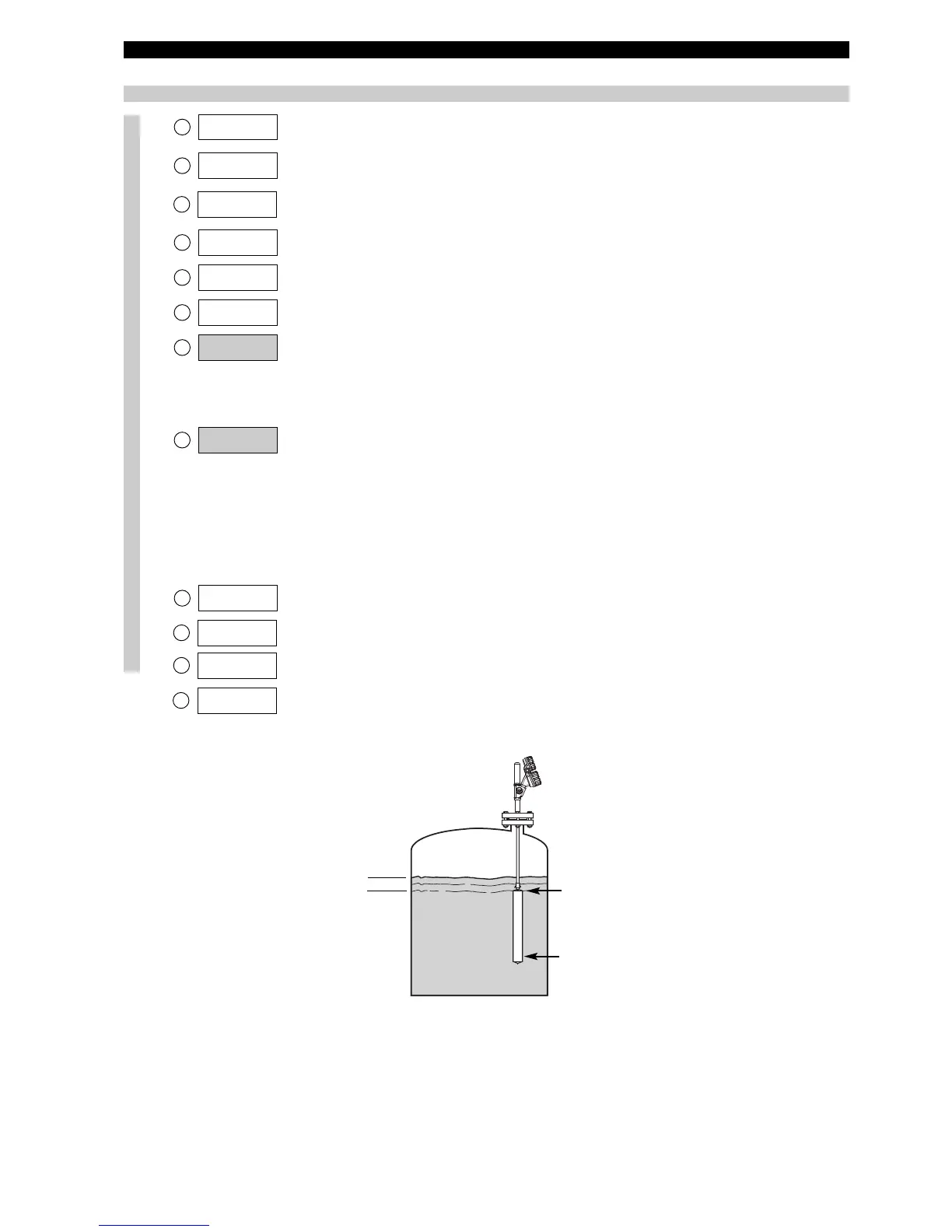
he immerged displacer is fully
i
mmerged in liquid at the min.
S
.G. value = 4 mA point.
P
ress Enter to enter manual setting
mode.
Press up arrow + Enter
(simultaneously) to confirm 4 mA value.
M
anual setting of 4 mA output signal. Displacer immerged in liquid
w
ith the min. S.G.
The immerged displacer is fully
immerged in liquid at the max.
S
.G. value = 20 mA point.
P
ress Enter to enter manual setting
m
ode.
Press up arrow + Enter
(
simultaneously) to confirm 20 mA
v
alue.
Note: in case the max. S.G. cannot be
reached, adjust loop readout to current
S.G. (see at right).
Liquid S.G. is ideally brought to match with 20 mA point. If this is not
possible, bring S.G. to the highest possible value (should correspond
w
ith min 8 mA). Attach a mA meter and adjust the loop current via
t
he keypad (down & up arrows) to match with the calculated mA
v
alue of the current S.G.
Enter new password. Use arrows to select desired value. Values between 0 and 255.
Select language.
Select «English», «Français», «Deutsch» or «Espagnol».
None, do not adjust.
Factory setting. «Ver» refers to software version.
Advanced diagnostics. See page 15.
lowest SG = 4 mA
Highest SG = 20 mA
min 50 mm (2")




 To Next Page