57
BE 57-660 Eclipse Model 700 Guided Wave Radar Transmitter
3.4.5.3 Configuration using Custom Table
The following table provides an explanation of each of the
System Configuration parameters for open channel flow
applications using the Custom Table.
SPLINE OR LINEAR
SPLINE
P1
P2
P
3
P4
P5
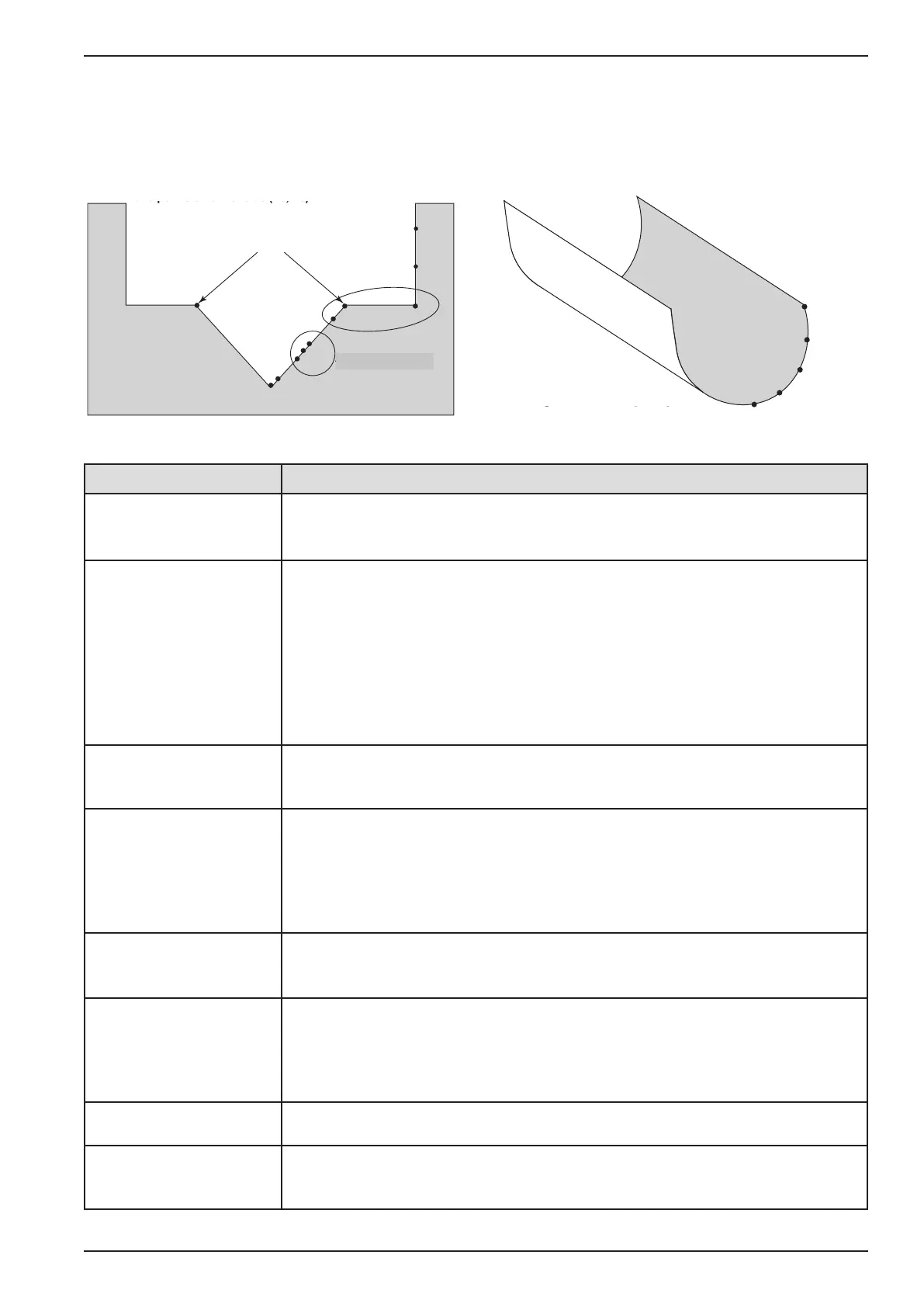
Concentrate points along curve
P2
P3
P7
P10
Tran si ti on
point
P1
C
oncentrate points as follows:
A. At least two points at beginning (P1 and P2);
B. At least two points at end (P9 and P10);
C. Three points at approximate average flow rate (for
example, P3, P4, P5); and at transition point (P7)
and points on either side (P6, P8).
P
5
P
4
P
6
P8
P9
A
verage flow rate
Configuration Parameter
Explanation (Open Channel Flow — Custom Table)
Flow Units
A selection of Gallons/Minute (factory default Flow Unit), Gallons/Hour,
Mil Gallons/Day, Liters/Second, Liters/Minute, Liters/Hour, Cubic Meters/Hour,
Cubic Ft/Second, Cubic Ft/Minute, and Cubic Ft/Hour are provided.
Flow Element
Select one of the following primary Flow Elements that are stored in the firmware:
Parshall flume sizes of 1", 2", 3", 6", 9", 12", 18", 24", 36", 48", 60", 72", 96",
120" and 144". Palmer-Bwls (Palmer-Bowlus) flume sizes of 4", 6", 8", 10", 12",
15", 18", 21", 24", 27" and 30". V-notch weir sizes of 22.5
O
, 30
O
, 45
O
, 60
O
, 90
O
and
120
O
. Rect with Ends (Rectangular Weir with End Contractions), Rect w/o Ends
(Rectangular Weir without End Contractions), and Cipoletti weir. Custom Table (see
page 57 can be selected if none of the stored Flow Elements can be used. The
table can be built with a maximum of 30 points. The Model 700 also has the capa-
bility of using a Generic Equation (see page 56) for flow calculation.
Custom Table
The Custom Table points can be a Linear (straight line between adjacent points) or
Spline (can be a curved line between points) relationship. Refer to the drawing
above for more information.
Cust Table Vals
A maximum of 30 points can be used in building the Custom Table. Each pair of val-
ues will have a Head (height) in the units chosen in the Level Units screen, and the
associated flow for that Head value. The values must be monotonic, i.e., each pair
of values must be greater than the previous Head/flow pair. The last pair of values
should have the highest Head value (usually the Maximum Head value) and the flow
associated with that Head value.
Reference Dist
The Reference Distance is measured from the sensor reference point to the point
of zero flow in the weir or flume. This must be measured very accurately in the
user-selected level units.
Maximum Head
Maximum Head is the highest liquid level (Head) value in the flume or weir before
the flow equation is no longer valid. The Maximum Head is expressed in the user-
selected Level Units. The Model 700 will default to the largest Maximum Head value
that is allowed for any given flume or weir. The Maximum Head value can be revised
depending on the value of the Reference Distance, or for end user preference.
Maximum Flow
Maximum Flow is a read-only value that represents the flow value corresponding
to the Maximum Head value for the flume or weir.
Low Flow Cutoff
The Low Flow Cutoff (in user-selected level units) will force the calculated flow
value to zero whenever the Head is below this point. This parameter will have a
default and minimum value of zero.
T
ransition
point
A
verage flow rate
Concentrate points as follows:
A
. At least two points at beginning (P1 and P2);
B. At least two points at end (P9 and P10)
C
. Three points at approximate average flow rate (for
e
xample, P3, P4, P5); and at transition point (P7) and
points on either side (P6, P8).
C
oncentrate points along curve





 To Next Page