EN
3
Controls and Functions
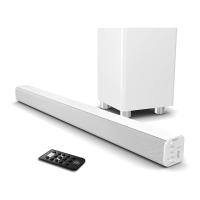
Side View: Buttons
4. Press and hold for 3 seconds to
switch the unit on/off. Press to
switch between Bluetooth, USB,
AUX or OPTICAL in.
5. Volume increase
6. Volume decrease
7. 3.5mm stereo AUX/RCA
POWER
MODE
VOL
VOL
AUX
4
5
6
7
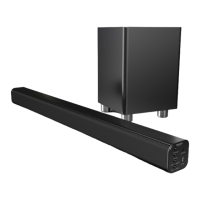
Rear View: Panel Interface Connection
8. Subwoofer Output
9. USB Socket
10. OPTICAL In Socket
11. DC 18V 2.3A Socket
108
9 11
Automatic Power Off Function
The Majority Bowfell will automatically go to standby mode after 180
minutes if the connected TV is switched off.
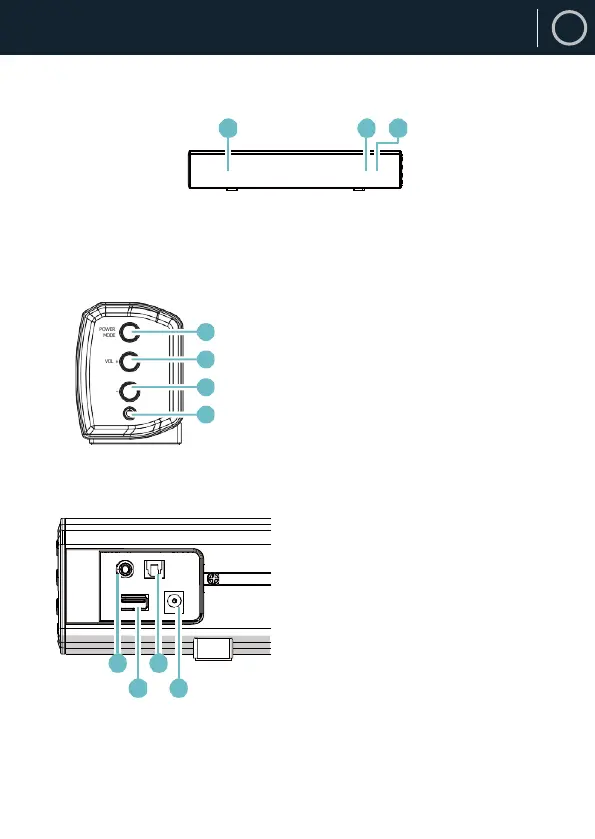
1. Speaker Drivers
2. Remote Control Sensor
3. LED Indicator Light
Front View/LED Indicator Light
1
2 3
1



 To Next Page